I’m a Solution Architect specialising in Custom Solutions, with over 10 years of experience delivering CCM solutions for customers across different industries.
Throughout my career, I’ve learned that customer communication management is never just about generating documents. Every organisation has its own processes, habits, expectations, and unique ways of interacting with customers. Understanding those differences and translating them into practical, scalable solutions is what I enjoy most about this work.
My primary area of expertise is working with Quadient Inspire, where I focus on bridging standard platform capabilities with tailored custom development.
I believe that successful digital transformation is not only about implementing new technologies but also about adapting them to real business needs in a way that makes everyday work simpler, more efficient, and more reliable.
Even within “out-of-the-box” platforms, there is always room for creativity, optimisation, and smart automation. I’m particularly interested in how AI and automation can support CCM processes — not by replacing people, but by helping teams work faster, reduce repetitive tasks, and deliver more personalised customer experiences.
Outside of work, I enjoy trekking and spending time in nature. One of my favourite experiences so far was a multi-day trek in northern Sweden, beyond the Arctic Circle, surrounded by complete silence and untouched landscapes. It’s the kind of experience that helps me recharge and appreciate simplicity and perspective
You have a Customer Relationship Management (CRM) which manages your company’s relationship with current and potential customers. You have an Email Service Provider (ESP) for campaign delivery. And yet, every time a regulatory change comes, the same problem may resurface: nobody can say with confidence exactly what is reaching customers, through which channel, and in which version.
The problem lies here: each system owns a different slice of the process, operates at a different pace, and is managed by a different team. And where those slices ought to come together into a coherent whole, there is frequently nothing at all.
This article is about architecture: how these systems function in relation to one another, where each one reaches its limits, and what falls through the gaps between them.
Why CRM and ESP Cannot Substitute for One Another
The most common mistake when designing a communications architecture is treating these systems as interchangeable. Each of them operates at a fundamentally different organisational tempo.
A CRM (Salesforce, Microsoft Dynamics, or Oracle) lives at the rhythm of the customer relationship. A customer buys a product, moves to a different segment, walks into a branch, and the data updates. The document side of the story is not its concern: the CRM does not know that someone, somewhere, needs to send a contract right now. The sales team knows that, because for them, the CRM is a customer card, not a communications engine
ESPs live at a completely different rhythm. Segments, send schedules, A/B tests. Changing an email template takes a few hours. Compliance is not what these systems are built for. When marketing launches a quarterly cross-sell campaign, the ESP performs exactly as designed. When the same team is asked to send a contract amendment, things start to break down, and more on that below.
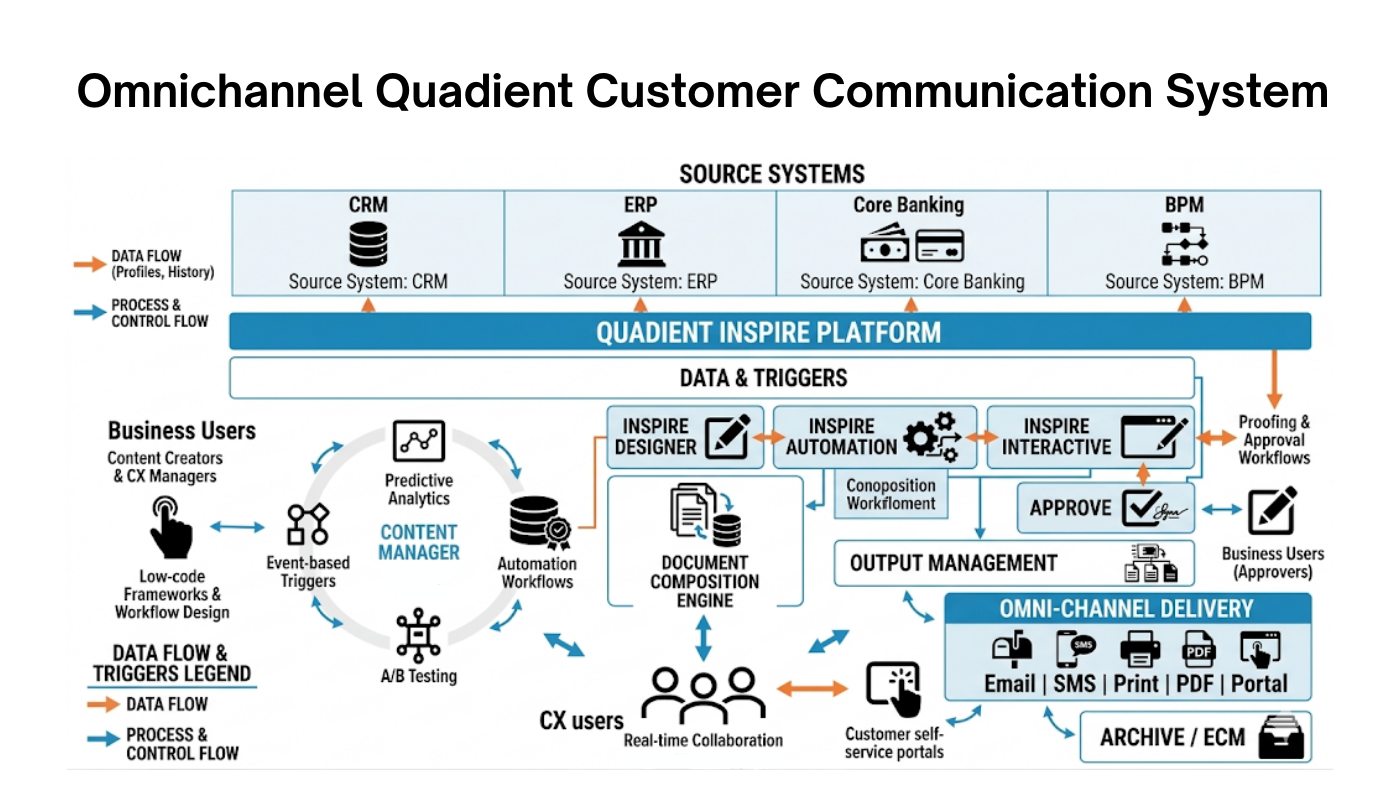
CCM is the layer that connects these two rhythms and makes the customer experience omnichannel and compliance-safe. It pulls customer data from the CRM, generates the document in the required format, delivers it through the right channel (email, print, portal, SMS), and at the same time keeps the audit trail, versions the template, and ensures PDF/UA and EAA compliance.
In other words, it does what CRM and ESP were never built to do.
Where CRM and ESP Reach Their Limits
Each of these systems has a legitimate place in the architecture. Each also has a point at which it is no longer sufficient.
CRM: Customer data, not customer official documents and communications
The CRM knows when sales last called and which segment a particular customer belongs to. That is the foundation everything else sits on.
Most CRMs can generate a document from a template, like a prebuilt invoice or a quote. But that is where it ends. Template versioning that would survive a compliance audit does not exist in a CRM, because the data model was never designed to hold approved versions of a regulated document over time.
Print fulfilment is not handled because the CRM has no concept of a print stream, a fulfilment vendor, or a postal SLA. And there is no log of who sent what, when, and which version went out. The CRM logs that an email was triggered, not which version of the underlying template was active at the moment of sending.
A regulator running an audit can ask: show me the exact version of the letter you sent this customer fourteen months ago and the regulatory basis for issuing it. The CRM has no answer.
ESP: Well-suited to comms campaigns, ill-suited to compliance
An ESP sends email fast, at scale, with segment personalisation and deep automation. For cross-sell campaigns and promotional notifications, it is the right tool because that is exactly what it was built for.”
It is not, however, a compliance tool. Templates are not versioned in a way an auditor can use, because the platform treats a template as a draft that can be edited freely until the send button is pressed. Print and other channels sit outside its scope, because ESPs were designed for one delivery method. Regulated communication was never the design intent.
Personalisation makes this worse. A campaign with two hundred segments and dynamic content blocks is potentially two hundred variants of the same regulated message, and the ESP will not store any of them as a versioned artefact. The platform can tell you that an email went out and that the customer opened it. It cannot tell you which exact wording the customer saw.
Sending a contract amendment through an ESP means sending a legal document through a marketing platform. There is no versioning of the regulated content. There is no guarantee that the email version matches the printed version. There is no way to demonstrate, fourteen months later, that the customer received the exact wording that was in force on the date the amendment took effect.
CCM: Making dots connected
Every gap where CRM and ESP fall short is precisely the territory for which CCM is responsible:
Function
CCM
Customer data
Pulled from CRM, no manual transfer
Document generation and delivery
Print, email, SMS, in-app notifications, and the customer portal, all running from one process and one template source
Template versioning
Every change recorded with date and approval
Multichannel consistency
The same template logic across every channel
Audit trail
Full log: who, what, when, which version
WCAG / PDF/UA accessibility
Built into the template, not bolted on afterwards
High-volume regulated communication
Compliance dimensions handled in one place, for every document
Two Main Scenarios in Which the Absence of CCM Becomes Apparent
A regulatory change. A regulator announces a new disclosure requirement. The organisation has CRM and ESP, but none of these systems manages customer-facing document templates centrally. Each channel is updated independently, by different teams, in different systems, with no guarantee of consistency. The timelines are too compressed to run a coordinated IT change across all of them simultaneously. One channel is left carrying an outdated version, and nobody notices the gap until an audit arrives.
When a regulatory audit finally arrives, the regulator requests documentation of all customer communications over the preceding 12+ months: which template versions were used, when, to whom, and on what regulatory basis. The CRM holds interaction history, and ESP holds send logs. None of these systems can confirm which template version was active on a given date or whether the document that went out was consistent with it. Reconstructing that history manually, across two systems, takes weeks and rarely produces a complete picture.
A new communications channel due to shifting consumer demand, technology modernisation or organisational expansion.For example, the organisation adds SMS as a channel for regulatory notifications. Without CCM, this means a new IT project: a separate integration, separate template logic, separate approval process and a fresh source of inconsistency with the other channels. With CCM, it is a configuration task within an existing platform. The templates, the business logic, and the audit trail all remain unchanged.
A Data Flow Architecture That Enables Both Operational Efficiency and Regulatory Compliance
Every organisation is different. But across the banking and insurance projects we deliver across Europe, a number of architectural principles emerge whose absence reliably leads to one of the two scenarios described above.
Versioned templates of regulated documents, print fulfilment, PDF/UA output, evidence of what was actually sent
A document was triggered from a CRM record, but the CRM stops at the trigger event
ESP
Email campaign execution, segment-based personalisation, A/B testing, send-time optimisation, open and click analytics
Print, SMS, portal, in-app notifications as part of one coordinated process; auditable versioning of regulated content; archival-grade record of the exact variant sent
An email left the platform with a specific subject line, but the regulated wording inside is not tracked as a versioned artefact
CCM
Template versioning with approval workflow, multichannel rendering from one source, audit trail per document per recipient, accessibility compliance built into the template, integration contract with CRM and ESP
Customer master data, marketing campaign logic, sales process
A document was generated from an approved template version, delivered through the designated channel, and recorded against the recipient with a full audit history
When the architecture is complete with all the ins and outs, a regulatory change does not trigger an IT project; it just requires a template update. An audit does not mean weeks of manual reconstruction across two systems, because the answer exists in one place. And adding a new channel is a configuration exercise, not a new integration.
Why CCM Is So Often the Missing Layer
In banking and insurance, every document sent to a customer simultaneously serves several roles:
it is a legal obligation
a brand consistency benchmark
an archive-grade transactional record
an element of deep automated customer experience
a potential exhibit in regulatory proceedings
and a programmatic cross-selling engine for revenue generation
CRM and ESP were each designed with one or two of these roles in mind. CCM must fulfil all at once, for every document, through every channel, with every regulatory change.
This is why the decision to implement CCM is not a decision about adding another tool. More often, it is a decision that the organisation will no longer accept a situation in which nobody is truly accountable for what is actually reaching customers.
What this layer looks like in practice, and what its absence costs organisations that have spent years trying to fill that role with a patchwork of existing systems, is explored in our article on the real cost of maintaining legacy CCM environments.
Summary
The right question to ask is not “Which system should we choose?” It is: “Does our architecture include a layer that is genuinely accountable for regulated customer communications, and is it actually capable of meeting that responsibility?”
If the answer is “the CRM handles some of that” or “we send it through the ESP”, this is precisely the moment to examine the architecture carefully. Before the regulator does it for you.
Great news — your knowledge pack is on its way!If you don’t see our email in your inbox, please check your Spam & Promotions folders just in case.
Meanwhile, we welcome you to get into our materials, which answer uncomfortable questions about CCM, CX omnichannel communication, and, of course, accessibility.
Case studies. Get the answers to questions most tech teams don’t ask about.
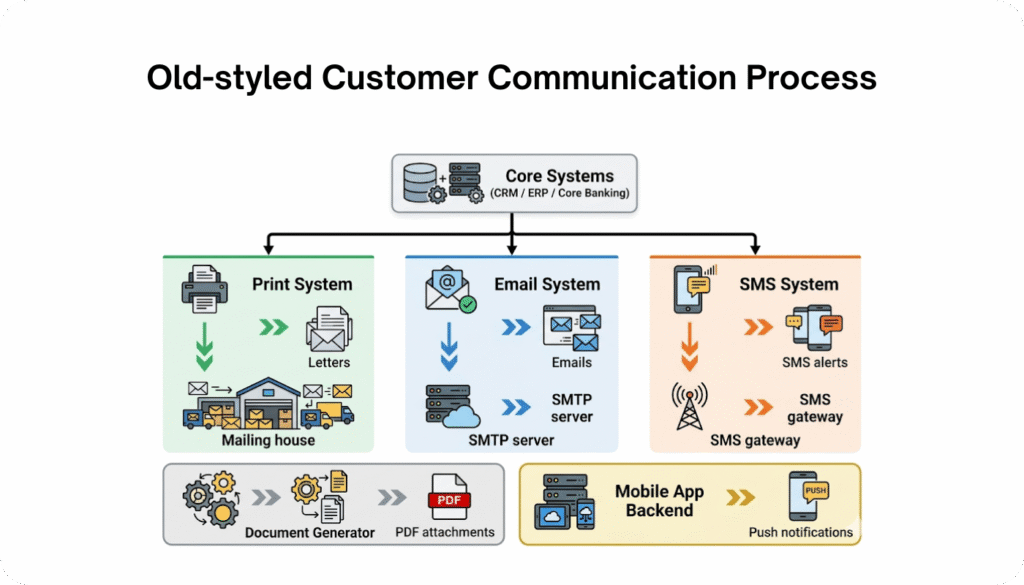
You have probably faced with situation: One system for print, another for email, another for generating PDFs, and another for SMS. Each follows its own logic and none of them is responsible for what actually reaches the customer.
While banks are discussing how to implement AI agents to their core systems, something really valuable is missed. The customer, which brings not only the investment, but also its trust, ends up receiving different versions of the same message with no connection or common scence. And later the auditor asks which system was binding. The answer takes weeks.
Customer Communication Management changes this model – one place, one logic, all channels aligned.
What is CCM?
Customer Communication Management (CCM) is both a strategy and a system that allows organisations to centrally manage all outbound customer communication, both printed and online ones. This includes letters, emails, SMS messages, push notifications, PDF documents, and bank statements
CCM system is not just another email-sending tool or a PDF generator. It acts as a layer that connects customer data, document templates, delivery channels, and regulatory requirements into a single, manageable process and does so before any document leaves the organisation.
To understand what Customer Communication Management is today, it helps to look at where it comes from – and why traditional mass correspondence is no longer enough. We explore this in more detail in our previus eductaional article on what mass communication really means today.
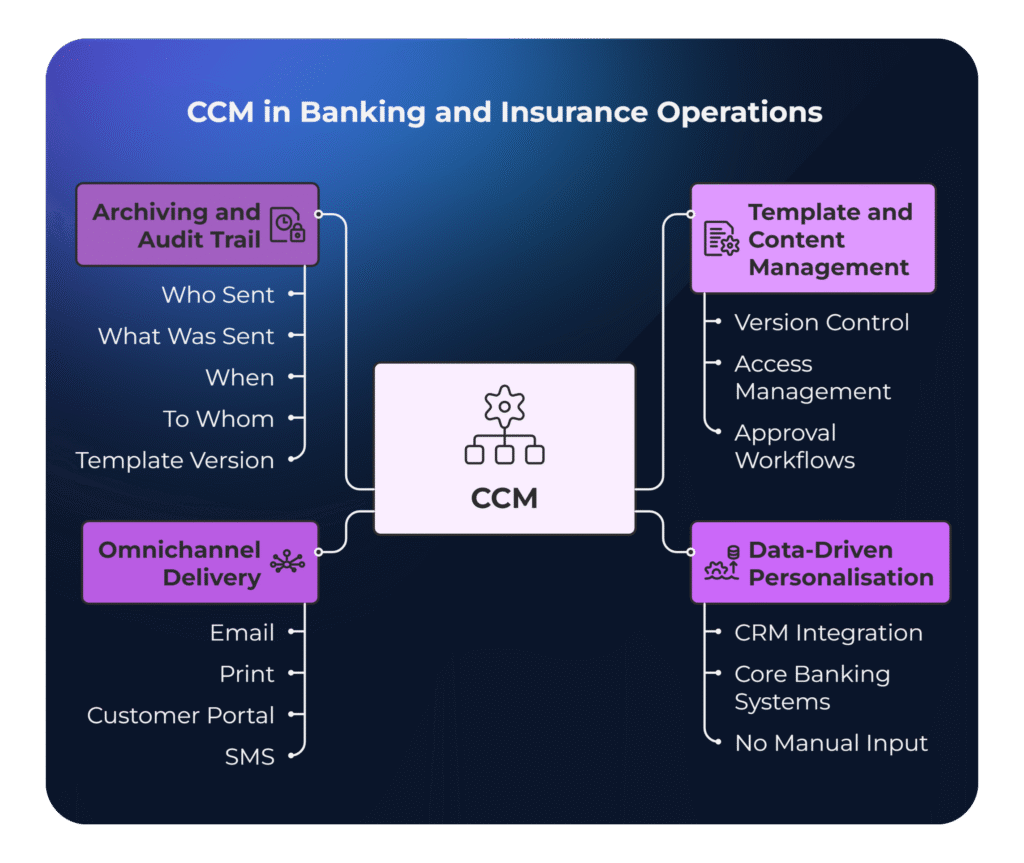
4 Core CCM Capabilities in Practice
What CCM handles in the day-to-day operations of a bank or insurance company.
1. Centralised template and content management
Instead of dozens of Word files scattered across shared folders and endless email threads with the “latest version of the template”, CCM provides a single repository with version control, access management, and approval workflows. A change made in one place is reflected across all channels at once.
2. Data-driven personalisation – not manual input
Customer data, such as name, product, balance, or interaction history, is automatically pulled into documents from CRM or core banking systems.
No manual copying, no reliance on outdated data, and no errors as a result.
3. Omnichannel delivery from a single process
The same document can be delivered via email, print, customer portal, or SMS – depending on customer preferences and product requirements.
One process, multiple channels, consistent content.
4. Archiving and a complete audit trail
Every document sent is recorded: who sent it, what was sent, when, to whom, and using which version of the template.
Without this, reconstructing communication history during a complaint or regulatory audit turns into manual cross-checking across multiple systems – and rarely results in a complete picture.
Why Banks Try to Build Customer Communication ManagementSystem Themselves?
This is a pattern that repeats itself across Central and Eastern Europe.
It often starts innocently: mail merge templates in Word, Excel exports, batch printing. No one sees a problem while there are only two or three channels in play.
Then email is added. Then SMS. Then a customer portal. Then marketing automation.
And each new channel means a separate integration, separate logic, and a separate team responsible for it.
The bank decides to build its own tool.
At first, it works as it works. But three years in, only one developer truly understands how it does its job- and they happen to be on holiday when the regulator asks about a document version from 15 months ago.
A new regulatory requirement is announced. Deadline: 6 weeks.
In a custom-built system, every channel has to be updated separately: a meeting with IT, cost estimation, sprint planning, regression testing – and hoping that no outdated template version is still running somewhere in production.
On a CCM platform, a specialist simply opens the template, makes the change, and sends it for approval. All channels update from a single source.
The real savings don’t come from a single change.
They come from the fact that this cycle repeats multiple times a year – and without a platform, every new channel creates yet another loop.
Key Risk Areas
Area
In-house solution
Dedicated CCM platform
Regulatory preasure (e.g. DORA, GDPR, local laws.)
Requires developer involvement
Template-level change, no coding required
Audit and archiving
Scattered across systems, compliacted to reconstruct
Built-in, automated, full audit trail
Template version control
Multiple versions of the same template – no one knows which is final
Central repository with full version history
Document accessibility (WCAG / PDF/UA)
Manual validation or no validation at all
Compliance embedded into templates, not added afterwards
Each of these areas on its own is an operational issue. Taken together- it becomes a regulatory risk.
Customer Communication Managementand Compliance as a Part of the Architecture
Regulations in the banking and insurance sectors evolve constantly. Every change, whether it’s GDPR, EAA, or DORA, directly affects customer-facing documents. Banks and insurers must not only update content, but also be able to prove that their communication was compliant at a specific point in time.
The European Accessibility Act, which came into force in 2025, is a good example. PDF documents must now be digitally accessible, with proper semantic structure, tagging, and compliance with WCAG 2.1 and PDF/UA standards.
Legacy systems – originally designed with a “print-first” mindset, simply cannot meet these requirements without costly workarounds. And workarounds don’t provide auditability, which in a regulatory context effectively means non-compliance.
In a compliance context, CCM plays a clearly defined role:
Version tracking: Every document is linked to a specific template version and its deployment date.
Audit trail: A complete communication log is available on demand, without manually reconstructing history.
Digital accessibility: Documents compliant with WCAG 2.1 and PDF/UA are generated automatically as part of the template logic, not added at the end of the process.
Consent management: Every message is sent in line with the customer’s current consents and preferred communication channel.
For a Compliance Manager, this represents a real shift – from “we need to check this” to “we have evidence”.
What is Quadient Inspire? What Its Role in the Customer Communication ManagementMarket?
Quadient Inspire has been a recurring presence in banking and insurance tenders across Europe for years. Organisations that have gone through the migration from legacy systems to Quadient see tangible benefits across IT, compliance, operations, and product teams. With a real proof.
Its 11% share of the global CCM market, according to International Data Corporation (IDC), reflects both this momentum and the fact that the platform performs reliably at scale in production environments.
Quadient Inspire is built in a modular way, meaning organisations can implement only what they need, without committing to the entire ecosystem upfront:
Module
What it does
Inspire Designer
It combines data and design possibilities to produce both electronic and printed output at high volumes. Data manipulation, design creation, impositioning of media and production configuration can all be defined in the user interface of this powerful tool.
Inspire Scaler
Handles high-volume document generation in both batch and real-time modes, ensuring the scalability and stability required by IT teams
Inspire Interactive
Interactive and personalised correspondence, either at agent level or via self-service. This enables the personalisation of operational communications without the need for additional integrations.Creating document templates without writing code, which also allows, for example, Product Owners and business teams to make changes themselves without involving IT
The platform integrates directly with CRM, ERP, and SAP systems. Customer data is pulled in real time, without manual transfers between systems.
When It’s Time to Consider a CCM Platform?
Not every organisation needs CCM from day one. But there are clear signals that this decision is no longer “for the future” – it’s overdue:
Operational signal
What it means in practice
Every template change requires developer involvement
IT teams are managing content updates instead of developing systems
You handle multiple types of customer documents
Maintaining consistency becomes difficult without central control
You operate across multiple channels (print, email, portal, SMS)
No single control point increases the risk of inconsistency
You are approaching a regulatory audit
Lack of a full audit trail becomes a real issue, not a theoretical one
You are implementing EAA or WCAG requirements
Manual accessibility checks are neither scalable nor efficient
You are launching a new product or entering a new market
Each new communication channel becomes a separate IT project without a platform
You are going through a merger or acquisition
Integrating communication systems becomes one of the most complex stages of M&A
If three or more of these sound familiar, it’s no longer a question of whether to implement CCM. It’s a question of when.
Quadient and Migration from Legacy Systems
One of the most common reasons financial institutions turn to Quadient is the need to move away from outdated systems such as StreamServe, DOPiX, ISIS Papyrus, or HP Exstream.
These systems were built in an era dominated by print. They were never designed for omnichannel communication, GDPR or DORA requirements, or digital accessibility standards.
Over time, they have been extended with additional integrations and workarounds, to the point where even a minor content change requires disproportionate involvement from IT. And every new regulation turns into a separate project instead of a simple template update.
Migration is often met with resistance, and if poorly planned, it can lead to the loss of historical templates or disruptions to production processes. Quadient Inspire addresses this with structured migration paths and tools for importing existing templates.
In such projects, the priority is not just moving files, it is preserving output consistency and ensuring operational continuity. A practical example is the migration from DOPiX to Quadient Inspire carried out for a large insurance institution – step by step, without interrupting production.
The CCM Market – Quadient Is Not the Only Player
Quadient Inspire is not the only CCM platform available.
Other key players include OpenText Exstream, ISIS Papyrus, and Smart Communications, Message Point, and others, each with its own implementation model, target customer profile, and trade-offs.
The differences between them go beyond feature lists.
What matters is:
who within the organisation can operate the platform independently,
how deeply it integrates with legacy systems,
and whether it meets compliance requirements without additional overhead.
These are the questions worth asking before even starting a conversation with a vendor.
We take a detailed look at the four leading platforms – their strengths, limitations, and the types of organisations they best suit, in our article on choosing a CCM platform.
Summary
CCM shifts control over document content from IT to the business side. For banks and insurers, this means that responding to regulatory change no longer starts with a meeting with a system architect, it starts with opening a template.
Regardless of the channel – letter, email, SMS, or PDF – content, logic, and audit trail remain in one place.
Quadient Inspire remains one of the few platforms that operates at this scale in real production environments and one that offers well-documented migration paths from systems that many European financial institutions are already looking to move away from.
We are seeing a pattern repeat itself across nearly every large-scale Customer Communications Management (CCM) engagement we step into. An organisation runs a legacy CCM platform, the license and maintenance are paid, the output works somehow.
Nobody is asking hard questions about what that system actually costs because the line item in the IT budget looks manageable. In this article we place a stress on costs that stay behind invoices.
The real spend on legacy CCM hides in places that never make it onto an invoice:
the senior developer who spends 3 weeks on a regulatory change that should take 3 days;
the WhatsApp channel your competitor launched 8 months ago while your team was still trying to determine if the channel was even possible within the current architecture;
and the compliance deadline you will meet only by throwing contractors at the problem.
This article looks at 5 specific systems we encounter regularly in the field: Exstream, DOC1, Assentis, DOPiX, Papyrus, and CSF.
The Systems Trusted by Leadership and Questioned by Reality
HP Exstream (OpenText)
Exstream was built in the early 2000s for high-volume transactional document output in insurance and banking. Many organisations still run it for policy documents, statements, and regulatory notices. The pain point in 2026 is architectural: Exstream was designed around batch processing and server-side rendering. Which means connecting it to event-driven flows (triggered emails, mobile push, API-first architectures) requires significant middleware. In our direct experience, organisations on document-centric legacy platforms spend more on integration than on the platform licence itself. And that integration overhead is often what triggers the first serious conversation about Exstream migration.
DOC1 from Pitnew Bower company started as a batch composition engine in European banking and utilities. Quadient acquired and evolved it into the Inspire platform, covering interactive, on-demand, and multi-channel output. What we consistently see, though, is that many organisations still run old DOC1 templates and workflows never migrated to modern Inspire architecture. They are technically on “Quadient” but operationally still on DOC1, with the gap between vendor capability and actual usage sometimes a decade wide. The templates, logic, and data mappings are so embedded that a full DOC1 replacement feels enormous, so teams keep running legacy logic on modern infrastructure, paying current prices for decade-old behaviour.
Assentis DocFamily
Assentis established a strong position in the Swiss and broader DACH banking sector, particularly in wealth management, due to its ability to handle multilingual and highly regulated documentation effectively. However, this very specialisation, built around static and tightly controlled communication scenarios, has become a bottleneck for the current environment. The market has shifted: banks now require omnichannel onboarding, mobile-accessible statements, and real-time notifications. As a result, a platform optimised for complex document production struggles to adapt to dynamic digital channels, forcing organisations to choose between short-term workarounds and full platform replacement.
DOPiX
DOPiX is widely used in the insurance and public sectors across the DACH region and Northern Europe, particularly for the creation and optimisation of printed documents. But at the same time, as businesses shift from “document production” to full-scale customer communication, this architecture begins to limit capabilities. Modern requirements include HTML output, email campaigns, A/B testing, and other digital tools that the platform does not natively support. As a result, organisations are forced either to build parallel solutions or to forgo certain channels altogether.
Papyrus (ISIS Papyrus)
Papyrus positions itself as a combined BPM and CCM platform, and for organisations that adopted it 10-15 years ago for insurance policy correspondence and claims processing, this was a compelling pitch. In practice, this combined architecture creates lock-in: business processes and document templates in the same proprietary system means replacing either one risks disrupting the other. Clients who want to modernise communications first have to untangle them from the process layer, and that alone can take 6-12 months before actual CCM modernisation work begins.
Where the Budget Actually Goes When Supporting Legacy System
These 5 systems differ in architecture and heritage, yet the hidden costs follow the same 4 patterns:
Talent tax on scarce legacy skills: Dependency on niche expertise that is expensive, hard to replace, and creates operational risk.
Compliance delays → compounded costs: Delays go beyond fines, driving slower delivery, higher operational overhead, and missed market opportunities.
Maintenance spiral (cost increases over time): Postponing migration leads to growing technical debt, higher change costs, and reduced system flexibility.
Legacy trap (classic car effect): Low upfront cost, but high ongoing burden like specialist support, limited suppliers, hidden costs, and time spent maintaining instead of delivering value.
Truly it looks a bit like owning a classic car from the 1990s: the purchase price was settled long ago. But the specialist mechanic, the parts from a single supplier, the fuel nobody tracks, and the weekends in the garage instead of on the road add up to far more than running a modern, low-maintenance vehicle.
The Talent Tax
Finding a developer who knows Exstream’s scripting language, DOC1’s template logic, or Papyrus’s BPM/CCM environment is a scarcity game with predictable consequences. In our experience, senior consultants with deep legacy CCM knowledge command significant premiums over modern full-stack developers. They know they are hard to replace, which shifts negotiating power entirely to the consultant. The talent pool shrinks every year as experienced professionals retire or move to modern stacks, and every month of delayed migration makes the premium steeper.
Compliance Delays That Cost More Than Fines
The European Accessibility Act took its full effect in June 2025, and GDPR enforcement continues to tighten. Each regulatory change triggers a chain reaction across document templates, output channels, data handling, and audit trails. Enforcement under national accessibility laws is already happening across the EU, and the EAA will only sharpen that pressure.
On a modern API-native CCM platform, a compliance update might take a sprint or two. In a legacy environment, that same change can take months: the template has to be modified in a proprietary editor, testing requires a full regression cycle without an automated test suite, and the one person who understands the system is booked out for 6 weeks.
We have written about the specific collision between legacy CCM and the European Accessibility Act in detail. Retrofitting accessibility into a system designed for print-first output is effectively a rebuild of the output layer.
Opportunity Cost: Channels You Cannot Reach
Your competitor sends policy renewal reminders via WhatsApp, your marketing team wants interactive payment links in emails, your product team needs push notifications and in-app messages from a microservice, and operations needs SMS confirmations. All standard in 2026, but if your CCM was built for batch PDF output, each channel requires a standalone integration. Some organisations build a parallel communication layer next to the legacy CCM to support digital channels, and suddenly they maintain 2 systems, 2 sets of templates, and 2 compliance workflows where one should be enough.
This is why organisations that want to expand into digital channels cannot treat them as add-ons. Without a structured migration approach, each new channel simply adds another layer of complexity on top of an already fragmented communication stack.
The Maintenance Spiral
Technical debt on legacy CCM platforms does not grow linearly; it compounds. A workaround you build today becomes a dependency tomorrow. A custom integration becomes something the next developer has to reverse-engineer. A deferred upgrade quietly inflates the eventual migration scope. In our CCM experience, organisations that postpone migration regularly find that the project scope has grown well beyond original estimates, simply because the legacy environment kept accumulating custom logic in the meantime.
The Calculation Nobody Wants to Do
Licence fees are easy to track. The salary premium on a legacy Exstream developer, the 4-month delay on an accessibility compliance project, the WhatsApp channel that launched at your competitor while your team was writing a feasibility study. Those numbers live in different spreadsheets, or no spreadsheet at all.
Staying on a legacy CCM platform is itself a budgetary decision, even if nobody formally approved it, and it carries a compounding price in slower delivery, scarcer talent, growing technical debt, and missed channel opportunities.
Once organisations reach this point, the focus inevitably turns to how to approach migration in a structured and low-risk way. We have explored this in more detail in our overview of legacy CCM migration, including both strategic and operational aspects.
At some point, every organisation running one of these 6 systems will have to add up the full cost of keeping it, and when they do, the support licence will be the smallest number on the page. The only question is whether you run that calculation now, on your own terms, or later, when the next regulatory deadline or channel requirement makes the decision for you.
Not so long ago, “bulk communications” was a fairly straightforward concept. A document went to print, then into an envelope, then to a mailing house, and the matter was considered closed. Bulk mailing was something you simply had to produce and dispatch efficiently – ideally at volume, without unnecessary complication.
For years, that model held. Paper was the primary medium, and the whole process was logistical rather than communicative. Someone printed, someone packaged, someone sent. You supplied the content, and everything else happened somewhere downstream.
Over time, however, the scope of what we mean by “mass correspondence” or “bulk communications” began to expand. The same piece of information now appears as a letter, an email, a PDF attachment, an SMS and also the banking app notification. The channels have multiplied, but the underlying matter remains the same.
At what point did this stop being a simple process? We’ll figure our in this article.
What Happens When Channels Multiply Without Architecture Transformation?
In practice, this means organisations are managing inbound and outbound correspondence across multiple channels, often without formally treating it as a single coherent process. Physical mail runs through one system, email through another, SMS through a third. Each channel operates by its own rules, and consistency between them typically depends on the goodwill and attention of individual teams, not on process architecture.
The result is divergence. The same information reaches a customer in a different form, at a different time, and sometimes with different details – not because anyone made a mistake, but because the channels were never managed together.
This version of bulk communications already operates inside most regulated organisations. The question worth asking today is not whether you’re running it, but whether you actually control what you’re sending to customers.
Why Mass Mailing and Bulk CommunicationsBecame an Operational Problem?
That divergence has a specific origin. On the surface, the processes look orderly. Letters are generated, emails leave the servers, SMS notifications arrive without delay. Each channel does its job, and individual systems, in isolation, meet their stated objectives. The real operational challenges emerge the moment you try to bind all of this into one coherent whole.
In practice, the same piece of information frequently looks different in a letter, different again in an email, and different once more in a PDF attachment. The discrepancies are sometimes subtle, with a different phrasing here, a different ordering of information there, but substantive inconsistencies do occur. This rarely happens through bad intent. It happens because every content change passes through several teams and several tools, each operating by its own logic.
Why Does The Same Message Look Different Across Channels?
The larger the volume, the more visible this becomes with legacy bulk communications tools and systems. Even a minor amendment to terms and conditions, a new legal clause, or an update to contract terms triggers a costly and risk-laden operational cascade. Managing mass mailing and correspondence in a fragmented model is not only risky but it is also extraordinarily time-consuming.
The organisation faces the need to manually apply corrections across multiple systems simultaneously, and in that volume of parallel work, a question eventually surfaces: which version of the message is the authoritative one?
The absence of a single, controlled content source stops being a mere operational inconvenience the moment a complaint, an audit, or the need to demonstrate exactly what & when was sent, comes into play. Reconstructing a complete picture of the communications history tends to be far more complicated than anyone assumed when the process was first designed.
What Are The Real Business Risks of Fragmented Communication?
The result is that bulk communications technic stops being an administrative task closed off at the end of a workflow. It becomes an element of business architecture with direct implications across four areas:
Content consistency — the same information across different channels may differ in form or meaning, with no single source of truth.
Change control — updating a single piece of content requires manual synchronisation across multiple systems. This creates the massive overload for IT department.
Audit trail — reconstructing what was sent and when can be difficult or impossible. The chain of communication stops being clear – this is where customer loses the brand’s earned trust.
Regulatory compliance — discrepancies between channels create legal and compliance risk.
These are not technical problems, but the consequences of having no shared architecture for managing correspondence and customer communications as a whole.
What Actually Changes When You Introduce Customer Communication Management (CCM) As an Evolution of Bulk Communications?
The answer to these challenges is CCM – a Customer Communications Management system that operates at the level of individual documents and messages. Policies, statements, invoices, payment notifications, transaction confirmations, marketing campaign materials. These are what actually reaches customers and shapes their experience. CCM governs how, when, and in what form that information leaves the organisation and arrives with the recipient.
This is where a distinction often overlooked in day-to-day practice becomes important. CCM is not a text editor or a document composition tool. CCM is a layer that simultaneously manages content templates, customer data, communication channels like PDF, email, SMS, customer portal, and the business logic that drives the send.
Does CCM Connect to CRM, ERP, and Core Systems in Practice?
Instead of several fragmented processes and tools, there is one coherent system managing the entirety of the communications process. For example, the leading Customer Communication Management system Quadient Inspire integrates directly with CRM, ERP, and SAP systems, pulling customer data in real time. Without manual data transfers between systems.
In financial services and insurance, that consistency carries particular weight. Every document sent to a customer serves three roles simultaneously: it is a legal obligation, an element of the customer experience, and a potential source of operational risk. The same invoice or policy document must meet regulatory requirements, be comprehensible to the recipient, and be defensible in the event of a complaint or audit. Without a shared management layer, those three perspectives operate independently – legal in one department, customer service in another, operations in a third. And each running on its own logic and at its own pace of change.
CCM brings order to that space by connecting all the elements in a single system. Automating document and communication management means that handling bulk communications stops being a process coordinated manually between teams. CCM enables the entire process to be controlled, audited, and adapted as requirements evolve. This eliminates the risk of a scenario where a single regulatory update triggers a series of uncoordinated edits across several systems at once.
Why Is Personalisation in Customer Communication Often Misunderstood?
The word “personalisation” is used so frequently today that it has largely lost its original meaning. Many organisations still operate on the assumption that the pinnacle of message tailoring is an automatically inserted first name in an email header. It’s a nice touch, and technically everything is in order. But from a business perspective and from the perspective of the customer relationship it changes very little.
Real personalisation is not about inflecting a surname. It is about taking context into account: who the customer is, where they are in the relationship, and why they are receiving this particular communication in the first place. The same invoice, repayment schedule, or notification of changed terms should look different depending on the recipient’s situation: f.e. their payment history, contract status, and prior interactions with the institution.
In practice, this means the message stops being “mass” in its content, even as it remains mass in its scale. It becomes a specific response to an individual’s situation, even while the organisation is processing a send of thousands of documents simultaneously.
This is exactly where CCM’s role as an interactive customer communications platform becomes visible. The recipient has the sense that the organisation knows their situation and understands the context of the matter, and the organisation does not need to deploy teams of staff to manually tailor each case. It is personalisation that not only looks right, but actively builds customer loyalty and reduces the volume of enquiries reaching the contact centre.
Omnichannel Question: Why the Channels Cannot Operate in Isolation?
Up to this point, we have been looking at the problem from the organisation’s perspective. Fragmented systems, no shared content source, the risk of inconsistency between channels. It is worth looking at the same situation from the other side.
The customer does not see channels – they see one company. They have no interest in whether physical mail runs through a different system than email, or whether the mobile app operates according to its own logic. When communication is inconsistent, the organisation loses credibility. Not because it made a factual error, but because its channels are visibly not talking to each other.
Omnichannel, in this sense, is not a question of how many channels are available. It is a question of continuity between them. A conversation that starts in one place should continue naturally in the next, without having to be re-explained from scratch or corrected for contradictions.
How Does CCM Ensure Consistency Across Communication Channels?
A Customer Communications Management system enables that continuity, because the same logic and the same content serve as the source for all channels simultaneously. The organisation does not have to check whether the email aligns with the letter. The customer does not have to wonder which version of the information is correct. That’s a win-win. Communication becomes a single coherent process, regardless of how many customer touchpoints it spans.
There is also a purely operational dimension. Maintaining separate systems for each channel means separate licences, separate IT teams responsible for integrations, and independent content update processes. Every regulatory change or rebrand has to be carried out multiple times, once in each system. At growing communications volumes, that model stops being efficient. As it scales, maintenance costs rise, the risk of error increases, and dependence on IT resources deepens with every change, however minor. Consolidating channels in a single CCM platform eliminates that redundancy. Instead of coordinating several independent systems, the organisation manages one coherent environment. It includes a direct impact on the cost of handling bulk communications, the time required to prepare a send, and the ability to manage content changes quickly without needing to engage multiple teams simultaneously.
Does Customer Communication Management (CCM) Fit the Organisation Workflow?
Although an increasing share of communication has migrated to digital channels, physical letters remain a meaningful element of mass mailing, particularly where regulations require it or where the nature of the customer relationship demands it. CCM does not remove paper from the communications process.
The logic, content, and personalisation of documents are managed centrally, regardless of whether a document ultimately goes to an email inbox, a PDF file, or print. In practice, this means automating document management across the entire communications process. CCM prepares personalised files ready for mass dispatch, while the print run itself can be handled internally or by an external operator, without an additional layer of manual coordination.
Paper becomes, in this way, one channel within a coherent communications model – not a separate process governed by its own rules. Control over content, document version, and audit trail remains in one place, regardless of which route the document takes to the recipient.
Why CCM Matters Most for Banks and Insurers?
In banking and insurance, customer communication is never neutral as it was before. Every document from a statement to a policy to a notification of changed terms carries specific legal and financial consequences. Even a minor inconsistency between channels can quickly become a complaint, an inspection, or a regulatory problem.
Scale amplifies the effect. A mass send of hundreds of thousands or millions of documents means that what would be a single incident in a smaller organisation becomes a systemic risk. One outdated document version, one delayed content update and the problem suddenly affects thousands of customers at once.
Are Customer Communications Now a Subject to Regulatory Audits?
Regulatory pressure compounds this further. Audits, disclosure obligations, and growing requirements around the accessibility and transparency of communications mean that documents are no longer a by-product of core systems. They become subject to scrutiny — from regulators and from customers alike.
Data security is equally relevant. Mentioned earlier, Quadient Inspire is GDPR-compliant, every operation on customer data is logged, and a full audit trail makes it possible to demonstrate compliance with applicable regulations at any point. The platform holds ISO 27001 and ISO 9001 certifications, which carry direct significance in financial services and insurance during audits and regulatory reviews.
Many institutions in the sector are still operating on CCM systems implemented a decade or more ago. Over the years, those systems have been extended with successive integrations and workarounds, to the point where every content change now requires a disproportionate level of IT involvement. These systems were not designed with multichannel communication in mind, were not built for GDPR compliance, and were not sized for the volumes that are standard in modern customer communications. In practice, they have increasingly become a bottleneck operationally and regulatorily.
What Changes After Migrating to a Modern CCM Platform?
Migration to a modern CCM platform such as Quadient Inspire resolves that problem from a nutshell. Automating communications management and centralising control over send logic eliminates dependence on manual processes and reduces the risk of inconsistency at high communication volumes. Quertum specialises in delivering that transformation from assessing the existing environment, through implementation and testing, to maintaining the production environment.
What Actually Changes When Communication Becomes a Managed System?
Mass mailing, correspondence and bulk communications have long functioned inside organisations as something self-evident – letters go out, emails are sent, documents reach customers. The problem only surfaces when you try to manage all of it as a single, coherent process. Fragmented channels, no shared content source, and systems designed for an entirely different operational reality create a risk that grows in proportion to send volume. In regulated industries such as banking and insurance, that has direct implications for regulatory compliance, customer service quality, and operational cost.
CCM brings order to that space by shifting control over communications from the level of individual systems to the level of one coherent process. Regardless of channel, if it’s letter, email, SMS, or PDF – content, logic, and audit trail remain in one place. That is what a modern Customer Communications Management system is actually for: not simply a tool for sending documents, but the foundation of communications that are consistent, scalable, and in control.
Arm Your Compliance Strategy with Actionable Insights
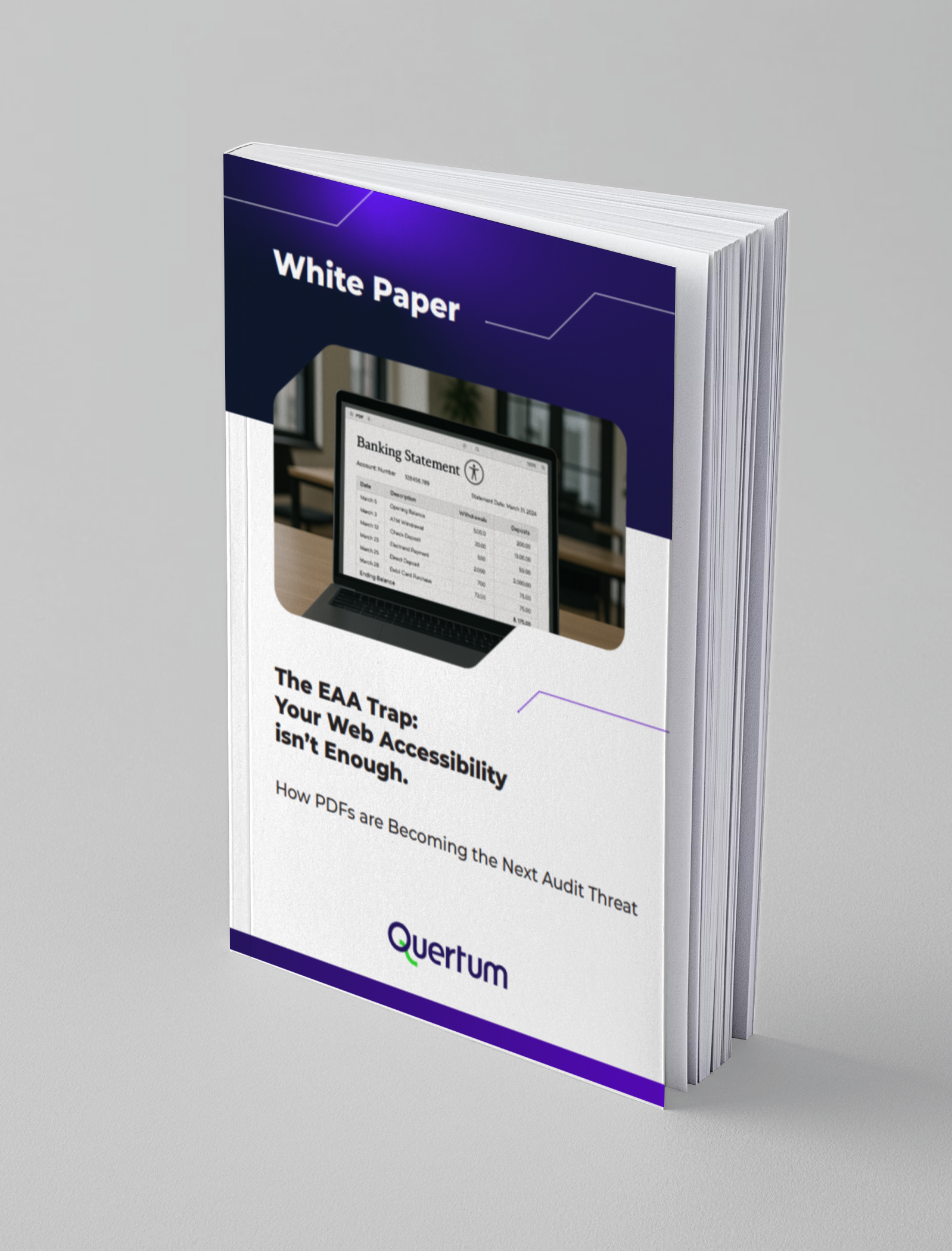
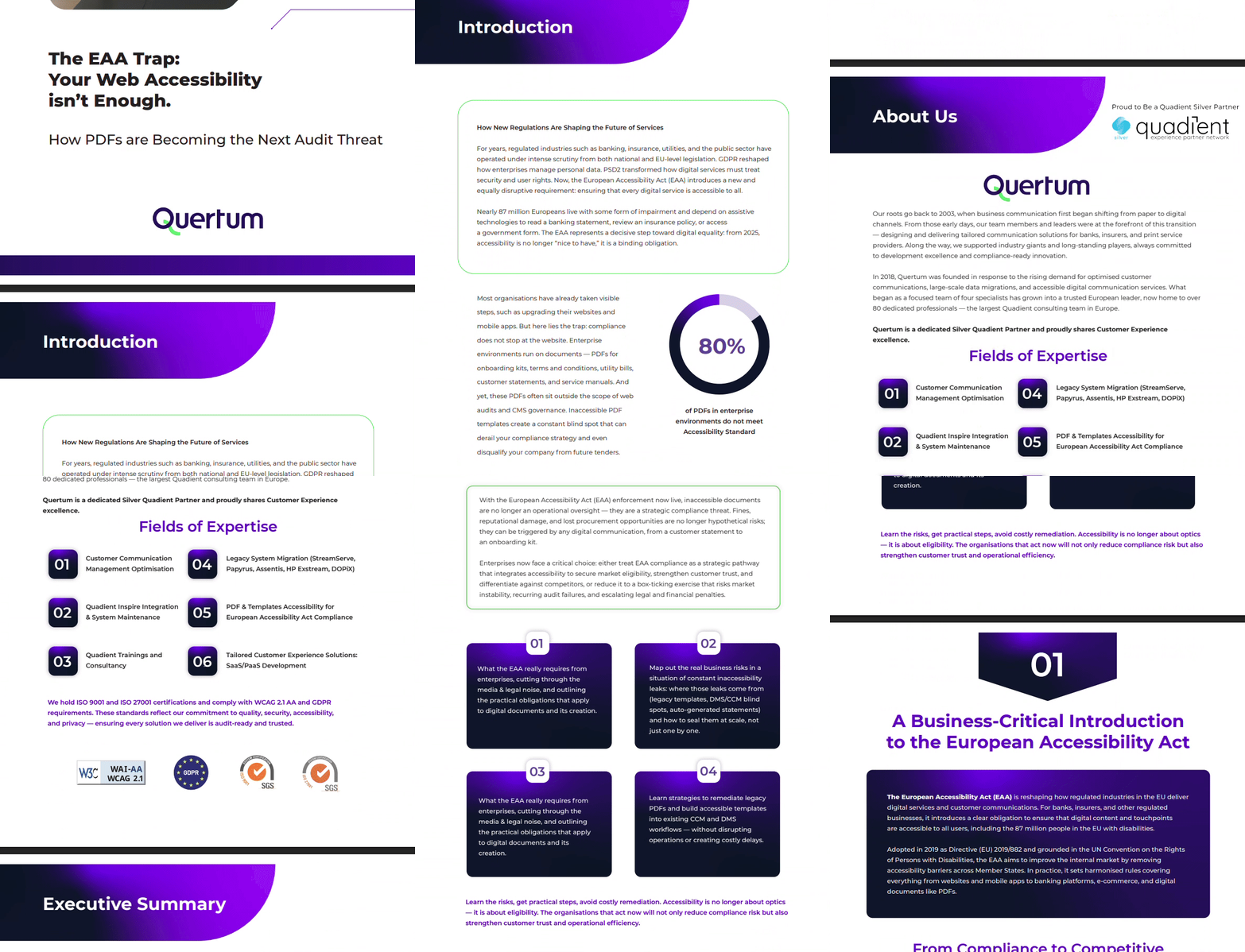
What is Included in the White Paper?
Together, these insights give decision-makers a complete blueprint for turning inaccessible, high-volume document workflows into fully compliant, future-proof, customer-friendly communication ecosystems.
Outlined practical obligations for digital documents based communications
Get a precise breakdown of what the European Accessibility Act requires from organisations that produce customer-facing documents like contracts, statements, bills, policies, onboarding materials, disclosures, and self-service communications.
WCAG 2.1, EN 501 349 and PDF/UA standards and how business should comply with it
The White Paper shows how these standards connect, how they influence each other, and how they convert into real operational decisions across templates, components, metadata, and automated rendering.
Where PDF accessibility breaks, and how to build scalable fixes into Customer Communication workflows
A deep-dive into the hidden failures inside enterprise PDFs. The material shows precisely why these issues happen, how they silently accumulate inside CCM pipelines, and how to eliminate them at scale.
2026 brings consequences for inaccessible documents. Don’t wait to find out the hard way
In 2026, digital inaccessibility stops being a “nice to fix” issue and becomes a measurable business risk. For organisations built on digital documents like PDFs, forms, statements, applications, the European Accessibility Act changes the equation completely.
The law was designed to close the gap between the 24% of Europeans living with impairments and the essential services they rely on every day: banking, insurance, utilities, and the public sector.
For these industries, inaccessible documents now directly translate into:
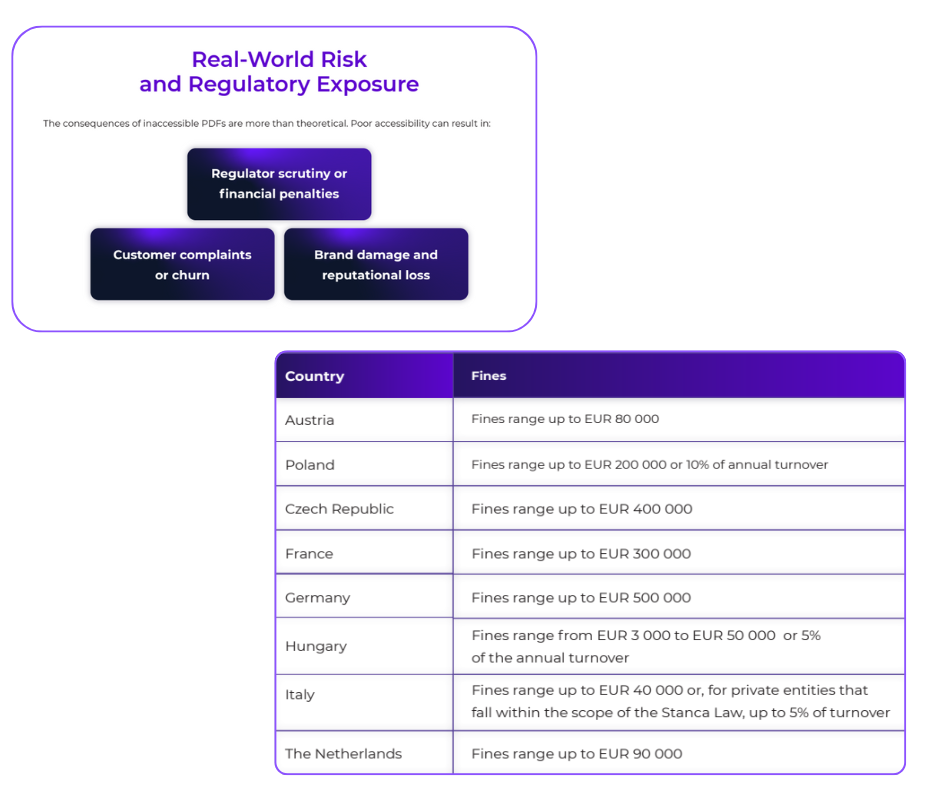
Financial penalties under EAA enforcement
Erosion of customer trust
Competitive disadvantage against compliant organisations
And learn how to reach the European Accessibility Act compliance with efficient approach.
Reaching full compliance with the European Accessibility Act isn’t about checking a single box. It’s about aligning three core standards that define, enforce, and operationalise accessibility across all customer communications.
Unify and organise your efforts on European Accessibility Act Compliance
Understand complex of accessibility implementation and don’t be misleaded
Build the future-proofing processes for your document-based communications
Quertum helps customer experience-oriented institutions modernise their technology stack with secure, scalable, and automation-ready software and cloud solutions — designed to support reliable customer experience & communication, operational efficiency, and compliant growth.
+22 years of experience delivering software engineering solutions for regulated environments.
Enterprise-level Experience
Systems designed to handle peaks and long-term growth with tons of proceses.
Regulatory Expertise
Deep understanding of compliance requirements in banking and insurance sectors.
Enterprise Technology Solutions
Comprehensive technology services designed for regulated industries like banking, insurance, and customer experience-focused organisations.
Custom Software Engineering
Enterprise-grade development for regulated environments and beyound
We design and develop custom business applications using .NET and C#, tailored to the operational and regulatory needs of banking and insurance organisations. Our solutions integrate seamlessly with existing systems, support high-volume processing, and enable long-term scalability. We focus on reliability, maintainability, and security — critical for systems that underpin customer communications, policy administration, claims processing, and internal operations.
✅ Performance optimisation and technical refactoring
Value for banking & insurance:
✅ Faster time-to-market for new products and services
✅ Stable foundations for customer communication platforms (CCM, portals, APIs)
✅ Reduced operational risk through clean architecture and clear ownership
✅ Software designed to scale during peak events (policy renewals, billing cycles, regulatory deadlines)
Cloud & Architecture
Cloud architectures designed for compliance, resilience, and scale
We design and implement cloud architectures that support mission-critical systems in highly regulated environments. Our approach balances business goals with technical constraints, security requirements, and long-term maintainability. Whether migrating existing systems or designing cloud-native platforms, we ensure architectures are audit-ready, resilient, and aligned with enterprise IT standards. We build cloud environments with security and continuity as first-class principles, not afterthoughts.
✅ Architectural support during development and maintenance
✅ Single-cloud and multi-cloud solutions (Azure / AWS)
✅ Secure cloud environment design
✅ Fault-tolerant and highly available architectures
Value for banking & insurance:
✅ Stable infrastructure for customer-facing and document-heavy workloads
✅ Reduced downtime risk during peak operational periods
✅ Cloud environments aligned with internal security, risk, and compliance requirements
✅ Architecture that supports future automation, analytics, and CX improvements
DevOps & Automation
DevOps & Infrastructure as Code for predictable delivery
We help organisations automate how systems are built, deployed, and operated. By introducing DevOps practices and Infrastructure as Code, we reduce manual effort, deployment risk, and configuration drift — common pain points in complex enterprise environments. Our focus is on repeatability, transparency, and operational control.
✅ Safer and faster releases with reduced human error
✅ Consistent environments across development, testing, and production
✅ Better visibility into system health and performance
✅ Strong foundations for regulatory audits and operational governance
Talent on Demand. Any Stack, Any Scale.
Strengthen your team with the right engineers.
We deliver complete technology solutions — but that’s not the only way we work. Many of our clients come to us for dedicated specialists or entire engineering teams to strengthen their internal capabilities. Whether you need one senior cloud architect or a cross-functional squad, we can scale quickly and match the right people to your challenge.
Quertum is Polish Digital Transformation company based in Warsaw with the biggest Quadient Consulting team in Europe. With regional offices in the UK and Poland, our team delivers Tailored Customer Communication solutions, PDF Accessibility and Data Migration services for your niche and market, speaking 8 of the most popular European languages to ensure effective communication and localisation.
Quertum is a Silver Partner of Quadient, offering expert solutions and services to help businesses optimise their customer communication and document management.
We proudly serve clients and implements projects in 15 European countries. In 2023, we expanded our presence to new markets such as Germany, Ireland, and the Netherlands, where we have successfully implemented our advanced digital solutions, strengthening our position as an industry leader.
Our team brings a wealth of experience, expertise, and passion to the table, ensuring that our clients receive the best possible service and Customer Communication Management solutions. We can help you to deliver personalised, connected, and compliant omnichannel experiences for your customers.
We’re Here to Help: Connect with Us and Experience the Power of Seamless Communication
Have any questions or feedback? Our team of experts is here to guide and support you every step of the way. Whether you need more information about our products or require technical assistance, we’re just a message or call away.
Let’s imagine you are a Product Owner on a quiet Friday afternoon (or perhaps there’s no need to imagine). The tea is warm, the sprint is closed, and life feels finally pretty calm. Then, an email lands from the Compliance Manager to your inbox.
It concerns the European Accessibility Act (EAA) agenda. Your task: ensure all historical customer documents are fully accessible. You aren’t worried, assuming these “legacy PDFs” are just a minor cleanup job. Next you casually message your Tech Lead for a total file count. When the reply comes back, the tea suddenly gets colder – this is not small pile of paperwork; your bank has 4.2 million accumulated documents that need to be compliant. And the clock is ticking for company audit.
Law is not a funny thing for BFSI: we’re talking about strictly enforced accessibility regulations such as WCAG 2.2 AA and PDF/UA in Europe, or their functional equivalent in the US, the Section 508. Non-compliance means lawsuits, reputational damage, and incomcliance fines.
Naturally, the first thought in our age is: “Let’s just use AI! It writes poetry and codes websites; surely it can tag a PDF.”
Is AI the magic solution that saves your weekend, or is it a trap that will land the company in court? Let’s dive in.
The AI Mirage: Why You Can’t “Chat” Your Way to Compliance
On paper, AI sounds like the dream employee. It doesn’t sleep and processes data at lightning speed.
When tasked with pdf accessibility remediation, this “digital employee” attempts a standard three-part approach:
OCR (Optical Character Recognition): Scanning pixels into text.
Auto-Tagging: Guessing the structure (Headings, Paragraphs, Tables).
Alt-Text Generation: Describing images.
For perfect, born-digital documents, the results can be impressive, but financial institutions rarely deal in them. They deal in complex legacies: scanned mortgage deeds, faded faxes, and financial tables with merged cells that would puzzle even a human editor.
The “Hallucination” Problem
Generative AI (LLMs like ChatGPT, Claude, or Grok) is a language model, not a structure model. It can predict the next word in a sentence, but it doesn’t inherently understand the binary tag tree structure of a PDF file.
As detailed in technical analyses of AI-powered checks, AI tools often create tags based on visual assumptions rather than code-level reality. Asking a chatbot to check your PDF accessibility is like asking a fish to climb a tree. It might flop around the trunk enthusiastically, but it isn’t getting to the top.
A Textbook Example of Failure
A recent experiment by GrackleDocs exposed the dangerous overconfidence of AI. They fed a perfectly compliant PDF to various leading AIs to see what would happen.
Grok declared the perfect PDF “Non-Compliant” and hallucinated missing tags that were actually right there.
Claude invented a compliance rating of “7.5/10,” listing “gaps” that simply did not exist.
ChatGPT confidently stated there was no Alt-Text (even though there was).
AI is programmed to be helpful, not necessarily honest. If you ask for a compliance report, it will happily invent one, complete with convincing technical jargon to give you a satisfying answer. In a regulated industry, relying on a tool that creates fiction just to make you happy is a dangerous game.
Industry’s Pragmatic Compromise: The Hybrid Approach
“AI-only” seems to be a reckless gamble, but on practice the hybrid model sounds more promising
AI handles 70-90% of the work (OCR, basic tagging), then human experts verify complex elements and test with screen readers like NVDA or JAWS. By keeping a human in the loop, you achieve 99% compliance. For critical documents where legal liability is high, this human verification provides the safety net that banks require. However, quality comes at a premium.
In a case study highlighted by AWS, Ohio State University faced the remediation of massive content volumes. The reality of manual or hybrid remediation is a simple equation of time and money: costs were estimated at $3 to $4 per page.
If your bank has 100,000 pages of legacy contracts (a conservative estimate), you’re looking at an investment of $300,000 to $400,000.
Moving from Remediation to Engineering
For organisations managing millions of transactional documents, the “per-page” cost model of the hybrid approach presents a scalability challenge with significantly higher price. And whilst 61% of organisations identify technical implementation as their biggest EAA compliance barrier, forward-thinking enterprises are discovering a more efficient solution. This has led some institutions to explore a different philosophy – template-based accessibility implementation and Rule-Based Automation.
Template-based Accessibility Implementation
The template-based approach represents the most strategic path to European Accessibility Act readiness for organisations managing high-volume customer communications. For enterprises already leveraging Customer Communication Management (CCM) systems for example Quadient Inspire, OpenText, Isys Papyrus or SmartCommunications, this methodology delivers a decisive advantage: implementing accessibility at the source of PDF generation ensures every document meets compliance standards while preserving brand identity and complex business logic.
Rather than stressfuly remediating thousands of individual PDFs under deadline pressure, industry leaders are embedding accessibility directly into their document templates. See how a Polish bank serving 1.5 million customers implemented 53 accessible templates in just two months, or explore how a Finnish banking group migrated over 100 legacy documents to fully accessible templates without disrupting daily operations. The elegance here is simple: fix the template once, and every document it generates is compliant forever.
Rule-Based Automation
The rule-based approach the philosophical cousin of template-based accessibility, but with a crucial difference. Instead of redesigning individual templates one by one, you’re essentially teaching your CCM system the rules of accessibility and letting it apply them automatically across your entire document ecosystem.
The logic flips on its head. Rather than fixing a PDF after it’s been born into the world (remediation), or manually coding accessibility (and brand designs) into each template, you define the rules of accessibility once and embed them into the document generation process itself. Every PDF that rolls off the production line emerges compliant – regardless of which template spawned it.
This is where platforms like Quadient Inspire Adapt distinguish themselves. Designed to act as a seamless overlay on top of existing Quadient CCM infrastructure, the engine uses proprietary parsing algorithms to “re-engineer” the document without significant altering of core setup. It interprets content objects and applies a strict set of rules aligned with PDF/UA standards.
The Comparison: Your Realistic Options
Criteria
Pure AI-based approach
Hybrid remediation approach
Template and Rule-Based PDF accessibility in CCM
Processing speed
Fast, but inconsistent
Slow, labour-dependent
Real-time, deterministic
Cost per page
$0.50-$1.00
$3-$4
Marginal for existing CCM users
Compliance guarantee
Unreliable – cannot verify structure
Can cover up to 95%with expert review
Depends on correct manual template setup
Risk of fines
High – false positives common
Low with proper oversight and professional supervision
Low if configured by CCM experts
Human factor
AI hallucinations, no validation
High impact (fatigue and time pressure affect quality at scale)
Expert oversight required
Suitable for high-volume legacy content
No (heterogeneity amplifies errors and validation effort)
Limited and expensive (manual review scales linearly with volume)
Yes, once rules and templates are in place, volume does not increase complexity
Audit trail & legal defensibility
None (probabilistic decisions lack full explainability)
Full audit trail (rules, templates, and outputs are documented and repeatable)
Case Study from Quadient Inspire Adapt: The Italian Service Bureau
An Italian service bureau needed to make a very large invoice estate accessible – including documents with complex, nested tables. They implemented Quadient Inspire Adapt as a middleware layer, without rebuilding their upstream document sources.
Result: They processed millions of pages in batch mode. Because the rules were deterministic, every single PDF came out 100% accessible and compliant.
Conclusion: Automation is the Engine, Expertise is the Fuel
Generative AI offers incredible speed, but often mistakes visual layout for semantic structure, leaving you with “plausible” but non-compliant documents. This approach can put at real risks all the document acceptance processes with no mistake logging in afterwards.
PDF Document Hybrid Remediation offers security and high accuracy, but it binds your budget to a linear cost model – the more pages you have, the more you pay.
Template-Based Implementation and Rule-Based Automation (Quadient Inspire Adapt) breaks the linear cost model and enables true scale. But scale without expertise is meaningless: accessibility emerges only when automation is guided by deep architectural and standards-level knowledge.
If you attempt to implement rule-based automation without a deep understanding of PDF accessibility standards, you risk simply building a very fast machine for creating non-compliant documents. The software provides the engine, but it does not replace the need for a skilled “pilot”.
But how do you install this “engine” into a complex banking infrastructure without halting operations? To discover how to implement these strategies within your existing architecture, we recommend reading Making digital documents accessible without disrupting the workflow. It provides a practical roadmap for integrating accessibility rules directly into your current systems, ensuring compliance without forcing a complete operational overhaul.
FAQ
Q1: My IT team wants to use a simple auto-tagging script. Will that work for our needs?
A: Auto-tagging scripts can be a starting point, but they typically achieve 70-80% accuracy because they rely on pattern recognition rather than deterministic rules. For regulated industries where compliance must be verifiable, you’ll want to consider whether that accuracy level meets your risk tolerance, particularly when processing large volumes.
Q2: If an AI validator gives my PDF a green tick, is it audit ready?
A: No. Automated checkers test for syntax (is there a tag?), not semantics (is it the right tag?). An AI might mark “image_001.jpg” as valid Alt-Text. You technically “pass” the software check, but you still fail the law (WCAG).
Q3: What happens if we miss EAA compliance and get reported?
A: Penalties vary by member state, but can be substantial, potentially reaching €100,000 or more. Beyond fines, there’s the reputational impact and the possibility of customer lawsuits. For regulated institutions, non-compliance may also trigger broader regulatory reviews of your processes.