Arm Your Compliance Strategy with Actionable Insights
What is Included in the White Paper?
Together, these insights give decision-makers a complete blueprint for turning inaccessible, high-volume document workflows into fully compliant, future-proof, customer-friendly communication ecosystems.
Outlined practical obligations for digital documents based communications
Get a precise breakdown of what the European Accessibility Act requires from organisations that produce customer-facing documents like contracts, statements, bills, policies, onboarding materials, disclosures, and self-service communications.
WCAG 2.1, EN 501 349 and PDF/UA standards and how business should comply with it
The white paper shows how these standards connect, how they influence each other, and how they convert into real operational decisions across templates, components, metadata, and automated rendering.
Where PDF accessibility breaks down, and how to build scalable fixes into CCM workflows
A deep-dive into the hidden failures inside enterprise PDFs. The white paper shows why these issues happen, how they silently accumulate inside CCM pipelines, and how to eliminate them permanently.
2026 brings consequences for inaccessible documents. Don’t wait to find out the hard way
In 2025, digital inaccessibility stops being a “nice to fix” issue and becomes a measurable business risk. For organisations built on digital documents like PDFs, forms, statements, applications, the European Accessibility Act changes the equation completely.
The law was designed to close the gap between the 24% of Europeans living with impairments and the essential services they rely on every day: banking, insurance, utilities, and the public sector.
For these industries, inaccessible documents now directly translate into:
Financial penalties under EAA enforcement
Erosion of customer trust
Competitive disadvantage against compliant organisations
And learn how to reach the European Accessibility Act compliance with efficient approach.
Reaching full compliance with the European Accessibility Act isn’t about checking a single box. It’s about aligning three core standards that define, enforce, and operationalise accessibility across all customer communications.
Unify and organise your efforts on European Accessibility Act Compliance
Understand complex of accessibility implementation and don’t be misleaded
Build the future-proofing processes for your document-based communications
Quertum helps customer experience-oriented institutions modernise their technology stack with secure, scalable, and automation-ready software and cloud solutions — designed to support reliable customer experience & communication, operational efficiency, and compliant growth.
+22 years of experience delivering software engineering solutions for regulated environments.
Enterprise-level Experience
Systems designed to handle peaks and long-term growth with tons of proceses.
Regulatory Expertise
Deep understanding of compliance requirements in banking and insurance sectors.
Enterprise Technology Solutions
Comprehensive technology services designed for regulated industries like banking, insurance, and customer experience-focused organisations.
Custom Software Engineering
Enterprise-grade development for regulated environments and beyound
We design and develop custom business applications using .NET and C#, tailored to the operational and regulatory needs of banking and insurance organisations. Our solutions integrate seamlessly with existing systems, support high-volume processing, and enable long-term scalability. We focus on reliability, maintainability, and security — critical for systems that underpin customer communications, policy administration, claims processing, and internal operations.
✅ Performance optimisation and technical refactoring
Value for banking & insurance:
✅ Faster time-to-market for new products and services
✅ Stable foundations for customer communication platforms (CCM, portals, APIs)
✅ Reduced operational risk through clean architecture and clear ownership
✅ Software designed to scale during peak events (policy renewals, billing cycles, regulatory deadlines)
Cloud & Architecture
Cloud architectures designed for compliance, resilience, and scale
We design and implement cloud architectures that support mission-critical systems in highly regulated environments. Our approach balances business goals with technical constraints, security requirements, and long-term maintainability. Whether migrating existing systems or designing cloud-native platforms, we ensure architectures are audit-ready, resilient, and aligned with enterprise IT standards. We build cloud environments with security and continuity as first-class principles, not afterthoughts.
✅ Architectural support during development and maintenance
✅ Single-cloud and multi-cloud solutions (Azure / AWS)
✅ Secure cloud environment design
✅ Fault-tolerant and highly available architectures
Value for banking & insurance:
✅ Stable infrastructure for customer-facing and document-heavy workloads
✅ Reduced downtime risk during peak operational periods
✅ Cloud environments aligned with internal security, risk, and compliance requirements
✅ Architecture that supports future automation, analytics, and CX improvements
DevOps & Automation
DevOps & Infrastructure as Code for predictable delivery
We help organisations automate how systems are built, deployed, and operated. By introducing DevOps practices and Infrastructure as Code, we reduce manual effort, deployment risk, and configuration drift — common pain points in complex enterprise environments. Our focus is on repeatability, transparency, and operational control.
✅ Safer and faster releases with reduced human error
✅ Consistent environments across development, testing, and production
✅ Better visibility into system health and performance
✅ Strong foundations for regulatory audits and operational governance
Talent on Demand. Any Stack, Any Scale.
Strengthen your team with the right engineers.
We deliver complete technology solutions — but that’s not the only way we work. Many of our clients come to us for dedicated specialists or entire engineering teams to strengthen their internal capabilities. Whether you need one senior cloud architect or a cross-functional squad, we can scale quickly and match the right people to your challenge.
Quertum is Polish Digital Transformation company based in Warsaw with the biggest Quadient Consulting team in Europe. With regional offices in the UK and Poland, our team delivers Tailored Customer Communication solutions, PDF Accessibility and Data Migration services for your niche and market, speaking 8 of the most popular European languages to ensure effective communication and localisation.
Quertum is a Silver Partner of Quadient, offering expert solutions and services to help businesses optimise their customer communication and document management.
We proudly serve clients and implements projects in 15 European countries. In 2023, we expanded our presence to new markets such as Germany, Ireland, and the Netherlands, where we have successfully implemented our advanced digital solutions, strengthening our position as an industry leader.
Our team brings a wealth of experience, expertise, and passion to the table, ensuring that our clients receive the best possible service and Customer Communication Management solutions. We can help you to deliver personalised, connected, and compliant omnichannel experiences for your customers.
We’re Here to Help: Connect with Us and Experience the Power of Seamless Communication
Have any questions or feedback? Our team of experts is here to guide and support you every step of the way. Whether you need more information about our products or require technical assistance, we’re just a message or call away.
Let’s imagine you are a Product Owner on a quiet Friday afternoon (or perhaps there’s no need to imagine). The tea is warm, the sprint is closed, and life feels finally pretty calm. Then, an email lands from the Compliance Manager to your inbox.
It concerns the European Accessibility Act (EAA) agenda. Your task: ensure all historical customer documents are fully accessible. You aren’t worried, assuming these “legacy PDFs” are just a minor cleanup job. Next you casually message your Tech Lead for a total file count. When the reply comes back, the tea suddenly gets colder – this is not small pile of paperwork; your bank has 4.2 million accumulated documents that need to be compliant. And the clock is ticking for company audit.
Law is not a funny thing for BFSI: we’re talking about strictly enforced accessibility regulations such as WCAG 2.2 AA and PDF/UA in Europe, or their functional equivalent in the US, the Section 508. Non-compliance means lawsuits, reputational damage, and incomcliance fines.
Naturally, the first thought in our age is: “Let’s just use AI! It writes poetry and codes websites; surely it can tag a PDF.”
Is AI the magic solution that saves your weekend, or is it a trap that will land the company in court? Let’s dive in.
The AI Mirage: Why You Can’t “Chat” Your Way to Compliance
On paper, AI sounds like the dream employee. It doesn’t sleep and processes data at lightning speed.
When tasked with pdf accessibility remediation, this “digital employee” attempts a standard three-part approach:
OCR (Optical Character Recognition): Scanning pixels into text.
Auto-Tagging: Guessing the structure (Headings, Paragraphs, Tables).
Alt-Text Generation: Describing images.
For perfect, born-digital documents, the results can be impressive, but financial institutions rarely deal in them. They deal in complex legacies: scanned mortgage deeds, faded faxes, and financial tables with merged cells that would puzzle even a human editor.
The “Hallucination” Problem
Generative AI (LLMs like ChatGPT, Claude, or Grok) is a language model, not a structure model. It can predict the next word in a sentence, but it doesn’t inherently understand the binary tag tree structure of a PDF file.
As detailed in technical analyses of AI-powered checks, AI tools often create tags based on visual assumptions rather than code-level reality. Asking a chatbot to check your PDF accessibility is like asking a fish to climb a tree. It might flop around the trunk enthusiastically, but it isn’t getting to the top.
A Textbook Example of Failure
A recent experiment by GrackleDocs exposed the dangerous overconfidence of AI. They fed a perfectly compliant PDF to various leading AIs to see what would happen.
Grok declared the perfect PDF “Non-Compliant” and hallucinated missing tags that were actually right there.
Claude invented a compliance rating of “7.5/10,” listing “gaps” that simply did not exist.
ChatGPT confidently stated there was no Alt-Text (even though there was).
AI is programmed to be helpful, not necessarily honest. If you ask for a compliance report, it will happily invent one, complete with convincing technical jargon to give you a satisfying answer. In a regulated industry, relying on a tool that creates fiction just to make you happy is a dangerous game.
Industry’s Pragmatic Compromise: The Hybrid Approach
“AI-only” seems to be a reckless gamble, but on practice the hybrid model sounds more promising
AI handles 70-90% of the work (OCR, basic tagging), then human experts verify complex elements and test with screen readers like NVDA or JAWS. By keeping a human in the loop, you achieve 99% compliance. For critical documents where legal liability is high, this human verification provides the safety net that banks require. However, quality comes at a premium.
In a case study highlighted by AWS, Ohio State University faced the remediation of massive content volumes. The reality of manual or hybrid remediation is a simple equation of time and money: costs were estimated at $3 to $4 per page.
If your bank has 100,000 pages of legacy contracts (a conservative estimate), you’re looking at an investment of $300,000 to $400,000.
Moving from Remediation to Engineering
For organisations managing millions of transactional documents, the “per-page” cost model of the hybrid approach presents a scalability challenge with significantly higher price. And whilst 61% of organisations identify technical implementation as their biggest EAA compliance barrier, forward-thinking enterprises are discovering a more efficient solution. This has led some institutions to explore a different philosophy – template-based accessibility implementation and Rule-Based Automation.
Template-based Accessibility Implementation
The template-based approach represents the most strategic path to European Accessibility Act readiness for organisations managing high-volume customer communications. For enterprises already leveraging Customer Communication Management (CCM) systems for example Quadient Inspire, OpenText, Isys Papyrus or SmartCommunications, this methodology delivers a decisive advantage: implementing accessibility at the source of PDF generation ensures every document meets compliance standards while preserving brand identity and complex business logic.
Rather than stressfuly remediating thousands of individual PDFs under deadline pressure, industry leaders are embedding accessibility directly into their document templates. See how a Polish bank serving 1.5 million customers implemented 53 accessible templates in just two months, or explore how a Finnish banking group migrated over 100 legacy documents to fully accessible templates without disrupting daily operations. The elegance here is simple: fix the template once, and every document it generates is compliant forever.
Rule-Based Automation
The rule-based approach the philosophical cousin of template-based accessibility, but with a crucial difference. Instead of redesigning individual templates one by one, you’re essentially teaching your CCM system the rules of accessibility and letting it apply them automatically across your entire document ecosystem.
The logic flips on its head. Rather than fixing a PDF after it’s been born into the world (remediation), or manually coding accessibility (and brand designs) into each template, you define the rules of accessibility once and embed them into the document generation process itself. Every PDF that rolls off the production line emerges compliant – regardless of which template spawned it.
This is where platforms like Quadient Inspire Adapt distinguish themselves. Designed to act as a seamless overlay on top of existing Quadient CCM infrastructure, the engine uses proprietary parsing algorithms to “re-engineer” the document without significant altering of core setup. It interprets content objects and applies a strict set of rules aligned with PDF/UA standards.
The Comparison: Your Realistic Options
Criteria
Pure AI-based approach
Hybrid remediation approach
Template and Rule-Based PDF accessibility in CCM
Processing speed
Fast, but inconsistent
Slow, labour-dependent
Real-time, deterministic
Cost per page
$0.50-$1.00
$3-$4
Marginal for existing CCM users
Compliance guarantee
Unreliable – cannot verify structure
Can cover up to 95%with expert review
Depends on correct manual template setup
Risk of fines
High – false positives common
Low with proper oversight and professional supervision
Low if configured by CCM experts
Human factor
AI hallucinations, no validation
High impact (fatigue and time pressure affect quality at scale)
Expert oversight required
Suitable for high-volume legacy content
No (heterogeneity amplifies errors and validation effort)
Limited and expensive (manual review scales linearly with volume)
Yes, once rules and templates are in place, volume does not increase complexity
Audit trail & legal defensibility
None (probabilistic decisions lack full explainability)
Full audit trail (rules, templates, and outputs are documented and repeatable)
Case Study from Quadient Inspire Adapt: The Italian Service Bureau
An Italian service bureau needed to make a very large invoice estate accessible – including documents with complex, nested tables. They implemented Quadient Inspire Adapt as a middleware layer, without rebuilding their upstream document sources.
Result: They processed millions of pages in batch mode. Because the rules were deterministic, every single PDF came out 100% accessible and compliant.
Conclusion: Automation is the Engine, Expertise is the Fuel
Generative AI offers incredible speed, but often mistakes visual layout for semantic structure, leaving you with “plausible” but non-compliant documents. This approach can put at real risks all the document acceptance processes with no mistake logging in afterwards.
PDF Document Hybrid Remediation offers security and high accuracy, but it binds your budget to a linear cost model – the more pages you have, the more you pay.
Template-Based Implementation and Rule-Based Automation (Quadient Inspire Adapt) breaks the linear cost model and enables true scale. But scale without expertise is meaningless: accessibility emerges only when automation is guided by deep architectural and standards-level knowledge.
If you attempt to implement rule-based automation without a deep understanding of PDF accessibility standards, you risk simply building a very fast machine for creating non-compliant documents. The software provides the engine, but it does not replace the need for a skilled “pilot”.
But how do you install this “engine” into a complex banking infrastructure without halting operations? To discover how to implement these strategies within your existing architecture, we recommend reading Making digital documents accessible without disrupting the workflow. It provides a practical roadmap for integrating accessibility rules directly into your current systems, ensuring compliance without forcing a complete operational overhaul.
FAQ
Q1: My IT team wants to use a simple auto-tagging script. Will that work for our needs?
A: Auto-tagging scripts can be a starting point, but they typically achieve 70-80% accuracy because they rely on pattern recognition rather than deterministic rules. For regulated industries where compliance must be verifiable, you’ll want to consider whether that accuracy level meets your risk tolerance, particularly when processing large volumes.
Q2: If an AI validator gives my PDF a green tick, is it audit ready?
A: No. Automated checkers test for syntax (is there a tag?), not semantics (is it the right tag?). An AI might mark “image_001.jpg” as valid Alt-Text. You technically “pass” the software check, but you still fail the law (WCAG).
Q3: What happens if we miss EAA compliance and get reported?
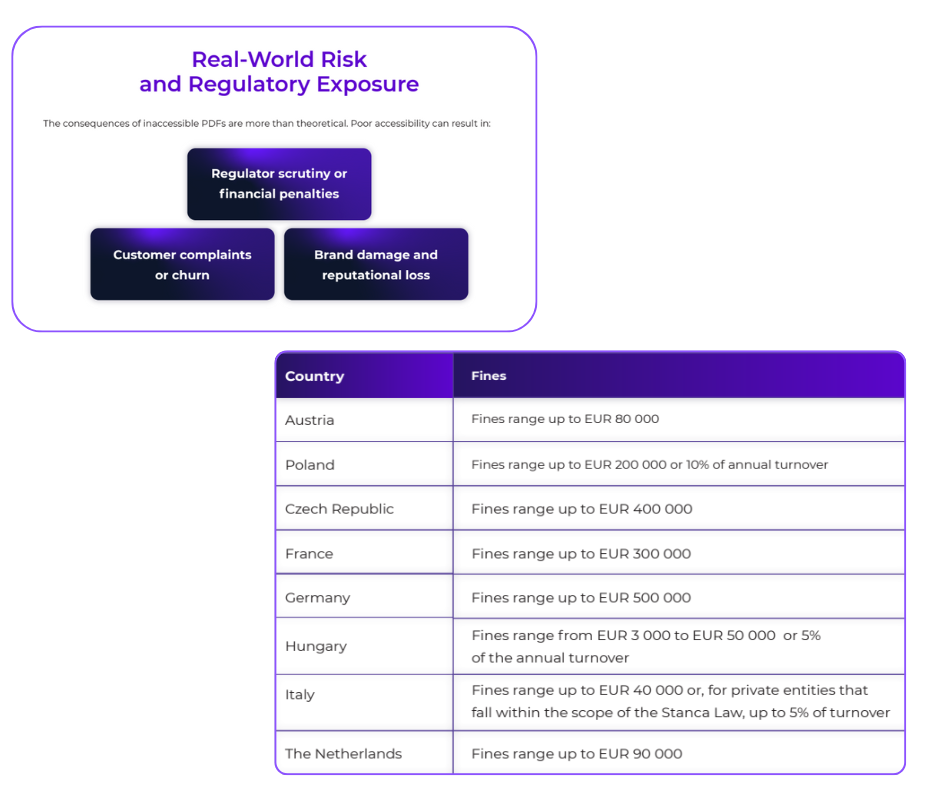
A: Penalties vary by member state, but can be substantial, potentially reaching €100,000 or more. Beyond fines, there’s the reputational impact and the possibility of customer lawsuits. For regulated institutions, non-compliance may also trigger broader regulatory reviews of your processes.
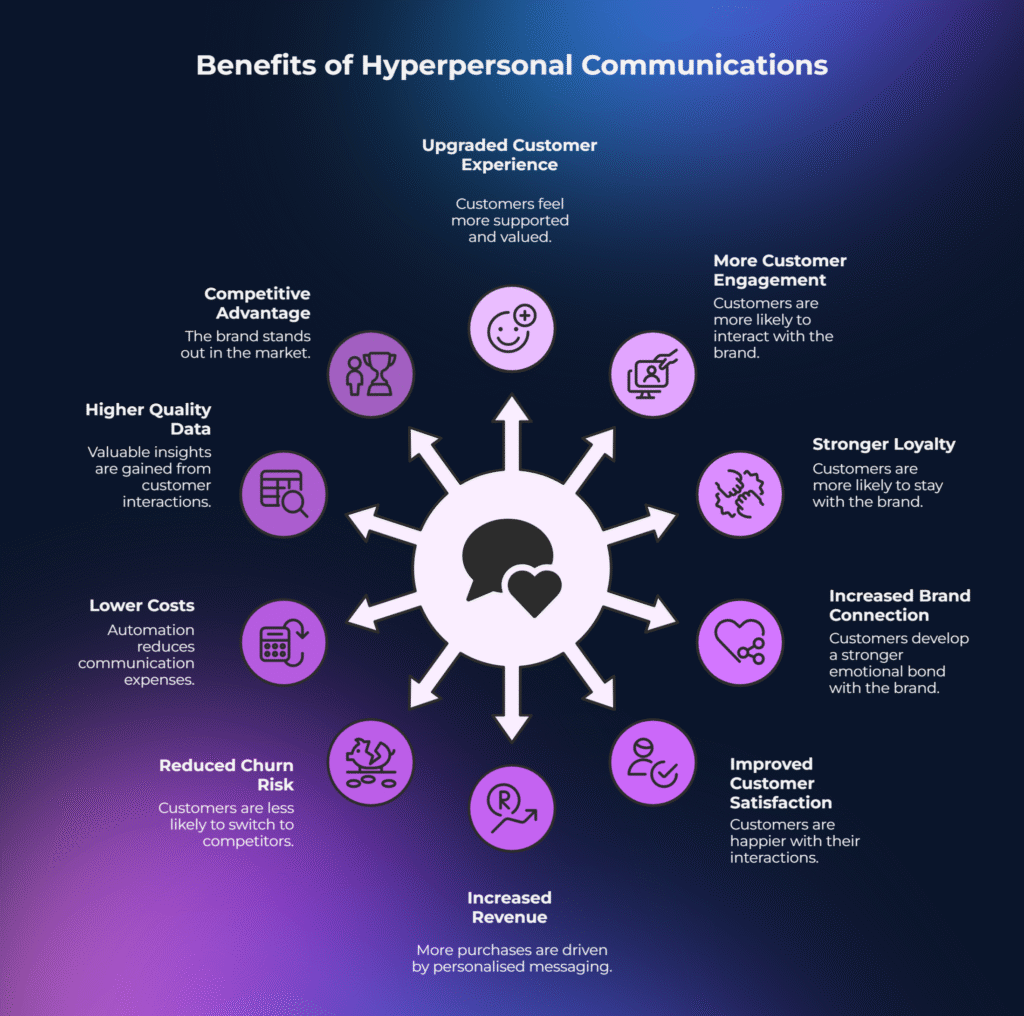
In 2025, customer experience initiatives shifted from a cost-cutting mindset to a customer-centric approach. This and other CCM trends are widely observed in industries like e-commerce, which tend to shape the CX perspectives for complex B2C, B2B, and G2B industries. For banks and insurers the picture doesn’t change: instead of just cheap, compliant mailings, firms now prioritise great digital experiences – using AI, cloud, and personalisation to delight customers.
This article explores 5 key CCM trends of 2025 reshaping BFSI communications and setting the stage for 2026.
Cost vs. Experience – 0 : 1
Until recently, companies chose CCM platforms mostly to cut costs and meet compliance. Now that’s flipped – in 2025 the top objective for customer communications is improving the customer experience. Market data confirms this pivot, as organisations move from “cost containment” to customer-centric innovation powered by AI and automation. Banks and insurers are retiring legacy CCM in favor of cloud-native solutions.
For example, one of our clients – the mid-sized insurer from the Netherlands – managed to deploy CCM on their own private cloud on Microsoft Azure with integration partners for greater agility and control, instead of using a vendor’s one-size-fits-all cloud. The payoff is clear: more engaging communications, quicker content updates, and lower churn – turning CCM from a cost center into a strategic CX engine.
AI-Powered Hyper-Personalisation – Top in CCM Trends
Personalisation in communications went into overdrive in 2025. Instead of generic mass emails, banks and insurers now leverage AI-driven CCM to craft one-to-one messages for each customer. Hyper-personalisation uses real-time data and predictive analytics so that content (alerts, push-notifications etc.) matches an individual’s needs at that moment.
For example, generative AI can ensure data is accurate and even suggest a product a customer might need before they realise it. This practice is no longer experimental – it gained significant momentum in 2025 and continues to expand as AI capabilities mature. AI tools like chatbots and automated language translation also help deliver a more personal, convenient experience.
The result is communications that feel custom-made for every client, which significantly boosts engagement and satisfaction.
Coming to 2026 with PDF Accessibility and EAA Compliance
A regulatory shift in 2025 made accessible communications a must-have. The European Accessibility Act (EAA) now requires that all customer documents (bills, statements, policies, etc.) be readable by assistive technologies. Legacy CCM systems struggle here – they place text for print but don’t include the tags and structure that an accessible PDF needs. The risk of non-compliance is serious: regulators have already fined companies (the Spannish airline Vueling was hit with €90,000) for inaccessible content.
As a result, banks and insurers are overhauling how they generate documents. Modern CCM platforms bake in accessibility by design, automatically tagging PDFs to meet standards.
Banks vs. Fintech – What Shapes What
An important 2025 development is the innovation gap in communications. Many big banks remain bogged down by legacy tech, while fintech challengers leap ahead with AI and cloud. This technical gap becomes more significant, leaving traditional banks behind in a significantly evolving era of digital transformation. Banking and insurance giants, which have been deserving of the trust and customer preferences for centuries, are at risk of losing it in 2026.
One of the surveys says that 66% of bank IT leaders said that trying to run AI on outdated core systems is “like fueling an EV with petrol”, and nearly 80% agreed fintechs are racing ahead as a result. But some incumbents are actively rewriting that story.
Santander Portugal, for example (3M+ customers, 150M+ communications per year), moved away from an outsourced, PSP-dependent setup where sensitive data left the bank’s environment and template changes were slow and vendor-bound. By migrating to Quadient Inspire Evolve, the bank brought communications back under tighter governance – enabling faster template updates, shorter time-to-market for regulatory changes, and end-to-end control with traceability in a cloud-native model.
Market Shake-Up: Who Leads the CCM Trends?
The CCM software market is evolving fast, and Quadient now holds the #1 global CCM market share at 11%.
Legacy-only vendors are fading, while those enabling agile, personalised communications are rising.
IDC observes that organisations are investing in AI-driven communication platforms that personalise engagement across all channels, which helps make the experience less and less fragmented. In other words – omnichannel and cohesive.
For example, a customer starts a policy renewal on email, pauses it halfway, then later calls the insurer — the agent immediately sees exactly what message was sent, what document version was opened, and where the customer dropped off, without asking them to repeat anything. If the customer ignores the email but clicks the SMS link instead, the system automatically continues the same conversation there, rather than restarting it. When regulations or personal data change at the last minute, the platform updates the content once and reflects it consistently across email, portal, PDF, and call-center screens, avoiding contradictory messages.
For regulated industries, it’s crucial to have responsible AI implementation. Every message, pop-up or email should reflect the clear connection between the business and end customer. Quadient’s platform AI adapts communication to customer needs – speeding content creation, personalising messages, and automating workflows for users. And in 2025, many enterprises followed this lead: phasing out old document systems and choosing CCM solutions built for flexibility and intelligent automation.
Going in to 2026
The evolving trends won’t change the direction in 2026. In the nearest future we’ll see autonomous AI agents starting to orchestrate customer interactions in real time, taking personalisation to new heights. At the same time, the EU’s AI Act will fully kick in (by mid-2026), imposing stricter rules on AI use in customer communications.
Together, these developments mean real-time, AI-driven CCM – with robust governance – will likely become the norm. Companies that invested in modern, adaptable CCM systems are set to thrive, while others will scramble to catch up.
Brief FAQ for Produst Owners, Operational Leaders and Digital Transformation Experts
Q1: How do we justify CCM modernisation beyond “nice CX”: what metrics move in BFSI?
A: The business case comes from retention protection (fewer complaints/churn triggers), cost-to-serve reduction (call deflection from clearer statements/policy communications), and journey uplift (higher completion rates in digital servicing). Track it per use case: fraud alerts (time-to-action), renewals (drop-off), statements (inbound volume), regulatory notices (complaints/appeals). CCM becomes a revenue + risk lever once comms are treated as part of the customer journey.
Q2: Private cloud or vendor SaaS: what decides the right CCM model in 2026?
A: It’s driven by constraints: data residency, security architecture, integration complexity, and release speed. Private cloud (AWS/Azure) fits teams wanting direct infra control, enterprise-grade IAM/logging alignment, and flexible release cycles – often attractive to mid-sized firms paying for cloud + partner support rather than a full bundled stack. Vendor SaaS can win on speed-to-value but typically trades off architectural freedom.
Check our Case Study which shows the full implementation perspective and unbeatable benefits of PaaS Quadient/Azure based custom solution.
Q3: EAA-driven PDF accessibility: what does “done” mean operationally?
A: “Done” means accessibility is repeatable and auditable, not a one-off fix. You need governed templates + tagging rules, controlled reading order (tables/forms), and automated QA gates to prevent regressions. The risk isn’t only fines – it’s broken self-service (can’t read → calls, complaints, churn).
We’ve put an effort to make PDF accessibility clear to understand and easy to implement it with compliant & predictable results. Learn more about our method and template-made approach, and rid off the complication of the PDF accessibility and EAA compliance.
Conclusion
2025 didn’t just add “AI” to CCM – it changed the job description of customer communications in BFSI. When statements, policy packs, fraud alerts, and regulatory notices become part of the customer journey, CCM stops being a back-office print engine and turns into an operating system for trust: clarity, timeliness, relevance, and proof that you’re in control.
In our last article we already unpacked how The European Accessibility Act (EAA) has fundamentally changed the rules of engagement for banks, insurers, and utility providers. If you are still relying on a print-era engine to drive digital conversations, you have likely noticed a painful reality: your documents might look perfect to the human eye, but to a machine (and the law), they are invisible.
For years, accessibility was treated as a “nice-to-have” or a post-production patch, and these days are gone. With the EAA enforcement deadline looming, sticking to Legacy CCM systems is no longer just a technical debt issue, but it’s becoming a compliance gamble in 2026.
The 30-Second Read
The Problem in a nutshell: Old CCM platforms place text on a page using X/Y coordinates (print logic). Accessibility standards require HTML-like tags and semantic structure (digital logic).
The Risk: Regulators treat inaccessible system outcomes a failure of service. The financial and reputational costs are already visible in global enforcement cases.
The Solution: Retrofitting is expensive.Migration to a modern platform like Quadient Inspire is already counted as the most cost-effective and future-proof way for strategic business sustainability in regulated landscape.
The “Print-First” Trap: Why Legacy CCM Fails
Most legacy platforms were built when “customer communication” meant printing a letter and putting it in an envelope. They excel at placing ink on paper with pixel-perfect precision.
However, accessibility requirements demand context, not just placement. A screen reader needs to know that a bold line of text is a Header (H1), not just “bold text”. It needs to know that a grid of numbers is a table with rows and headers, not a random collection of floating integers.
Trying to force a print-based system to generate accessible documents is like trying to turn a typewriter into a web browser. You can force it to work with enough glue and plugins, but it will never be scalable.
The Hidden Cost of “Bolted-On” Compliance
Some organisations attempt to solve this with post-processing tools — software that scans a PDF and tries to guess the tags. This is a dangerous strategy, and here is why:
Fragile workflows: If a marketing team changes a disclaimer layout, the automated tagger often breaks without even a warning.
No audit trail: You can not prove governance if your accessibility relies on a “black box” fix applied at the last second.
Performance drag: Retroactive tagging slows down batch processing, threatening SLA deadlines for delivery.
The Business Case: The Real Cost of Fines
While internal operational friction is annoying, the external financial threat is immediate. It is important to look at the broader regulatory landscape to understand the risks and how the world of regulation behaves globally. While the EAA is new, the legal logic behind it, punishing organisations for denying service via inaccessible documents, is well-established globally.
Global Precedents: The “Document Liability” Warning
Though ADA (Disabilities Act in the USA) and EAA are different in scope and jurisdiction, both treat inaccessible communication as a barrier to equal service. For instance, Wells Fargo settled a case with the U.S. Department of Justice for $16 million in 2011 after failing to provide accessible bank statements and forms in alternative formats like large print, Braille, and properly tagged digital files. The case reinforces how inaccessible documents are not considered technical faults but as legal liabilities.
Recent European Enforcement
“Closer to home”, European regulators are already proving they will enforce similar standards:
Vueling Airlines (Spain): Fined €90,000 for inaccessible digital channels. While this focused on interfaces, it confirms that digital barriers attract significant penalties.
UBS (Switzerland): Ordered to pay CHF 20,000 regarding inaccessible online banking. The regulator’s message was clear: digital exclusion is a punishable failure.
The EAA simply extends this logic explicitly to your PDF/UA documents and customer communications.
Why Legacy CMM Migration Attracts So Much Attention of Banking and Insurance Leaders?
Meeting WCAG guidelines requires a platform that understands structure from the moment a template is designed. Modern platforms like Quadient Inspire do not “scan” for accessibility; they build it into the DNA of the document.
1. Omni-channel Consistency
Modern ecosystems separate content from presentation. You create the message once, and the system generates a compliant PDF for archiving, an accessible HTML5 email for mobile, and a tagged format for the web portal. This automation ensures consistency across all channels without triplicating the effort.
2. Risk Mitigation (Compliance by Design)
When you migrate, you shift from “detecting errors” to “preventing them”. Designers use templates with pre-approved accessibility blocks. If a font size is too small or a colour contrast fails accessibility standards, the system flags it before production, not after.
3. Future-Proofing
The EAA is just the beginning, and regulations will tighten. CCM migration allows you to adapt to new mandates (like EN 301 549 updates) via software updates rather than rewriting your entire codebase.
Frequently Asked Questions Covered
Q1: Can the 2030 transition period delay our migration plans?
Only for historic contracts. All new customers must receive accessible documents now, so postponing migration increases cost and complexity.
Q2: Does accessibility slow down batch processing?
Modern platforms build structure and layout simultaneously, so batch performance remains stable.
Q3: Are the automated tagging tools enough for compliance?
No. Automated fixes cannot guarantee full alignment with the WCAG 2.1 or PDF/UA standards. Accessibility must be built into the template.
Conclusion: The Era of Static Documents is Over
The European Accessibility Act is forcing a necessary evolution in how organisations handle data distribution. Sticking to Legacy CCM systems is a choice to face regulatory scrutiny and potential financial penalties like those seen in the Wells Fargo and Vueling cases. CCM migration is not just an IT upgrade; it is a strategic move to protect your brand and your bottom line.
Read how to CCM Migration made simple and how to go with it confidently in 6 steps. And don’t wait for the first fine. Contact our team to review risks and determine your optimal CCM migration strategy.
Most inaccessible client facing PDFs are born from inaccessible Word documents. Your compliance team might focus on website WCAG audits whilst overlooking the thousands of contracts, statements, policies, and customer communications generated monthly from poorly structured Word templates – filled with mostly common document accessibility mistakes.
When regulators audit your customer documents in 2026, they won’t accept “doc looked fine visually and nobody complained” as justification. But screen readers don’t see visual formatting, and so as your clients with impairments. Assistive technologies don’t rely on semantic structure that most business documents completely lack.
During the accessibility implementation projects, we spotted a lot of faults, but some of them deserve decent attention. Below are the 15 most common and costly Word document accessibility mistakes we spot frequently in banking, insurance, and financial services. Each one creates barriers for customers with disabilities, exposes your organisation to discrimination claims, and once it’s embedded in CCM templates, multiplies across thousands of generated documents.
Understanding these errors can prevent your time and resources spent on penalties, remediation costs, and reputational damage that follow when accessibility failures reach regulators or courts.
Structural Errors: The Foundation That Breaks Everything
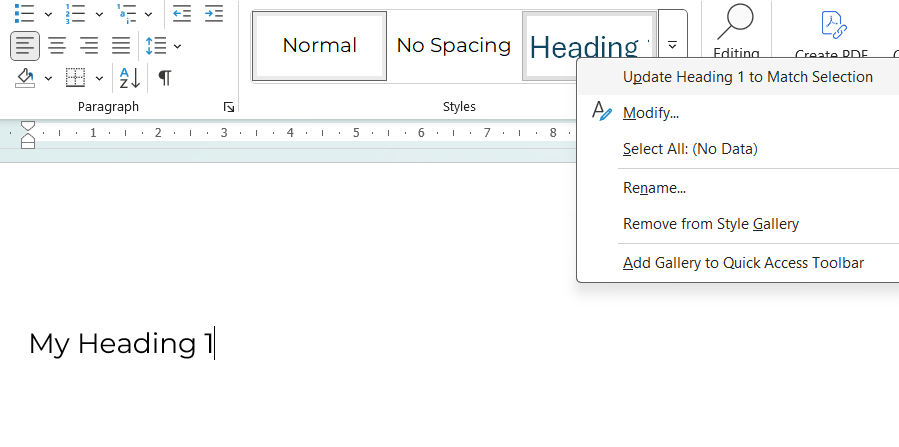
1. No Proper Heading Structure
Walk into any compliance department, and you’ll find dozens of Word documents where headings are created by simply making text bold or increasing font size. Authors skip heading levels, jumping from H1 directly to H3, or scatter multiple H1 tags throughout a single document without understanding the semantic hierarchy this creates.
How Customers with Disabilities Experience It: Screen reader users hear the entire document as one long, undifferentiated text block. They cannot navigate by headings, jump to specific sections, or un derstand document hierarchy. A 30-page policy document becomes an audio marathon with no way to skip to relevant sections.
The business impact extends beyond user frustration. Long contracts, product guides, and policy documents become practically unusable for blind customers, triggering complaints and potential discrimination claims. Under EN 301 549 and the European Accessibility Act, this represents a fundamental failure, not an edge case regulators might overlook.
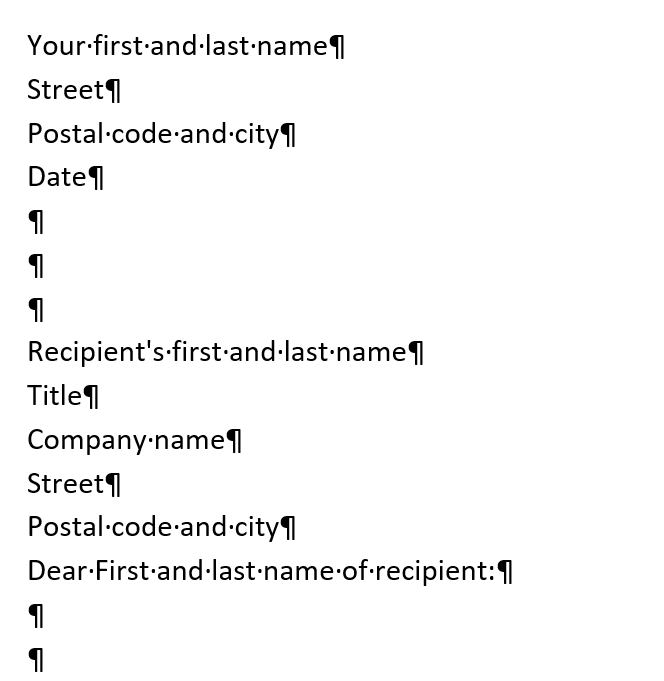
2. Empty Lines for Spacing
It seems harmless enough: pressing Enter repeatedly to create visual spacing between sections. Yet, this common habit creates a peculiar experience for assistive technology users. Screen readers faithfully announce each empty line as “emptiness”. It makes all the text scope muddling and simply unprofessional.
How Customers with Disabilities Experience It: Screen readers announce each empty line: “blank… blank… blank… blank…” This creates confusion about document structure and wastes time. Users cannot distinguish intentional breaks from formatting errors.
When embedded in CCM templates, this issue multiplies across thousands of generated documents.
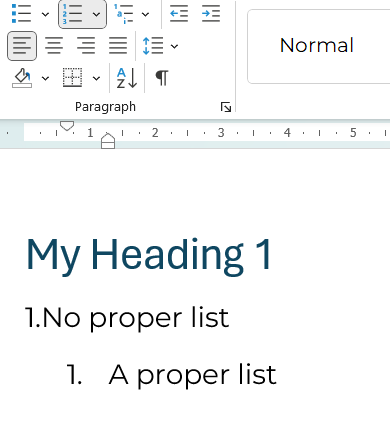
3. Fake Lists Using Manual Numbering
Consider how many business documents contain numbered procedures or bulleted features created by typing “1.” followed by a space, or manually inserting dashes as text characters. Authors avoid Word’s built-in list formatting tools, creating what appears visually as a proper list but contains no semantic structure underneath.
How Customers with Disabilities Experience It: Screen readers read fake lists as continuous paragraphs without announcing list structure. Users cannot navigate list items, understand hierarchies, or know how many items exist. Numbered steps in contracts or instructions become incomprehensible.
This increases support tickets, creates confusion about contractual obligations, and exposes the organisation to claims that critical information wasn’t properly communicated.
Tables: Where Complexity Meets Chaos
4. Over-Complex or Malformed Tables
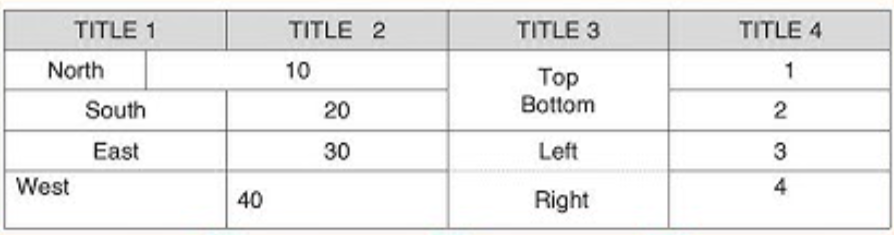
Tables present unique accessibility challenges, and most business documents handle them poorly. Authors create tables with merged cells to achieve specific visual layouts, nest tables within tables, insert blank rows for spacing, or simply forget to define which rows and columns serve as headers.
How Customers with Disabilities Experience It: Screen readers track position by counting cells. Merged or split cells break this logic, causing users to hear “cell… cell… cell…” with no context. Financial tables in statements, tariffs, or fee schedules become meaningless sequences of numbers.
For banks and insurers, this creates particularly high risk because core financial information like interest rates, payment schedules, fee tariffs, transaction histories, becomes meaningless sequences of numbers. Customers cannot understand critical financial data affecting their accounts, creating clear grounds for discrimination claims under accessibility law.
5. Tables Used for Layout Purposes
What people do? They use multi-column tables to position text or create visual layouts, rather than for actual data presentation.
How Customers with Disabilities Experience It: Screen readers treat layout tables as data tables, announcing nonsense rows and columns. Content appears out of order, creating a chaotic and fragmented reading experience.
When layout tables appear in CCM templates generating customer letters, every single document becomes structurally inaccessible, and batch remediation for thousands of historical documents becomes prohibitively expensive.
Images and Visual Content: The Silent Barriers
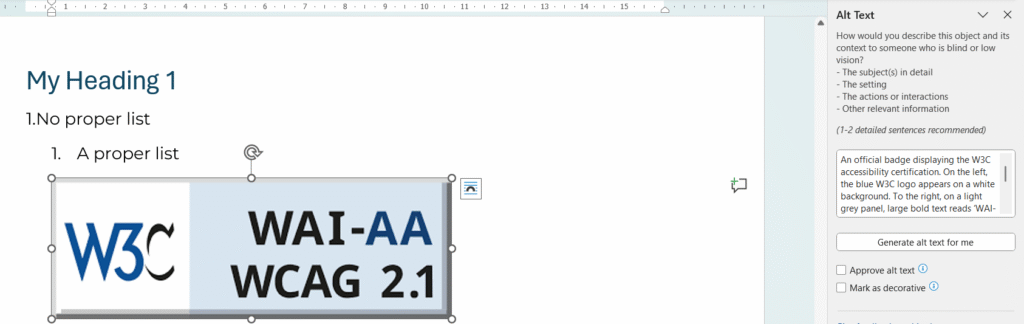
6. Missing or Meaningless Alt Text
Images pepper business communications – charts showing payment projections, promotional banners announcing limited-time offers, process diagrams explaining how services work. Yet most contain either no alternative text descriptions or meaningless placeholders like “image1,” “logo,” or “chart.”
How Customers with Disabilities Experience It: Blind users receive no information about image content. If charts show payment schedules, promotional banners contain deadline warnings, or diagrams explain processes, visually impaired customers never learn this critical information.
This constitutes “information not provided” – a clear discrimination violation under accessibility law. In CCM workflows, the problem often affects marketing banners, legal disclaimers embedded in images, and data visualisations that organisations consider essential communication elements.
7. Text Embedded in Images
Perhaps more problematic still is the practice of embedding text within images – promotional banners designed in graphics software, infographics containing statistics and explanations, or scanned documents where text appears only as part of an image rather than selectable content.
How Customers with Disabilities Experience It: Screen readers see nothing. The document contains blank space where critical information should be. Even sighted users with low vision cannot zoom or reflow text embedded in images.
A blind customer literally cannot read documents your legal team considers as “successfully delivered.” This creates high litigation risk, as organisations cannot prove information was made accessible to all customers.
Links and Navigation: Breaking the Journey
8. Non-Descriptive Links (“Click Here”)
Open a business related document, and you’ll likely find links labelled “click here”, “read more”, or raw URLs stretching across three lines of text. These seem innocuous until you understand how screen reader users navigate documents.
How Customers with Disabilities Experience It: Screen reader users navigate by pulling up a list of all links. When they hear “click here, click here, click here, click here,” they have no idea where any link leads and must open each one blindly to find relevant content.
This affects everyone, not just assistive technology users. Furthermore, this creates particular barriers when regulatory materials, disclosures, and support resources remain effectively hidden behind meaningless link text. Support centre volume increases as customers cannot self-serve using document navigation.
Language and Metadata: The Invisible Foundation
9. Missing Document Title and Metadata
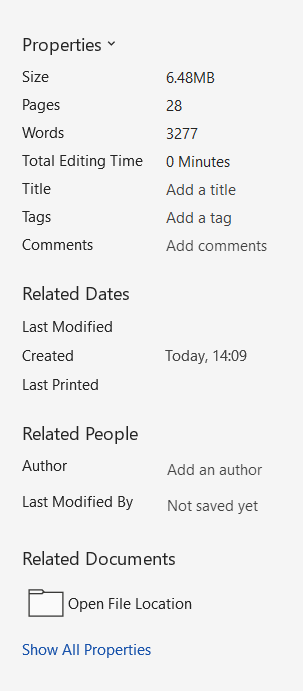
Documents live or die by their metadata, yet most Word files leave property fields blank. When exported to PDF, these become identified only by filename. Often something like “doc_final_v3_really_final.pdf” that makes sense only to the person who saved it.
How Customers with Disabilities Experience It: Screen readers announce only the filename. Users cannot distinguish between similar documents in portals or archives, creating navigation chaos and wasting time.
Customer portals become unusable for organising and accessing statements, contracts, or correspondence. During regulatory audits, organisations struggle to prove which documents were provided and when.
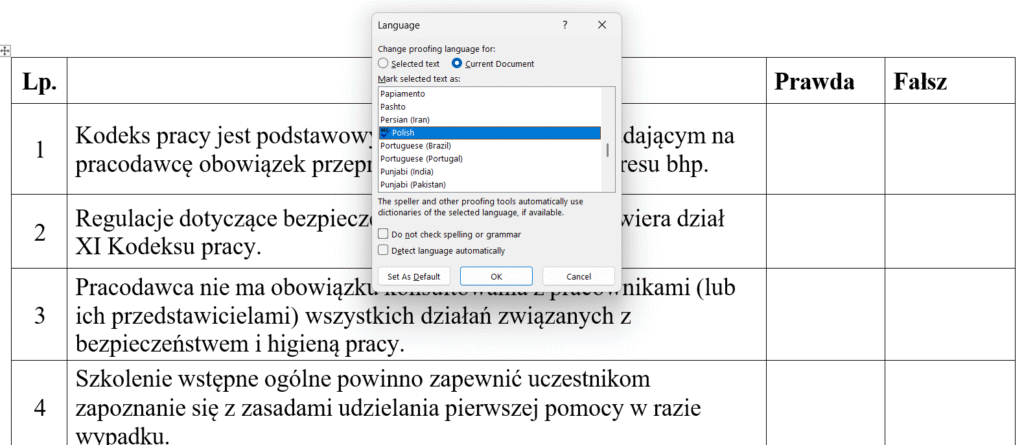
10. Wrong or Missing Document Language
European financial institutions serve multilingual markets, yet document language settings often remain on default English even when content contains Polish, French, or German text. Authors don’t mark foreign phrases or financial terms with correct language tags, assuming visual presentation suffices.
How Customers with Disabilities Experience It: Screen readers use incorrect pronunciation rules, making bilingual documents sound like gibberish. Polish financial terms pronounced with English phonetics become incomprehensible.
For multi-language markets common in European banking, this creates frequent hidden failures. It triggers complaints from language minorities and cross-border customers who cannot understand documents supposedly provided in their language.
Visual Design: When Appearance Excludes
11. Low Colour Contrast
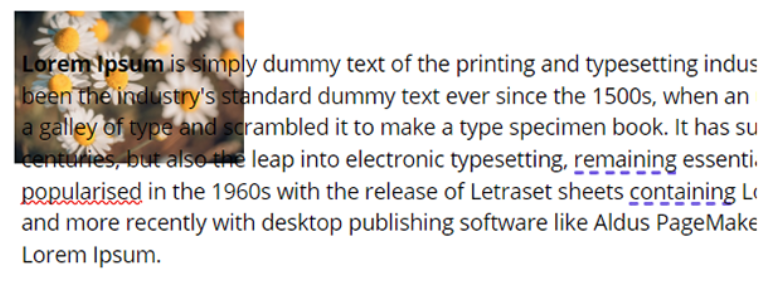
Light grey text on white backgrounds. Text overlaid on decorative images. Font sizes shrinking to 9 or 10 points in legal sections and disclaimers. These design choices create documents that technically contain all required information whilst rendering it functionally invisible to significant customer populations.
How Customers with Disabilities Experience It: Low-vision users see faded shapes instead of readable text. On mobile screens or in bright sunlight, content becomes completely unreadable. People with cataracts or ageing vision struggle with insufficient contrast.
The “small print” becomes literally unreadable, creating extreme risk in contracts, fee schedules, and consent forms where regulators may interpret poor contrast as intentional obscuring of important information.
12. Colour as the Only Indicator
Red text signals overdue amounts. Green indicates approved status. Yellow highlighting marks mandatory fields. These colour-coded systems seem intuitive until you remember that approximately 8% of males and 0.5% of females experience colour blindness.
How Customers with Disabilities Experience It: Colour-blind users see similar shades and cannot distinguish between states. They miss critical warnings, payment statuses, or required actions.
Payment status indicators, approval workflows, and error messages become ambiguous, leading to financial mistakes, missed deadlines, and complaints that create both compliance and operational risk.
Word-to-PDF Export: Where Accessibility Dies
13. Wrong PDF Export Method
Here’s where many organisations trip at the finish line. They’ve invested time ensuring Word documents use proper heading styles, alt text, and semantic structure. Then someone exports the document using “Print to PDF” instead of “Save As → PDF” with accessibility options enabled, and every bit of that structure vanishes.
How Customers with Disabilities Experience It: Despite the source Word document having proper headings and structure, the PDF contains none of it. Screen readers announce: “This document has no headings, no structure.” Users experience long, undifferentiated text blocks.
This represents the most common trap banks and public bodies fall into when implementing EAA compliance. They believe they’re compliant because “we used Word styles correctly”, yet final PDFs sent to customers fail accessibility audits. The visual appearance remains identical, whilst the underlying accessibility completely disappears.
14. Critical Content in Headers/Footers
Account numbers in headers. Reference IDs in footers. Deadlines and contract numbers repeating across every page. This seems logical: important information visible throughout the document.
How Customers with Disabilities Experience It: Many screen readers skip headers and footers entirely or read them inconsistently. Critical information becomes invisible, even though it visually appears on every page.
Customers cannot find reference numbers needed to call support, account identifiers required for transactions, or deadlines for contract actions. This generates complaints and increases support centre volume.
15. Justified Text Alignment
Apply full justification (flush left and right margins) because it “looks professional and clean.”
How Customers with Disabilities Experience It: Justified text creates uneven spacing between words, making it difficult for people with dyslexia or cognitive disabilities to track lines. The irregular spacing disrupts reading rhythm and comprehension.
Long contracts, policies, and product documentation become harder to read for a significant portion of customers. This increases abandonment rates and reduces comprehension of important terms.
The Template Multiplication Effect
We are happy you went so far, and now you can see the broader perspective on how inaccessible documents and templates create back and forth both for operations and clients. Here’s why these document accessibility mistakes matter more than you think: when document accessibility mistakes exist in CCM templates (Quadient Inspire, OpenText Exstream, or similar platforms), they multiply across every generated document.
One inaccessible template generating 10,000 monthly bank statements = 10,000 compliance violations monthly, which can lead up to 120,000 violations annually.
At €1,000 per violation (conservative estimate based on Swiss and Norwegian precedents), that’s €120 million in potential exposure – from a single broken template.
Manual remediation at €15-30 per document would cost €1.8-3.6 million annually just to fix outputs from one template. Meanwhile, fixing the template once costs €5,000-15,000—a 99% cost reduction.
This is why template-based accessibility is the only sustainable approach for document-heavy organisations.
Tiding Up the Accessibility Before 2026 Audits Season Begin
Audit Your Word Templates: Start by auditing your Word templates rather than assuming documents are accessible because they “look fine visually.” Microsoft’s built-in Accessibility Checker catches only 30-40% of issues, so commission professional audits that include manual testing with actual screen readers and assistive technologies.
Fix Templates, Not Individual Documents: Focus more remediation efforts on templates rather than individual documents. Remediate PDFs and ready documents, which your organisation uses “forever”. For CCM platforms, fixing accessibility at the source means one accessible template generates unlimited compliant outputs, eliminating recurring remediation costs that would otherwise compound monthly.
Train Content Creators: Business analysts, compliance officers, and document designers must understand accessibility requirements. Budget 40-60 hours per person for proper training on accessible document creation, understanding this as infrastructure investment rather than overhead.
Validate Export Processes: Validate your export processes to ensure Word-to-PDF conversion preserves accessibility tags and semantic structure. Test with actual assistive technologies like PAC 2024, screen readers, and keyboard navigation rather than relying solely on automated checkers that miss contextual problems.
Document Your Compliance: Document your compliance efforts meticulously. Maintain records of accessibility audits, remediation work, and testing results. Regulators increasingly demand proof of proactive compliance efforts, rather than reactive fixes implemented only after complaints arrive.
Ready to audit your document templates before regulators do? We’ve detailed the complete implementation process in our latest case study: EAA-Ready Document Communications for Banking, where a leading Polish bank implemented accessible templates at scale.
“Accessibility penalties are not theoretical” – that what we hear from every newspoint from the Europen Accessibility Act inforcement. Though in truth, they never were. In the USA and some EU countries, accessibility violations have long been treated as discrimination issues with legal consequences. Yet many businesses dismissed them as rare enforcement actions that “wouldn’t happen to us.”
The European Accessibility Act has changed that calculation entirely.
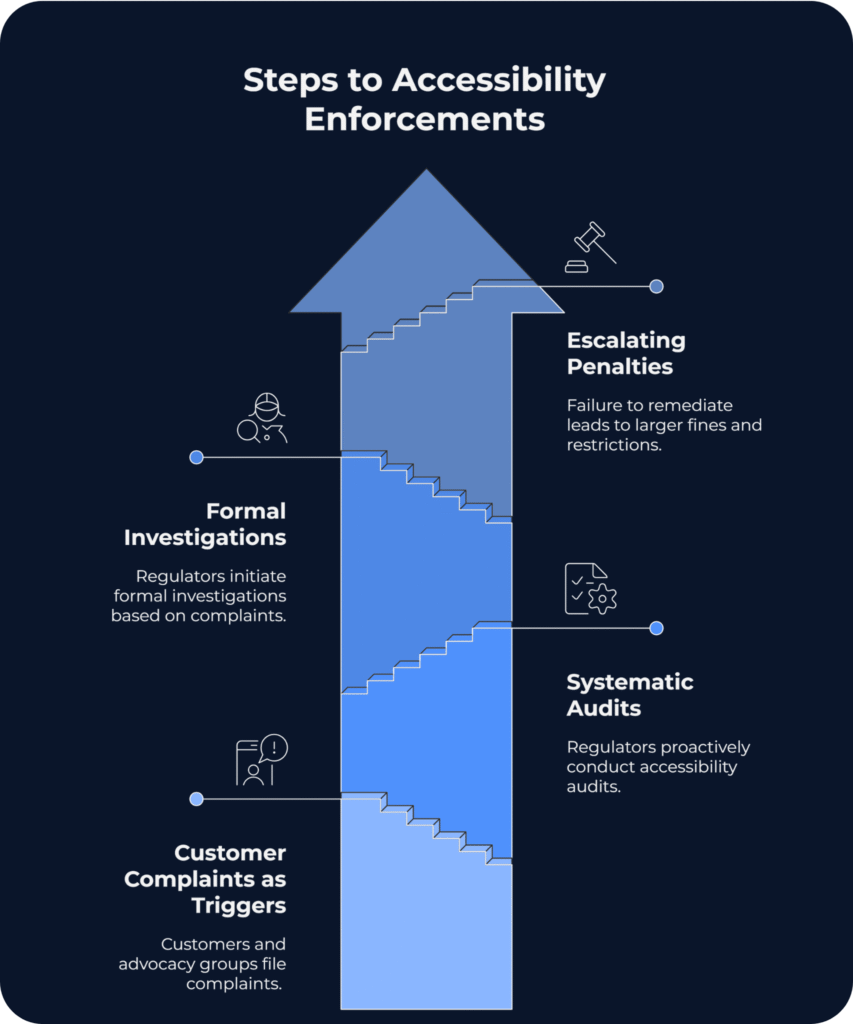
We analysed not only the headline-grabbing EAA announcements but dug deeper, and discovered something striking: accessibility topic has evolved from quiet supervision to loud enforcement. The cases below aren’t distant warnings or isolated incidents. They’re recent, high-profile examples where inaccessible digital services triggered significant financial penalties, operational restrictions, and reputational damage. More importantly, they serve as early indicators of how enforcement under the EAA and related regulations will evolve across Europe.
As we approach 2026, digital-based industries like e-commerce and already heavily regulated services like online banking face unprecedented scrutiny. Learn those real-world cases that illustrate how inaccessible digital services lead to measurable consequences and serve as early indicators of how EAA enforcement will evolve across Europe.
Vueling – A Well-Known Spannish Lowcost Airlines (Spain, 2024)
Spain’s National High Court fined Vueling €90,000 and temporarily barred the airline from receiving public funds after its website was ruled inaccessible under national law. Vueling’s website failed to meet accessibility standards required under Spanish Royal Decree 1112/2018, which mandates WCAG 2.1 Level AA compliance for all public-facing digital services. The court found that customers with disabilities could not independently book flights, check in, or manage reservations — the core functions of an airline’s digital platform.
The Consequence: Beyond the direct fine, Vueling’s exclusion from public funding eligibility represented a significant operational restriction. For airlines dependent on government contracts, subsidies, or participation in public transport programmes, this penalty creates cascading financial impact far exceeding the initial €90,000.
What Does This Mean?
This was one of the first major private-sector enforcement cases directly linked to EAA implementation, setting a precedent that non-compliance results in both financial penalties and operational sanctions. Spanish regulators demonstrated willingness to use multiple enforcement mechanisms simultaneously — a strategy other EU member states are now replicating.
AccessiBe – Web Accessibility Company Powered With AI (USA, 2024)
The U.S. Federal Trade Commission fined AccessiBe $1 million for making deceptive claims about its AI-powered widget’s ability to make websites WCAG compliant. AccessiBe marketed its automated overlay tool as capable of achieving full WCAG compliance through AI-driven code injection. The FTC found these claims misleading — the widget could not deliver genuine accessibility and, in many cases, actually created new barriers for assistive technology users.
The Consequence: Beyond the $1 million penalty, AccessiBe must cease making unsubstantiated accessibility claims and notify customers that their widget does not guarantee compliance. The settlement sends a clear regulatory signal: automated shortcuts will not satisfy legal obligations.
What Does This Mean for EU Businesses?
Many European companies currently rely on similar overlay solutions, assuming they provide adequate EAA protection. This case signals rising regulatory scepticism towards automated fixes across jurisdictions. Genuine accessibility work includes manual audits, proper code remediation, template-level fixes. Theywill be required to meet compliance obligations. Overlays may supplement accessibility efforts but cannot replace them.
SAS: The “Impossible to Use” Website (Norway, 2017–2018)
Again we have case with customer-first communication channel, which does not meet the minimal accessibility. Norwegian regulator Difi threatened Scandinavian Airlines with daily fines of approximately €15,000 after its redesigned booking website failed 20 of 28 tested WCAG success criteria.
In 2017, SAS launched a redesigned website that immediately drew complaints from disability organisations. Norway’s Agency for Public Management and eGovernment (Difi) conducted an audit under the country’s Equality and Anti-Discrimination Act, which mandates WCAG 2.0 AA compliance.
The results were damning. Specific failures included:
No keyboard navigation support – interactive elements couldn’t be reached without a mouse (violating WCAG 2.1.1, 2.1.2)
Insufficient colour contrast for text (failing WCAG 1.4.3)
Missing alt text for images, icons, and even the SAS logo
Inaccessible CAPTCHA with no non-visual alternative
Unlabelled form fields and error messages relying solely on colour cues
Difi’s official verdict described the site as “impossible to use” for disabled customers — a quote that became infamous in Norwegian media.
The Enforcement Timeline
November 2017: Difi releases audit findings, gives SAS one year to remediate.
August 2018: Difi issues 10-day ultimatum with threat of NOK 150,000 (~€15,000) daily fines.
Final deadline: SAS resolves critical issues just in time to avoid penalties.
The Consequence: Whilst SAS ultimately avoided the daily fines by achieving compliance before the final deadline, the case generated extensive negative publicity. Headlines like “SAS website gets failing grade” and “SAS risks fines for new website” ran in major Norwegian newspapers. The threat of €15,000 daily accumulating fines forced immediate action and resource allocation.
What Does This Mean?
The SAS case demonstrates how daily penalty mechanisms work: an initial audit identifies violations, a compliance period allows remediation, then escalation to accumulating fines when progress stalls. Norway’s enforcement model shows that even large private companies face accountability for WCAG failures, and that daily fines create powerful incentives for rapid compliance.
By the way, SAS’s competitor, Norwegian Air, had invested in accessibility proactively and passed its Difi inspection with only minor comments — a fact widely noted during the controversy, demonstrating competitive advantage for early adopters.
Union Bank of Switzerland
UBS faced a 20,000 CHF fine plus mandatory remediation after its online banking platform was found to exclude visually impaired customers from basic operations like account login and transactions.
UBS’s digital banking interface was not screen reader-friendly or keyboard-navigable, effectively denying blind users independent access to their accounts. This violated Switzerland’s accessibility standards (based on WCAG 2.0/2.1 Level AA) and constituted discrimination under Swiss disability law.
Specific issues included:
Missing screen reader labels and alt text (violating WCAG 1.1.1)
Critical interactive elements rendered inaccessible to assistive technology users
Swiss authorities ordered:
Immediate payment of 20,000 CHF fine
Mandatory accessibility improvements within 6 months
Compensation for affected customers who had been unable to use online services
Accessibility training for staff to prevent recurrence
What Does This Mean?
The UBS case demonstrates that financial services face particularly strict scrutiny. Banking accessibility isn’t just about compliance. But it’s about fundamental access to financial services, which courts and regulators treat as essential infrastructure.
Notably, Swiss law allows individual discrimination claims with awards up to CHF 5,000 per person. For banks with thousands of affected customers, the potential liability extends far beyond the initial fine. The requirement to compensate affected users sets a precedent that inaccessibility creates measurable financial harm requiring restitution.
Common Patterns Across Enforcement Cases
These cases reveal consistent enforcement approaches emerging across jurisdictions:
1. Multiple Penalty Mechanisms: Financial fines (fixed or daily accumulating), operational restrictions (funding eligibility), mandatory remediation timelines, customer compensation requirements, and staff training obligations.
2. Focus on Core Functionality: Regulators prioritise accessibility failures that prevent users from completing essential tasks—booking flights, accessing bank accounts, completing purchases. Cosmetic or minor issues receive less scrutiny than barriers to critical services.
3. No Safe Harbours for Large Companies: Major airlines and multinational banks face the same enforcement as smaller entities. Brand recognition and market position provide no protection from accessibility requirements.
4. Automated Solutions Face Scepticism: The AccessiBe ruling signals that overlay widgets and AI-driven “quick fixes” will not satisfy regulators. Genuine code-level accessibility and manual validation are increasingly required.
5. Daily Fines Create Urgency: The SAS case demonstrates how daily accumulating penalties (€15,000/day = €450,000/month) force immediate resource allocation and executive attention in ways fixed fines may not.
Calculate Your Exposure
Ask yourself:
How many customer-facing channels your organisation operate?
What percentage meet PDF/UA and WCAG 2.1 AA standards?
If each inaccessible online communication a potential violation, what’s your total exposure?
For example, for a bank generating 50,000 monthly PDF statements:
If 0% are accessible and individual fines reach €1,000 per violation (conservative estimate)
Potential exposure: €50 million monthly
Even if only 1% of customers file complaints, that’s €500,000 in immediate risk—before considering reputational damage, operational restrictions, or daily accumulating penalties for non-remediation.
The organisations thriving post-EAA aren’t debating whether accessibility matters. They fixed their digital communication channels before enforcement arrived.
Living in the business world, we are getting used to seeing the opportunities, when most people have no attention to. This is a great ability, which helps not only earn but also make our life better.
In the World Health Organization (WHO) European Region, an estimated 90 million people have vision impairment or blindness and 190 million have hearing loss or deafness. We collected some great examples of companies, which managed to treat Accessibility as an opportunity and got not only better ROI, but earned trust.
Now people with impairments can use the service of the next companies and live their best life. They can buy a ticket, hear the banking statement and monitor the usage clearly with utility service bills.
Points of Development for Banking Leaders: Observing the Demand to Fill It In
Despite growing regulation and awareness, the majority of digital services and documents remain inaccessible to people with disabilities. The WebAIM Million study (2025) found that 95% of the world’s top websites contained detectable WCAG 2 failures, highlighting how pervasive accessibility gaps remain – even among large and regulated companies that are expected to lead by example.
The issue extends beyond websites. In academia, where digital publications should be a cornerstone of inclusive knowledge sharing, the situation is equally problematic. Kumar and Wang (2024) examined scholarly PDFs published between 2014 and 2023 and found that fewer than 3.2% met basic accessibility standards such as tagging, alternative text, language metadata, and structured tables. This neglect reflects a broader trend across industries: documents, though widely used for contracts, policies, billing, and customer communications, are rarely designed with accessibility in mind.
Even with accessible websites, PDFs remain a weak link in the compliance chain. However, the reality is that many companies still struggle with both – non-compliant websites and inaccessible documents often coexist, and either can trigger enforcement. Most companies don’t realise how many critical documents (onboarding, billing, contracts) fall outside centralised systems and therefore skip routine audits.
The institutions below recognized this reality and took action. Their implementations offer practical roadmaps for organizations still planning their compliance strategies.
Case #1: Eurobank (Greece) – Comprehensive EAA Alignment
Not every bank has created a document that officially recognises their accessibility gaps and development plans. Eurobank deserves recognition for this transparency—they’ve formally aligned their accessibility strategy with the European Accessibility Act through Greek Law 4994/2022, publishing a comprehensive public statement that most competitors avoid.
What They’re Doing
In their 2025 accessibility statement, Eurobank commits to making all services and channels, including digital content like “files in PDF format”, accessible and comply with EN 301 549:2021 and WCAG 2.1 AA standards. This means customer-facing PDFs (forms, statements, brochures, account documents) are being updated to meet technical accessibility requirements.
Eurobank emphasizes that accessibility is both a legal obligation and “a fundamental expression of respect, inclusion, and customer-centred service.” The bank’s digital channels are currently partially compliant and undergoing continuous improvements toward full accessibility.
Strategic Approach
Rather than treating accessibility as a one-time project, Eurobank frames it as core to their customer experience strategy. This positioning signals to customers, regulators, investors that accessibility improvements are sustainable, not superficial.
Case #2: Bank of England (UK) – Public Sector Leadership
As a public-sector entity, the Bank of England follows UK accessibility regulations, requiring all new content meet WCAG standards.
What They’re doing
The Bank’s accessibility statement notes they “strive to make any new PDFs and Word documents we publish meet accessibility standards.” In practice, newly published reports, consultation papers, and policy documents are designed for assistive technology compatibility, tagged PDFs with alternative text, proper reading order, and semantic structure.
Legacy documents (pre-2018) may not all be remediated, but accessible versions are provided upon request. This pragmatic approach acknowledges resource constraints while ensuring ongoing compliance for new publications.
Strategic Approach
The Bank of England adopted an “accessibility by default” policy for new documents rather than attempting to retroactively fix decades of archives. This forward-looking strategy prevents accumulation of new accessibility debt while managing legacy content requests case-by-case.
Case #3: Honda Bank GmbH (Germany) – Forward-Looking Compliance
Honda’s finance arm in Germany issued an accessibility (Barrierefreiheit) statement aligned with the EAA under German law (Barrierefreiheitsstärkungsgesetz – BFSG).
What They’re Doing
Honda Bank acknowledges that some PDFs on its website currently lack accessibility features (missing tags, insufficient alt-text). However, the bank “plans to design future PDF documents to be barrier-free, in order to meet the required standards.”
All newly generated PDFs for customers—product information, account documents, contract terms—will be created to PDF/UA and WCAG specifications before the June 2025 enforcement deadline.
Strategic Approach
Honda Bank’s transparency about current gaps paired with concrete remediation timelines demonstrates regulatory compliance without overpromising. By focusing on template-level changes for future document generation, they can build scalable accessibility into their customer communication workflows rather than pursuing expensive per-document fixes.
For the financial industry, these cases signal a clear shift from one-off document fixes to systematic, scalable accessibility management. This transparency shows that real compliance depends on embedding accessibility into every customer communication template, not just polishing a few visible reports.
Opportunities in Numbers
These implementations aren’t just regulatory responses, they unlock measurable business opportunities. Approximately 24% of the EU population lives with some form of disability. By providing accessible PDFs and digital services, banks can serve this demographic that competitors are neglecting. For context, UK households with disabled members control £274 billion in annual spending power. Banks and building societies lose an estimated £935 million monthly by maintaining accessibility barriers that drive these customers away.
Where to Start Your PDF Accessibility Implementation Journey
The institutions above share common implementation patterns your compliance team can replicate:
1. Conduct Honest Accessibility Audits: Don’t assume website compliance means document compliance. Most organisations have accessible web properties but inaccessible PDFs in contracts, onboarding, billing, and customer communications outside centralised systems.
2. Prioritise Template-Level Fixes: Following Honda Bank and Bank of England’s model, focus on making new document templates accessible rather than remediating entire archives. One compliant CCM template generates thousands of accessible outputs—precisely what banks and enterprises need at scale.
3. Document Your Progress Publicly: Like Eurobank, publish accessibility statements with specific standards and timelines. Transparency builds trust with customers and demonstrates good faith to regulators.
Here we broke in our article PDF Accessibility and EAA: Guide for Compliance, where you can find you need to know where you start to document accessibility strategy and how to lead this process painlessly.
EasyJet, British multinational low-cost airline and package holiday group, builds reliable customer experience while taking maximum from the market. In this short case, we welcome you to immerse yourself in the world of people with visual impairments and discover the principles of accessible customer experience in less than 5 minutes.
Our simple question: Have you ever tried to book a flight with closed eyes?
This sounds like a real challenge, but anyway EasyJet gets things solid, and lets people actually book the flight just with the voiceover. In this short video, you can try these shoes and understand the approach of accessibility better.
Comparing the service of Ryanair, Jet2 and Tui, Adi Latif, the well-known accessibility consultant, is booking a flight to Alicante, Spain. With no loud market data or buzzwords, but with real usage he showcased the ease of use of the EasyJet application for people with visual impairments.
This real-world example gave approximately 340,000 people with vision impairments a comfortable way to travel, whilst opening the door to market dominance among people with impairments. EasyJet proves that accessible customer experiences aren’t just compliant —they’re competitive advantages.
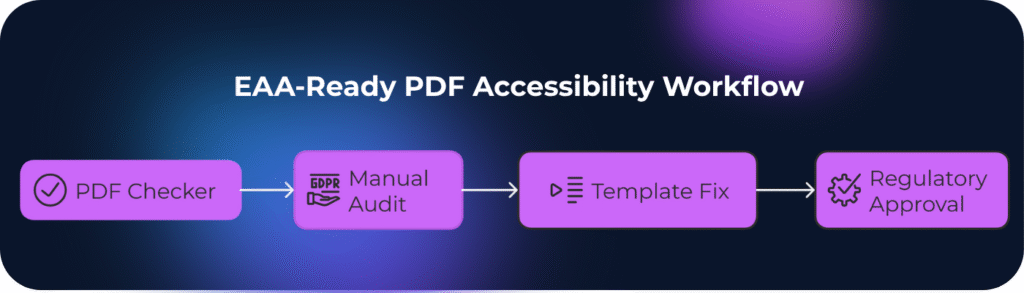
Checking PDFs for accessibility may sound straightforward, until you realise this:automated tools only catch 30-40% of real accessibility barriers. The European Accessibility Act has made PDF compliance mandatory across banking, insurance, utilities, and public sectors. Yet most compliance teams still rely solely on automated checkers to shape their EAA compliance strategy, missing critical issues that only manual testing reveals. And the the loop is clear: the more company relys on automated checkers, the more it puts financials at risk. Read our article about fines and penalties here.
This guide offers practical techniques for evaluating PDF accessibility tools and services in 2025. We’ll compare the most popular free and paid validators: PAC 2024, Adobe Acrobat Pro DC, PDFix Desktop Lite, and CommonLook PDF Validator. We’ll explain why even the best automation must be paired with manual accessibility audits by people who understand how assistive technologies actually work.
If you’re starting your accessibility journey post-EAA, this is your roadmap to choosing the right pathways without wasting budget on features you don’t need.
Understanding What PDF Accessibility Tools Actually Check
Before comparing specific tools, understand what automated checkers can and cannot do.
WCAG 2.1 AA technical checkpoints (color contrast ratios, language attributes)
Missing alt text or table headers
Document metadata and title display
Font embedding and Unicode mapping
But what automated tools miss:
Whether alt text is meaningful (tools can’t tell if “image1.png” describes the content)
Logical reading order across complex layouts
Table structure usability for screen reader users
Form field instructions clarity
Real-world navigation with keyboard or assistive tech
This gap is why EN 301 549 and national EAA implementations require both automated and manual testing. Tools provide technical compliance baselines. But humans verify usability.
PAC 2024 Accessibility Checker: The Free Industry Standard
PAC (PDF Accessibility Checker) 2024 is the first worldwide ISO 14289-1 (PDF/UA) validator and remains the go-to free tool for PDF accessibility testing. Developed by axes4 company, it’s trusted by European accessibility professionals.
Key Features:
WCAG 2.1 checks with all machine-testable checkpoints
Quality Checks feature to simplify visual inspection during manual assessments
Detailed error reports highlighting specific PDF/UA violations
Completely free with no feature restrictions
Strengths
Limitations
Precise document language checking adhering strictly to PDF/UA and WCAG specifications
Windows-only (Mac users need axesCheck online alternative)
User interface remains consistent across all screen resolutions
Manual visual review still necessary because PAC primarily focuses on technical elements
Soft hyphen highlighting in screen reader preview for better differentiation
No remediation features—purely a validation tool
Generates comprehensive PDF reports documenting compliance status
Learning curve for interpreting technical error messages
Best For: European organisations needing free PDF/UA validation for EAA compliance; teams with technical accessibility knowledge; audit documentation preparation.
Real-World Use Case: A Nordic insurance company used PAC 2024 to validate 12,000 policy documents before the EAA deadline. The tool identified 78% structural compliance but flagged 4,200 documents requiring manual alt text review—work PAC couldn’t assess automatically.
Adobe Acrobat Pro DC: The All-in-One Automated Remediation Solution
Adobe Acrobat Pro DC includes built-in accessibility checking, tagging, and remediation tools. It’s the most comprehensive single-tool solution but comes with complexity and cost.
Key Features:
Strengths
Limitations
Industry standard—most accessibility professionals know it
Checks many characteristics but doesn’t match PAC’s PDF/UA certification rigor
Combines checking and fixing in one environment
Expensive licensing (€180–240/year per user)
Handles complex table remediation
Steep learning curve for accessibility features
Integration with Adobe Creative Suite
Tag editing can be tedious for large documents
–
Automated tagging often creates more problems than it solves
Best For: Organisations with dedicated accessibility teams; high-volume remediation needs; complex document workflows requiring both creation and validation.
Important Note: Adobe’s checker is excellent for identifying issues, but experienced teams often use PAC 2024 as final validation because it’s specifically designed for PDF/UA conformance certification.
PDFix Desktop Lite: Lightweight Free Alternative
PDFix Desktop Lite offers basic accessibility checking and repair capabilities in a simpler interface than Acrobat. It’s designed for occasional users who need quick assessments without professional remediation features.
Key Features:
Automated tagging for simple documents
Basic accessibility checks
Reading order verification
Free for non-commercial use
Cross-platform (Windows, Mac, Linux)
Strengths
Limitations
Simpler interface than Acrobat
Less comprehensive than PAC or Acrobat checkers
Free tier available
Automated tagging quality varies significantly
Automatic tagging works well for straightforward documents
Limited manual remediation tools
Good for quick preliminary checks
Lacks detailed PDF/UA compliance reporting
Best For: Small teams testing occasional PDFs; preliminary document screening before professional remediation; educational purposes.
CommonLook PDF Validator: Enterprise-Grade Free Validation
CommonLook PDF Validator works as an Adobe Acrobat Pro plugin, identifying and highlighting accessibility concerns within PDF documents. Now part of Allyant, it’s widely used in US federal agencies and large enterprises.
Key Features:
Tests against Section 508, WCAG 2.0 AA, PDF/UA, and HHS guidelines
Guides users through manual tests necessary for complete accessibility compliance
Tag-based content highlighting—select content in PDF and immediately see corresponding tags
Provides certification report documenting compliance for each tested document
Strengths
Limitations
Divides checks into structure (ISO 32000) and accessibility conformance categories
Requires Adobe Acrobat Pro DC (adds to total cost)
More comprehensive standard coverage than PAC’s PDF/UA focus
Interface differences from PAC may require learning adjustment
Table summaries accuracy validation improves comprehension of tabular data
US-centric standard focus (though PDF/UA applies globally)
Accepted by regulatory agencies for compliance documentation
–
Best For: Organisations serving US and EU markets; federal contractors; enterprises needing multi-standard certification reports; teams already using Acrobat Pro.
Quick Sheet for PDF Accessibility Chekers
Tool
Cost
PDF/UA Check
WCAG Check
Remediation
Best For
PAC 2024
Free
Certified – provides highly accurate validation aligned with PDF/UA and WCAG 2.1 standards, widely accepted across the EU.
Level AA – verifies accessibility according to WCAG 2.1 AA, ideal for compliance audits.
No correction or editing options; used purely for validation and reporting.
EU compliance validation, auditors, and accessibility specialists needing a certified, trusted tool.
Acrobat Pro DC
€180–240/year per user
Good – performs detailed PDF/UA checks, including tagging and structure validation.
Broad WCAG coverage integrated with accessibility features and reports.
Full remediation workflow – allows manual and semi-automated fixes directly within documents.
Organizations seeking an all-in-one tool for creating, editing, and remediating accessible PDFs.
PDFix Lite
Free (limited version)
Basic – performs basic structure and tag checks for small or simple documents.
Basic – supports quick accessibility validation but lacks deep analysis.
Simple – includes limited remediation features like auto-tagging and metadata editing.
Occasional checking or small teams that need a quick, lightweight accessibility validator.
Extensive cross-standard compliance validation with detailed reports.
Validation only; remediation requires other CommonLook products.
Enterprise-level – large organisations, and government audits.
Why Automated Chekers Alone Fail EAA Compliance?
Here’s the uncomfortable truth: checkers and automated remediators primarily focuse on technical elements of accessibility, so manual review is still necessary, other wise the document can make no sence to a real person. Every major accessibility standard, like WCAG, PDF/UA, EN 301 549, requires human evaluation. It requires manual check because of:
Automated Tools Can’t Judge Context
A checker sees <Figure alt="graph"> and marks it compliant. A screen reader user hears “graph” with no data context. It is completely useless for person with impairment. A human auditor would flag this as non-compliant despite passing automated checks.
Reading Order Logic Requires Human Understanding
Tools verify that content has a reading order. They can’t assess whether the order makes sense. Multi-column layouts, sidebars, and callout boxes often pass technical checks while creating incomprehensible experiences for assistive tech users.
Form Usability Is Invisible to Automation
Validators check if form fields have labels. They don’t assess whether instructions are clear, whether error messages are helpful, or whether tab order follows logical completion flow.
Real-World Example: A Swedish bank we audited had 100+ PDF templates passing PAC 2024 checks at 98% compliance. Manual testing by accessibility specialists revealed:
40% of alt text was generic (“chart,” “logo”) without meaningful descriptions
29% of tables had correct tags but illogical header associations
16% of forms lacked keyboard navigation hints despite having technical labels
Fixing these issues at the template level eliminated manual remediation costs and ensured genuine accessibility, not just checkbox compliance.
How Quertum Combines Tools with Human Expertise
We use automated validators as the first screening layer, not the final answer. Our process includes automated scanning, manual accessibility audits with actual screen readers (NVDA, JAWS) and keyboard navigation, plus contextual review of whether alt text and form instructions actually communicate meaning—not just whether they exist.
However, for banks, insurers, and enterprises generating thousands of documents monthly, individual file remediation quickly becomes unsustainable. That’s why template-based accessibility implementation is the only approach that makes sense at scale.
The Template-First Strategy:
Instead of fixing 50,000 customer statements one by one, we remediate your CCM templates once. For Quadient Inspire, OpenText Exstream, Smart Communications or other enterprise systems, this means:
One compliant template = unlimited accessible outputs – Every bank statement, insurance policy, or invoice generated from that template automatically meets PDF/UA and EN 301 549 requirements
Future-proofing – New regulations or standard updates require template adjustments, not archive-wide remediation
Operational continuity – No disruption to document generation workflows; accessibility becomes built-in, not bolted-on
This template-centric approach is precisely what European banks and large enterprises need: scalable compliance that doesn’t require armies of remediators or disrupt customer communications.
Final Takeaway: Tools Are Your Starting Point, Not Your Finish Line
PAC 2024, Acrobat Pro, and CommonLook Validator are excellent tools when used correctly. They identify technical violations efficiently, but they’re screening tools, not compliance guarantees.
The European Accessibility Act doesn’t ask, “Did your PDF pass an automated checker?” It asks, “Can people with disabilities actually use your documents?” That second question requires human testers who understand assistive technology, not just software that counts tags.
Organisations that thrive in the post-EAA era understood this early. Read our case study on how a leading Finnish bank met the EAA deadline and future-proofed its reputation. By combining automated tools for technical checks with expert manual audits, they ensured real usability and lasting compliance.