Accessibility Tools

Skip to main content

Author: Łukasz Szczepański

Promotional title slide from Quertum titled "Adobe Experience Manager Forms End of Life: What It Means for Communication Management in Banking and Insurance." The background is a dark blue and purple gradient, featuring abstract graphics of digital user interfaces, form fields, and user icons.

Adobe Experience Manager End of Life: What It Means for Communications-Generating Teams in Banking and Insurance

⚡️Key Insights
  • AEM 6.5 support is ending. The article identifies 28 February 2027 as the planned end of core support for on-premise customers, bringing the next platform decision into focus.
  • The choice is more complicated than an upgrade. LTS, Cloud Service and alternative CCM platforms require different levels of adaptation, testing and operational change.
  • Staying with Adobe may involve substantial additional investment. The article highlights potential rebuilding, integration and testing costs—not a confirmed increase in Adobe’s prices. If that work is significant, compare alternatives before approving the budget.

Any communications operations lead or manager who has kept a legacy platform running beyond its prime is at risk of being caught out by the next situation. The system never announces its own decline; it just keeps working, with workarounds constantly being added, right up until the vendor sets an end-of-life date. This changes the whole conversation.

That is where Adobe Experience Manager (AEM) 6.5 finds itself now. The statements still render, the policy letters still go out, and the platform behind them has done nothing wrong. Adobe has simply given it a leaving date. For teams in banking, financial services, and insurance (BFSI) generating client communications on AEM Forms, a single line on a support roadmap turns a quiet piece of infrastructure into a budgeted decision with a deadline attached.

This is what AEM end of life actually means in practice: AEM 6.5 end of support closes on a fixed date, and Adobe’s own documentation already shows where AEM Forms and customer communications on AEM are heading next, whether that is AEM 6.5 LTS or the cloud.

This article sets out what is actually ending, where the product is heading, and what the 2 realistic paths look like for BFSI communications teams weighing their options. Choosing between those paths is a separate conversation; the job here is mapping the terrain before the deadline forces a rushed one.

What exactly ends on Adobe Experience Manager?

This particular deadline belongs to AEM 6.5. What ends on Adobe ecosystem are Adobe’s on-premise and Adobe Managed Services (AMS). AEM as a Cloud Service (AEMaaCS) sits on its own separate release cadence, so this clock does not touch that part of the product line.

AEM Sites, the web content and digital-experience side of the platform, and AEM Forms, the module BFSI comms teams actually rely on most for statements, policies, and correspondence, are worth separating too. Both fall under the same support deadline, though the operational stakes concentrate heavily on Forms.

When does the AEM support end?

According to Adobe’s release roadmap, service pack 6.5.26.0 is the last supported service pack for AEM 6.5. Support for AEM 6.5 on Adobe Managed Services ends 31 August 2026, and core support for on-premise AEM 6.5 customers is currently planned to close on 28 February 2027 – roughly 18 months after that final service pack.

Beyond that date, Adobe continues the 6.5 line through AEM 6.5 LTS, a long-term support branch built on Java 17 and 21 in place of the ageing Java 8/11 baseline.

MilestoneWhat it means for the team
Last supported service pack: 6.5.26.0Final quarterly service pack in the 6.5 line. No further feature or fix releases follow it.
31 August 2026 – AMS support endsAdobe Managed Services no longer covers AEM 6.5. Hosted deployments lose vendor support first.
28 February 2027 – core on-prem support endsPlanned end of core support for self-hosted AEM 6.5. Any extended-support window beyond this date should be confirmed against Adobe’s current roadmap before it is used in internal planning.
Beyond February 2027 – AEM 6.5 LTSContinuation branch on Java 17 and 21, with security and stability updates. Adobe recommends organisations plan an upgrade to LTS regardless of cloud plans.

We don’t do comparisons here. In turn, each one is worth rechecking against Adobe’s current release roadmap before it goes into an internal timeline, since roadmap wording can shift.

Why Does AEM Support End Now?

The root cause traces back to Java. AEM 6.5 runs on Java 8 and Java 11, and both versions left Oracle’s public support behind in 2023, continuing only under paid extended support since then. Adobe’s own timeline for AEM 6.5 simply tracks that underlying Java lifecycle – an inherited deadline more than a fresh decision about the product’s future.

For anyone outside the engineering team, the short version is simpler. The software AEM 6.5 depends on is losing vendor support, so the platform needs to move onto newer foundations too, either through the LTS upgrade or into the cloud service, which already runs on current Java versions. A support-end date, in that context, works as a fixed horizon for planning rather than a verdict on how the system is running today.

How AEM Forms 6.5 End of Life Influences Customer Communication Management Workflow?

For teams running customer communications on AEM Forms 6.5, 28 February 2027 does not stop documents from being generated, but it ends standard support unless they upgrade to AEM 6.5 LTS or migrate to the cloud.

AEM Forms as a Cloud Service can generate personalised statements, invoices and letters through real-time and batch APIs, while the browser-based Interactive Communication Editor provides a newer way to design print and digital communications.

However, moving existing Forms workloads is not a lift-and-shift: organisations must assess templates, XDP assets, business rules, integrations, workflows and output fidelity. The new editor should therefore not be described as a complete replacement for the Windows-based Designer without verifying the organisation’s specific use cases and feature requirements. For BFSI teams, the deadline creates an immediate need to choose between the lower-disruption AEM 6.5 LTS upgrade and a broader cloud migration whose communications capabilities must first be tested against the current estate.

Adobe’s documentation point: Cloud. Whatever it takes.

Adobe’s release notes point firmly toward the cloud. AEMaaCS now ships on a monthly feature-release cadence rather than the quarterly service-pack model built into 6.5: the 2026.5.0 feature release landed on 28 May 2026, with the following release confirmed for the month after. Recent releases show ongoing work on Edge Delivery Services, AI-assisted authoring, and closer integration with the wider Experience Cloud stack – Target, Experience Platform, and Journey Optimizer – alongside forward-looking Java runtime upgrades already being communicated for AEMaaCS itself. Inside that picture, AEM 6.5 LTS reads as a stable bridge for teams not yet ready to move, rather than a lasting second home for the platform.

The AEM as a Cloud Service (AEMaaCS) direction

For teams that mainly need the web and forms front end, this direction already looks fairly mature. Cloud Service has carried production workloads for several years, and Adobe’s own migration guides and acceleration tooling are built around it.

AEM Forms as a Cloud Service

For the AEM Forms and customer communications management side that banking & insurance comms teams rely on, the picture reads more like a documented direction still finding itself in. AEM Forms as a Cloud Service supports 2 core use cases, Digital Enrollment and Customer Communications, and Adobe has been rolling out an Interactive Communication Editor: a browser-based tool for building data-driven correspondence such as statements, bills, and benefit notices, replacing the older Windows-only Designer application. Several adjacent capabilities, including certain Experience Platform connectors and document-assurance APIs, sit under Adobe’s Early Adopter programme at the time of writing. Functional parity with the current on-premise Forms toolset is worth verifying directly against Adobe’s live documentation.

What Does This Mean for BFSI Communications Teams?

For banks and insurers using AEM Forms, the support deadline brings a practical decision: does the next investment in Adobe still make sense for the organisation’s customer communications?

The existing platform may continue to produce statements, policy documents and renewal notices reliably. But the cost of maintaining a supported environment now needs to be considered alongside what the business needs next: faster changes to approved wording, simpler template management, multilingual correspondence or more consistent delivery across print and digital channels.

That assessment starts with the communications already in production. A policy document may depend on data from several systems, country-specific clauses, approval workflows and archive connections. These dependencies determine how much work an upgrade or migration will involve—and which capabilities the target platform must preserve.

Adobe documents functional differences between AEM 6.5 Forms and Cloud Service, including differences in document services and migration tooling. Their significance depends on which features the organisation actually uses. A documented limitation becomes a business concern when it affects a required communication or production process.

Cost needs the same level of specificity. Adobe provides customised pricing, so there is no reliable blanket conclusion that staying or moving will be cheaper. A meaningful total cost of ownership comparison includes licensing, implementation, integration work, testing, training and ongoing operations. Where a transition requires parallel production, that belongs in the budget too.

If keeping customer communications on Adobe requires substantial rebuilding, it is worth comparing alternative CCM platforms before approving that investment. The comparison should establish whether another platform offers a better fit for the same requirements, after accounting for its migration costs and risks.

Paths forward

The decision involves three possible routes: upgrade to AEM 6.5 LTS, migrate suitable workloads to AEM Forms as a Cloud Service, or evaluate another CCM platform. Each should be assessed against the same communications requirements, operational constraints and planning horizon.

AEM 6.5 LTS: continue where the existing platform still fits

LTS provides a supported continuation of the 6.5 line on newer Java foundations. It can be a reasonable choice where the existing communications environment meets business needs, and retaining it offers a proportionate route forward.

The upgrade still requires assessment. Adobe notes that some legacy features and artefacts have been removed and recommends checking the impact on customisations and integrations. Teams should validate the document production processes affected by those changes.

The business case should also distinguish platform maintenance from improvements to the existing implementation. If duplicated templates or poorly documented rules already slow down customer correspondence changes, those issues may need separate work.

LTS does not have to be a temporary stop. But where a later migration is already planned, its cost and timing should be considered alongside the upgrade, including any work that would need to be repeated.

AEM Forms as a Cloud Service: establish the fit before committing

Cloud Service offers managed infrastructure, automatic scaling and ongoing updates. For an existing customer communication operation, the assessment is whether its document services and working practices can support the required communications with an acceptable level of adaptation.

Migration tooling covers specific assets and deployment models. Adobe’s Forms migration guidance describes a route from Forms on OSGi and excludes Forms on JEE content migration through that route. Establishing the current setup is therefore an early scoping task.

A proof of concept should test representative communications: a high-volume statement run, a multilingual policy with conditional clauses and a letter requiring manual review. The assessment should cover output accuracy, business rules, approvals, applicable accessibility requirements, delivery and archiving.

The result should be a scoped transition plan: what can be reused, what needs adaptation, what remains unresolved and how much effort the move requires.

Another, dedicated CCM solution: compare against the same requirements

Where the Adobe route involves substantial redevelopment, an alternative CCM assessment can help determine whether that investment would deliver greater value elsewhere.

The alternative needs to prove its case on the same documents, production volumes and business processes. Useful comparison points include the effort required to maintain templates, implement wording changes, manage approvals and operate integrations, alongside the full cost of migration and support.

Moving away from Adobe also introduces transition risk. A convincing case therefore needs evidence that the target platform improves the organisation’s position enough to justify that work.

A focused comparison can begin with the most demanding communications and a defined set of acceptance criteria. This gives the team a basis for deciding whether a broader evaluation is warranted.

The takeaway

The AEM 6.5 support deadline is a reason to reassess the next investment in customer communications. It does not, by itself, establish that Adobe is the wrong platform.

LTS may remain a sound fit. Cloud Service may offer benefits that justify the transition. Where either route requires substantial work, another CCM platform deserves consideration before the budget is committed.

The decision should rest on what each option can demonstrate: reliable document production, manageable change processes and a credible total cost over the years ahead.

Big Question mark with a text next to it: "Why Enterprise CCM Needs a Strategic Partner, Not Just a Platform Qualifying the questions and challenges on platform, migration, and operating model design so enterprise CCM can move safely, scale faster, and stay audit-ready."

Why Enterprise CCM Needs a Strategic Partner, Not Just a Platform

The platform decision absorbs most of the attention. The failures show up somewhere else entirely.

An organisation usually discovers its customer communication challenges during its most valuable events: an M&A, a migration to a modern system, a new communication channel launch, or a regulatory check.

For example, a regulator asks who approved a template change months ago, and the answer takes weeks, not just to look at it but to investigate it.

A one-line wording update to a customer letter needs a developer, a release window, and a risk meeting before it can go out.

None of these are composition problems – the platform built the document correctly every time. They are operating-model problems, and they are almost entirely absent from the conversation that decides which platform a bank or insurer buys.

Defining the Right Questions for CCM

Most enterprise CCM evaluations spend their energy on the wrong question. The debate fixes on composition: can the platform build this letter, merge that data set, or render the same template to print, to PDF, to email, and to the portal? And there is no magic here. By 2026 every enterprise platform composes well.

The failures land later, in production. They surface as a delayed release, a fragile upgrade, or an accessibility defect found after a customer complaint rather than before. That gap matters because the people who score the platform decision rarely see the regulation come in or the channels change.

An RFP scoring matrix measures features. So does a vendor demo, a proof of concept, and a feature checklist built by a business analyst. All of them measure composition, because composition is what is easy to show. The result is a process that scores the part of the platform that no longer differentiates anyone and stays silent on the part that determines total cost over the next five years.

What the matrix does not score is:

  • How does the platform behave as a governed system?
  • How do upgrades propagate across environments?
  • How are template changes versioned, tested and rolled back?
  • How is a release proved correct before it reaches a customer?
  • How does an archive hold up under a legal hold?

Teams also rarely measure whether the vendor or implementation partner can deliver add-on and maintenance work at the speed the business needs it. That capability is tested in the moments that matter most: standing up a new delivery channel before a product launch, remediating hundreds of templates for accessibility ahead of an audit deadline, integrating a new core or policy-administration system after an acquisition, or scaling output for a peak statement or campaign run. This is where the distance between licensing a platform and operating it shows up as either days or months.

In the next sections we walk through two scenarios your solution architect or product owner will likely recognise, then describe how an experienced CCM specialist would resolve each one.

Scenario 1: The Bank With the Right Platform and the Wrong Release Model

For example, retail bank runs Quadient Inspire and composes everything it needs to. Over time, its development, test and production environments have drifted out of alignment, so changes behave differently depending on where they run. Each upgrade becomes a manually sequenced exercise that lands on a weekend and needs specialist support to complete safely.

The approval step for template changes exists, but it is convention rather than an enforced control, so an urgent change to a regulatory notice reaches production without a recorded sign-off. Six months later a regulator asks who approved that change, and the team reconstructs the answer from inboxes.

The platform did its job throughout. The operating model is what created the cost: higher upgrade effort, delayed releases, and an audit trail that has to be rebuilt by hand. The problem was never Quadient Inspire. It was how the estate around it was run.

Solution. The fix is a release model, not a new platform. An experienced CCM team separates three things that tend to get mixed together: design-time content, runtime configuration, and governance. Templates and job artefacts move into a version-controlled repository in Inspire Content Manager, so every change is tied to an author and a version, and environments are rebuilt from a known baseline instead of drifting apart.

Upgrades then move from ad hoc weekend work to a scripted, ordered sequence with a defined rollback path, which is what removes both the defect risk and the dependency on a single specialist. The approval step becomes an enforced gate that records who signed off, so the audit answer already exists when the regulator asks, rather than being reconstructed after the fact.

Scenario 2: The Insurer Where Accessibility Becomes a Production Issue

An insurer remediated its policy PDFs for the European Accessibility Act ahead of the June 2025 deadline and recorded accessibility as done. Months later, a product team updated a premium table inside a template. The change reintroduced an untagged table and broke the reading order for assistive technology.

No one caught it, because accessibility had been treated as a one-time remediation project rather than a check that runs on every release. The defect shipped to exactly the customers the regulation exists to protect.

The lesson is that accessibility is not a date on a plan. Every template change can reintroduce risk, which means accessibility testing has to live inside the release process. The EAA turns document accessibility from a project into an ongoing governance requirement, and a platform that can produce an accessible PDF on request is not the same as an estate that cannot produce an inaccessible one by accident.

Solution. The fix is to move accessibility out of the project plan and into the release pipeline. An experienced team sets a conformance baseline covering tagging, reading order, language and PDF/UA structure, then runs an automated accessibility check on every template change, the same way regression testing runs, so a broken table or reading order is caught before release rather than after a complaint.

Remediation happens at the template and component level, so the fix survives the next change instead of being reintroduced. Accessibility sign-off becomes part of the same approval gate as everything else, which turns the EAA from a deadline that has passed into a control that keeps holding.

5 Places CCM System Creates Real Bottlenecks

Each case in Quertum’s job is evidence of CCM in regulated industries. It points to the same cluster of failure points again and again. Each one reads as a feature on paper and behaves as a liability in production.

Where CCM breaksWhat it looks like in productionBusiness risk
Deployment and upgradesUpgrades need manual sequencing, weekend work and specialist support; environments driftHigher cost, release delays, growing dependency on outside help
Testing and regressionVisual proofing cannot cover every channel, language, legal variant and accessibility ruleCustomer-facing defects, slower release cycles
Governance and approvalsApproval workflows exist, but controls can be bypassed and sign-off is not provableWeak audit evidence, harder regulatory updates
Archive and retentionRetrieval works, but legal hold, output provenance and durable-medium logic are unclearRegulatory and evidentiary exposure
AccessibilityAccessible output can be produced but is not guaranteed after every changeEAA non-compliance risk

These compound in ways a feature list cannot anticipate.

For example, the legacy migration makes that visible: layout conversion is the easy part, and the work that takes the time is rule rationalisation, data normalisation, output-diff testing, archive mapping and accessibility remediation. A team that scoped the project as “convert the templates” discovers it is actually running a transformation factory, and the estate it inherits is only as governable as the discipline built into it during the move.

Where Regulation Outgrows the Platform

The operating-model gap was always there. Regulation turned it from a cost-of-ownership question into a compliance one, and that is the point where most CCM estates need outside expertise rather than another tool. The pressure is not abstract; each regime lands on a specific part of how CCM is run, and each one asks the estate to prove something it was never set up to prove.

RegulationWhat it pressures in CCMWhat the estate now has to prove
DORAICT governance, change control, and third-party oversight for cloud and managed servicesThat every template and release follows a controlled, recorded change process, with baselines and supplier oversight for any outsourced CCM
EAAAccessibility of customer-facing digital documents, maintained over timeThat accessibility is tested on every release, not once, with conformance held at template level
MiFID IIDurable-medium records and document integrity that cannot be altered or deletedThat issued communications are stored immutably, with output provenance and retention that cannot be tampered with
GDPRData access, test-data handling, archive location and retentionThat archive location and region are controlled, test data is governed, and access and retention rules are enforced

Read together, these obligations convert “good enough CCM” into measurable exposure the moment communications are customer-facing, high-volume and legally material. A platform composes a document. It does not, on its own, own the outsourced-cloud governance, the release evidence, or the durable-medium archive that a regulator now expects. That responsibility sits in the operating model, which is precisely the layer the buying process never scored and precisely where a specialist partner earns its place.

Who Feels the Pain of CCM Internally?

This stays invisible because the people who define the requirement and the people who live with the consequence are rarely the same. Each team buys one thing and inherits another.

TeamWhat they think they boughtWhat they inherit
ProcurementA platform with the required featuresA five-year operating-cost profile
Business analystsTemplates and output requirementsChange complexity across every variant
IT and architectureA CCM applicationA production system that needs release discipline
ComplianceAn approval workflowEvidence, audit trail, retention and accessibility risk
OperationsA working communication engineDaily dependency on specialists and manual controls

The consequence concentrates on the operations lead, the architect and the consumer engagement function. They discover that a simple wording change takes three weeks and a developer, that every release carries document risk, and that customer communications have quietly become the slowest thing to change in the business. By the time CX transformation runs into this wall, the platform decision is years old and the operating model was never designed.

The Questions a CCM RFP should Actually Ask

The way to close the gap is to score the operating model, not just the feature set. A short set of questions which is usually asked on CCM consultancy or training surfaces most of the risk that a standard matrix misses:

  • How are templates versioned, and can a change be tied to who made it?
  • Can a release be rolled back cleanly?
  • Can the team prove who approved a change without reconstructing it later?
  • Is regression testing repeatable across channels, languages and variants?
  • Are accessibility checks built into the release process or run once?
  • Does the archive prove output provenance and satisfy durable-medium rules?
  • What happens to delivery when the key Inspire specialist leaves?
  • How much of the estate can internal teams operate without external dependency?

These questions move the conversation from “What can the platform do?” to “What can our organisation safely do with it?”, which is where the real cost lives.

What This Looks Like Done Right

Our recent project completion (to be shared soon in the Case Studies) shows the same principle in a different form. The US financial organisation was migrating hundreds of complex court forms onto Quadient Inspire across distributed teams in two regions. Production readiness was not created by a generic, full-stack platform course. It was created by training the team on their own documents, rules and workflows focused only on the Inspire Designer and Inspire Interactive components the migration actually required, with daily service levels maintained throughout.

The defining outcome was verified readiness before active migration began, not broad familiarity with a platform. That is the operating-model gap addressed at the level of enablement: the difference between a team that has seen Inspire and a team that can safely change, test and release on it. The detail is in the case study (link to follow).

Quadient Inspire / quadient.com

If a CCM platform is already chosen and the team still treats templates as content rather than as versioned, tested, governed artefacts, the operating-model gap is already accruing. The most useful first move is not a new tool. It is an honest audit of how the estate is deployed, tested, governed and archived against the obligations now in force and a clear view of where the cost is sitting.

Quertum works exclusively on Customer Communication Management systems, which means the assessment runs at the level that matters: the actual stack architecture, the licensing footprint, and the operational stability of the application in production.

Planning a CCM migration, upgrade, or estate review? Book a free 30-minute call with our team to discuss your current challenges, pressure-test your assumptions, and identify what kind of support your team actually needs – consultancy, training, or a deeper CCM assessment.

Banner graphic comparing two enterprise customer communications platforms. The Quadient logo appears on the left and the OpenText logo on the right with the text “vs” between them. Below the logos, the headline reads: “Which CCM Does More for Your Business?” The background is a dark blue gradient typical of enterprise technology visuals. The image introduces a comparison between Quadient Inspire and OpenText CCM platforms used by organisations such as banks and insurers to manage large-scale customer communications.

Migration Made for You: Quadient vs OpenText Comparison. Which CCM Does More for Your Business?

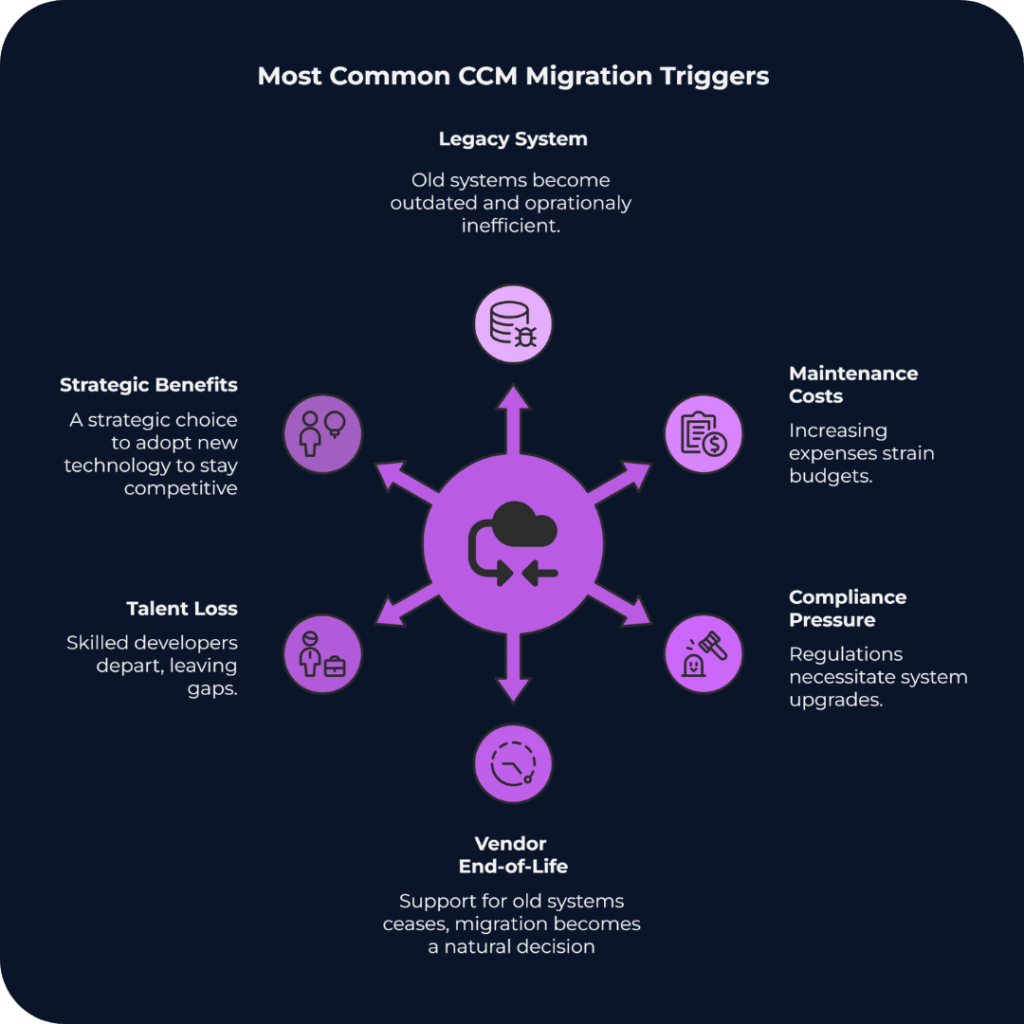
You might assume that CMM migration begins the moment it appears in a company strategy document. More often, however, it begins with a problem that has been accumulating for 2 or 3 years, and one event that finally makes it impossible to defer.

Sometimes it’s a vendor end-of-life notice that arrives on an otherwise ordinary Tuesday. In other cases, a compliance audit suddenly reframes the platform as a risk rather than an asset. Or a key developer who understood the original implementation leaves, and the team realises nobody can fully explain how the system actually works anymore.

At that point, the discussion changes quickly. The question is no longer whether migration should happen, but which direction makes sense, and how to justify that decision when leadership inevitably asks why this path was chosen.

If this kind of situation is approaching, you’re likely carrying a second question alongside the strategic one: what does the actual migration process look like for Customer Communications, and how do you keep it from becoming a multi-year disruption? We’ve written a practical guide on the six steps that ease legacy CCM replacement that’s worth reading alongside this one.

Infographic titled “Most Common CCM Migration Triggers.” In the center is a purple circular icon representing system migration, with arrows pointing outward to six surrounding causes. The causes listed around the circle are: Legacy System (outdated and inefficient infrastructure), Maintenance Costs (rising operational expenses), Compliance Pressure (regulatory requirements forcing upgrades), Vendor End-of-Life (support for the platform ending), Talent Loss (specialist developers leaving the organisation), and Strategic Benefits (adopting new technology to stay competitive). The graphic illustrates that organisations typically migrate customer communications management systems when several operational, financial, and regulatory pressures converge.

Scenario 1: The IT-Centric Bank and the OpenText Path

Take a mid-size European bank processing tens of millions of customer communications annually, operating on CCM infrastructure that has been running on-premise for 15 years without a major change. Statements, policy notices, regulatory disclosures, all generated by a system that nobody is quite sure how to upgrade without breaking something important.

The IT Director has been making the case for modernisation for 3 years. Every year the argument gets stronger. Every year the budget committee asks the same question: but is it urgent? Then the vendor end-of-life announcement lands, and that question stops being useful.

Why OpenText Makes Sense Here

For organisations where the primary CCM concern is governance, not speed or omnichannel agility but audit trails and deep integration with established archive systems, OpenText Exstream has a logic that is difficult to argue against.

The platform is built from HP Exstream, StreamServe, and xPression. That history gives it a functional breadth that few platforms match in high-volume batch environments. Nightly runs of 50 million personalised statements are well within what the architecture handles without drama.

OpenText also integrates tightly with its own portfolio. InfoArchive handles long-term record management, and there are dedicated accelerators for Guidewire and Duck Creek that reduce the data mapping work during implementation. For an organisation already running OpenText for Enterprise Content Management, that existing footprint makes the extension to CCM genuinely lower-friction than starting from scratch.

What the Teams Actually Talk About

In our experience working with banks through this process, the conversation at the architecture level rarely focuses on features. It focuses on:

  • Who owns the complexity after go-live?
  • How the platform behaves during the first major upgrade cycle?
  • What happens if the one certified Exstream specialist on the team decides to leave?

These are reasonable concerns. OpenText requires specialised expertise that is genuinely difficult to hire and retain, and upgrade timelines from legacy versions to the current Cloud Native architecture consistently land in the 12 to 24 month range. In practice it runs closer to 2 implementations in parallel, with the business continuing on the old system throughout.

For an organisation with deep regulatory requirements, an existing OpenText footprint, and the internal capacity to absorb that complexity, the trade-off works. Full implementations typically start at $1M and climb quickly once professional services, migration effort, and internal resourcing are factored in. For organisations without those three things, the difficulty tends to compound over time rather than resolve.

Scenario 2: The Insurer That Needs to Move, Not Just Survive

A European insurer, mid-market in size, that has spent 2 years watching its customer communications fall behind what its digital transformation roadmap was supposed to deliver. The marketing team wants personalisation at scale. Legal needs to update disclaimers faster than the current template pipeline allows. The digital team cannot integrate the mobile app because the legacy CCM engine does not expose reliable APIs.

The platform has run reliably for years, but the pace at which the business now needs to change what it sends, to whom, and through which channel has outgrown what the infrastructure was built for.

What Quadient Inspire Looks Like from the Inside

Across the CCM implementations we work on, Quadient Inspire comes up most consistently in organisations where the core question is not how to preserve existing infrastructure but how to replace it without stopping the business in the process.

The AnyPrem architecture is worth understanding specifically. A template built in Inspire Designer runs on-premise, in a private cloud, or in a public cloud environment without modification. For insurers managing hybrid cloud transitions under GDPR data residency requirements, that portability removes a class of risk that would otherwise need its own workstream.

The unified design environment has a practical impact that takes a few months to show up in the numbers. Managing Print, Email, Mobile, and Web outputs from a single template file rather than six separate variants means less maintenance overhead, fewer consistency errors, and shorter regulatory review cycles when a disclaimer needs updating.

Quadient holds 11% of the global CCM market, the largest individual share according to IDC. Organisations in financial services and insurance select it repeatedly over a long period, which tends to say more about operational reliability than any benchmark does.

The staffing profile is meaningfully different from OpenText. Quadient’s hiring pool is broader, and Quadient University, the vendor’s online training and certification platform, means new team members can reach productive output without relying on whoever built the original implementation. That dependency is a real operational risk, and one most organisations only recognise after someone leaves.

The Cost That Derails Most Migration Budgets

Template migration is consistently where CCM project budgets get revised upward, and where the original timeline estimate stops being credible.

A mid-size insurer accumulates thousands of document templates over a decade. Some are in active use, many are dormant but legally required, and some are genuinely critical and documented only in the memory of someone who retired in 2019. Manual template migration is slow and expensive, and it reliably surfaces legacy decisions that nobody remembered making.

In one recent project we supported, migrating from DOPiX to Quadient Inspire, the largest effort was not the platform installation but analysing and restructuring hundreds of legacy templates accumulated over more than a decade.

Quadient’s InspireXpress tool uses AI to auto-convert legacy templates from competing platforms. It does not eliminate human review for complex logic, but it substantially reduces the professional services hours needed in the early migration phases. For a project where the budget estimate is already moving, that reduction matters.

Focused Quadient implementations for a defined line of business typically take 3 to 6 months. Full enterprise rollouts run 6 to 18 months. The modular licensing structure means organisations can start with specific components, typically from around $500K annually, and expand as requirements grow, rather than committing to full enterprise capacity upfront.

Why the Right Answer Is an Operations Question, Not CCM’s Features List

The comparison between OpenText and Quadient tends to get treated as a feature question. The organisations that make it well treat it as a staffing and operations question as much as anything else.

OpenText Exstream makes sense for organisations where governance is the primary driver: audit trails, archival integrity, and tight integration with an existing OpenText content management stack. For Global Systemically Important Banks (G-SIBs) or large government agencies processing hundreds of millions of pages annually, the operational complexity is the cost of the control, and for those organisations it is a cost worth paying.

Quadient Inspire suits organisations where the constraint is speed: how quickly can a regulatory disclaimer be updated, how much does a routine template change depend on a specialist developer, how reliably can the mobile app trigger a document in real time. The modular pricing keeps the initial commitment lower, and AnyPrem means the cloud transition happens at a pace the organisation controls rather than the vendor’s.

The choice between them depends heavily on what the organisation can realistically sustain over a 3 to 5 year horizon, including staffing, upgrade cycles, and internal appetite for infrastructure complexity. Getting that assessment wrong in either direction tends to be expensive.

CriterionOpenText ExstreamQuadient Inspire
Primary mandateGovernance and archival integrityBuilt for organisations where the audit trail and record management are non-negotiableSpeed and digital channel agilityBuilt for organisations where the pace of change in communications is the primary constraint.
Best fitG-SIBs, government agencies, existing OpenText ECM stackRetail banks, insurers, mid-cloud transition
TCO entry point$1M+From $500K, modular
Implementation timeline12–24 months3–6 months (LoB) / 6–18 months (enterprise)
StaffingRequires certified OpenText specialists. The talent pool is narrow, and knowledge loss when a key person leaves is a documented operational risk.Broader hiring pool. New team members reach productive output faster, and Quadient University provides structured self-service training.
Cloud modelCloud Native (re-platforming)AnyPrem (no refactoring)

How to Build a Migration Case That Survives the Finance Committee

If you are determining whether migration is necessary rather than how to execute it, the architecture is rarely where the resistance comes from. Organisations resist migration because the existing system works, and changing something that works requires a level of justification that maintaining it never does.

A migration case built on “better features” tends not to survive contact with the finance committee. One built on EAA compliance deadlines, vendor end-of-life announcements, or documented scalability failures tends to hold. The difference is that the second set of arguments is about risk that is already present and growing.

The teams that navigate this well distribute the decision across IT, compliance, and finance rather than carrying it personally. They run a pilot before asking for full commitment. They document the external drivers clearly enough that the rationale survives leadership changes.

The trigger event, whether it is an audit finding, a vendor notice, or an outage, is rarely the moment the decision gets made. It is usually the moment the cost of waiting becomes visible to everyone at once.

What a Realistic First Step Looks Like

In banking and insurance, the organisations that move through this process with least disruption tend to start with a narrow scope: one line of business, one document type, one channel. A working pilot changes the internal conversation faster than any business case document, and the migration expands from there at a pace the organisation can absorb.

The projects we support in this space run on Quadient Inspire. The modular structure fits the phased approach well, and the AnyPrem deployment means the organisation does not have to resolve its cloud strategy before starting. If you are currently assessing whether your legacy CCM infrastructure warrants migration, or building a case to present internally, we can share what that process has looked like for similar organisations.

Cloud-based document platform architecture connecting servers and user devices for scalable communication processing.

Quadient Inspire Interactive on Azure: Accessibility Implementation and Inspire Scaler Integration for a Dutch Healthcare Insurer

For healthcare insurers the annual policy renewal season is the ultimate stress test. It shows a critical operational threshold where millions of personalised documents must be generated with absolute precision in a strictly limited timeframe. This is how the story behind our partner Impress client began — with no operational slack and a renewal deadline that could not move.

Facts Summary

Client: Leading healthcare insurance company in the Netherlands

Service Delivered: Azure-hosted Quadient Inspire environment setup, migration from Quadient Inspire Designer to Inspire Interactive, template rationalisation, accessibility implementation, and Scaler integration with Impress Connect.

Project Duration: June – November 2025

Challenge: Facing the renewal deadline, the client was constrained by a rigid legacy infrastructure that was becoming unmanageable due to 3 structural bottlenecks:

  • Strong IT Dependency: Every minor change to a policy, such as last-minute pricing tweaks or regulatory disclaimers, required a technical request to developers. However, business teams knew what needed to change but had to wait in an IT queue to execute it.
  • Inefficient Workflow: The team relied exclusively on Quadient Inspire Designer — the core tool for creating document templates and communication workflows in Quadient CCM. While Designer is a powerful tool for technical development, using it for day-to-day business edits is inefficient and blocks agility. The business needed a way to manage content without touching the code.
  • The Compliance Gap: New EU directives required every PDF to be fully accessible and EAA compliant, a capability the existing setup lacked.

To avert operational risks, the client’s primary partner, Impress BV, envisioned a solution: moving the infrastructure to the cloud and empowering business users with Quadient Inspire Interactive.

To execute this complex architectural shift, they engaged Quertum for our specialised engineering expertise and deep Quadient Development experience. In a high-velocity sprint spanning June to November, we re-engineered their workflow onto Microsoft Azure.

The objective was complex: move the infrastructure to the cloud, enable independent content management, and seamlessly integrate with Impress Connect, a modern digital delivery platform, all without disrupting the critical renewal cycle.

The Solution: Engineering Autonomy and Speed

We approached this not as a simple “rehost” migration, but as a complete re-engineering of the document production lifecycle. The existing environment was not just outdated — it structurally limited operational agility. Moving the same architecture to the cloud would have preserved the same bottlenecks.

1. Infrastructure: Building a Resilient Azure Foundation

Autonomy means nothing if the system crashes under load. Instead of retrofitting on-premise servers, we provisioned a dedicated cloud environment in Microsoft Azure.

This required precise architectural decisions. We configured secure networking between the Quertum Azure tenant and the Impress Connect external ecosystem, which ensured strict data isolation for sensitive medical records while maintaining the high performance necessary to handle massive spikes in volume. By leveraging our Quadient Inspire Deployment on Azure expertise, we created a foundation capable of absorbing the renewal season’s pressure without performance degradation.

2. Workflow: From “IT-Dependent” to “Business-Led”

Migrating to Quadient Inspire Interactive was the key to unlocking agility, but simply moving old templates to a new system would have been a mistake.

We performed a comprehensive template rationalisation. Our engineers broke down monolithic, legacy templates into atomic, reusable components. This allowed us to deploy a hybrid workflow:

  • Technical Teams maintain the complex data logic and structure in Designer.
  • Business Teams use the web-based Interactive interface to edit text, update clauses, and approve content instantly.

This shift eliminated the “ticket fatigue.” Marketing and Product teams gained full control over their messaging, reducing the time-to-market for changes significantly.

3. “Shift-Left” Compliance Implementation

Meeting the new accessibility standards was non-negotiable. Rather than treating compliance as a post-processing step, which is computationally expensive and error-prone, we integrated it into the core architecture.

We implemented WCAG 2.1 AA and PDF/UA standards directly at the template level. Logical reading orders, tagging, and artifact handling are now generated automatically by the Inspire engine. This ensures that 100% of documents are compliant by default, removing the operational burden from the product team, a strategy mirrored in our work on EAA-ready Document Communications for Banking.

4. Orchestration: The Nervous System

To unify these components, we configured automation workflows in Quadient Inspire Scaler. This engine acts as the orchestrator, automating the data flow from ingestion to the final handoff to Impress Connect for archiving and distribution.

The Outcome

The project was delivered on time for the renewal season, transforming a legacy bottleneck into a modern, cloud-native content factory. The shift in infrastructure and workflow delivered measurable impact.

As the client’s product lead noted regarding the new system’s performance:

“Generating samples, print streams, and archive output became significantly faster. Based on our performance observations, the processing speed has effectively increased by 2x.”

– Says Head of Operations

The Hidden ROI & Partnership Mechanics

Beyond speed, the strategic approach delivered critical cost efficiency. Building accessibility directly into the migration phase, rather than treating it as post-migration remediation, saved over 90% of compliance costs. This turned a mandatory regulatory burden into a streamlined, cost-effective process.

Success was also driven by a clear separation of concerns. While Impress managed client relations and the delivery platform, Quertum served as the “technical backbone”, handling the complex Azure-Inspire ecosystem. Unlike generalist partners, our combined expertise in both cloud infrastructure and CCM platforms eliminated the integration blind spots that typically derail such hybrid projects.

Key Results

Processing performance doubled after implementation, enabling faster document generation and shorter production cycles.

Gradient blue and green icon featuring the number “24” surrounded by two circular arrows forming a loop, symbolizing 24/7 availability or around-the-clock service.

The platform ensured uninterrupted operation during peak periods, with 0 downtime in the critical processing window.

Circular GDPR icon with a dark blue background, featuring the acronym "GDPR" in white text at the center, surrounded by a circle of twelve yellow stars. The design resembles the flag of the European Union, symbolizing data protection and privacy regulations under the General Data Protection Regulation.

Customer communications fully comply with GDPR and EAA requirements.

Automation and centralized management reduced compliance-related operational costs by more than 90%.

And last, but not least, operations teams gained direct control over communication updates, reducing IT dependency and enabling faster, safer production changes.

What’s Next?

Regulatory deadlines and legacy systems are constant challenges for enterprise leaders. To understand how we handle complex modernisation projects for other financial institutions, explore our Legacy System Migration Case Study.

Visual banner comparing top CCM platforms with the message “Choose CCM That Works for You.” Logos of Quadient, OpenText, Papyrus Software, and Smart Communications appear on the left. On the right, an aerial photo shows people crossing multiple pedestrian crosswalks, symbolizing different paths or choices.

Comparing TOP Customer Communication Management Systems. How to Choose a Modern CCM Platform That Actually Fits?

In our previous blog we discussed how legacy systems are slowing down modern business managers and here you are: realised the price for sticking to outdated systems and now it’s time to choose an efficient and clear CCM system. In this top CCM systems comparison, we’ll help you understand how to confidently choose the right modern communication platform that actually fits your business, without falling into the same traps that legacy systems create.

When you’re ready to migrate away from a legacy Customer Communication Management (CCM) platform, one thing becomes clear fast: there’s no shortage of options. From cloud-native innovators like Quadient or Smart Communications to heavyweight platforms like OpenText and Papyrus, each solution promises to improve efficiency, compliance and customer experience.

But picking the right CCM platform doesn’t merely include ticking off technical features. It’s also a strategic decision that shapes your agility, customer satisfaction and compliance readiness. This all factors will dictate you success for internal and external communications.

Here’s how to make that decision confidently.

Why Migrate at All – Fast Break Through

Just to refresh the information from the previous blog post, here is a brief review.

Legacy CCM systems are holding many businesses back. They’re often rigid, expensive to maintain, risky for long-play company development and difficult to adapt to new accessibility or data privacy laws. They also limit customer experience improvements – something today’s buyers increasingly expect.

Why it matters:

What to Look for in a Modern CCM Platform

When evaluating platforms, it helps to go beyond the product brochure and ask: What will this look like in action – in our business, with our processes and compliance requirements?

Here are six essential criteria:

1. The right deployment model for your business

Cloud-native CCM platforms are growing rapidly due to their scalability, fast deployment and lower IT overhead. However, the right choice depends on your organisations’ reality. Highly regulated industries or businesses with complex legacy systems may still benefit from on-premise or hybrid deployments. 

🧠 Our tip: Look for platforms that offer deployment flexibility without sacrificing modern capabilities like API access or low-code tooling. 

2. Omnichannel communication delivery

Modern customers expect a seamless experience whether they’re interacting via email, app, post, or portal. A good CCM platform enables you to design communications once and deliver them across all relevant channels, without duplicating work or causing formatting issues.

🧠 Our tip: Look for native support for print, web, SMS and mobile–plus responsive preview tools to test each format before sending. 

3. Ease of integration with existing systems

Your CCM solution doesn’t operate in a vacuum. It needs to connect with your CRMs, ERPs, archiving systems and sometimes even bespoke internal tools. Seamless integrations speed up implementation, reduce human error and help futureproof your stack.

🧠 Our tip: Prioritise platforms with pre-built connectors and open APIs, especially if you’re working in a multi-vendor IT environment.

4. Compliance & accessibility readiness

The compliance bar is rising. From GDPR to the European Accessibility Act (EAA), your customer communications must be secure, traceable and usable by everyone including users with disabilities.

🧠 Our tip: Ask vendors whether their platform supports:

  • Accessible document templates
  • Real-time audit trails
  • Role-based controls
  • Automated compliance checks

If you want to go deeper, it’s worth understanding what accessibility-ready document templates require and why seemingly small mistakes in structure or tagging can break compliance entirely. We also see many organisations repeating the same issues during implementation, which is why recognising common document accessibility mistakes organisations still make can save months of rework, audit risk, and unnecessary remediation costs later on.

This difference becomes visible in real projects. In one of our recent cases focused on EAA-ready document communications for a Polish bank, moving to a modern CCM setup meant rethinking document logic, templates, and approval workflows so they could scale and evolve over time. Compliance and accessibility were treated as integral parts of the CCM architecture, not as add-ons. This allowed the bank to standardise communications, maintain full auditability, and give business teams greater control, all without increasing operational complexity.

5. User experience for both your teams and end customers

It’s not enough for a platform to be powerful. It must also be usable by your content creators, legal reviewers, CX managers and other business stakeholders. A modern CCM tool should empower cross-functional teams, not bottleneck them behind IT. 

🧠 Our tip: Look for role-based interfaces, drag-and-drop templates and approval workflows that allow collaboration without code. 

6. Vendor partnership & long-term fit

Technology is only a part of the equation. Migration support, training, roadmap transparency and service responsiveness all play a role in the success of your new CCM platform. 

🧠 Our tip: Ask about post-sale support, local partner networks and how each vendor supports clients as business and compliance needs evolve.

Choosing the Best CCM System for Regulated Industries

Disclaimer: This top CCM systems comparison highlights that there is no one-size-fits-all solution. There’s no universally “best” CCM platform. Only the most suitable combination of tools, tactics, and collaboration conditions tailored to your organisation’s needs.

Below, we’ve summarised four of the most widely adopted platforms in the CCM space. Each one has unique strengths, deployment models and ideal use cases.

Quadient Inspire

Quadient offers a strong balance between user-friendliness and enterprise-grade power.
For leadership teams, Quadient Inspire often signals a high-performing, long-term investment in communication architecture. It’s modular, highly customisable and integrates with a wide variety of systems.

CTOs and CIOs tend to appreciate its scalability and robust architecture, especially for organisations undergoing transformation or with plans to consolidate multi-channel communication systems.
It’s particularly well-suited for marketing-driven organisations thanks to its intuitive omnichannel composition tools, real-time previews and role-based interface that empowers business users without relying heavily on IT. It supports cloud-native and hybrid deployments, integrates seamlessly with CRMs like Salesforce and Microsoft Dynamics. In practice, this kind of integration makes a material difference: in one of our PaaS projects for a Dutch insurance company, Quadient Inspire was deployed across print and digital channels with existing CRM logic intact with working at scale. For the organisation, this meant faster rollout of new communication use cases, lower integration risk, and a more predictable operating model as volumes and channels grew. For Product Owners, it translated into shorter change cycles, better visibility into template behaviour, and the ability to adjust content and logic without waiting for heavy IT involvement — all while keeping governance and compliance under control.

However, that power comes with a trade-off. The platform rewards those willing to develop or partner with skilled Quadient experts, turning what seems like complexity into a long-term differentiator. In this way, the early investment becomes a launchpad for sustained independence and strategic agility, which could serve for decades.

From a compliance perspective, Quadient Inspire is a solid bet. It offers granular control over messaging logic, audit trails and versioning, making it suitable for regulated industries such as banking and insurance. Legal teams often find comfort in its ability to document every step of a communication journey. Accessibility and auditability are built into its cloud capabilities, making it a right choice for organisations looking to futureproof compliance and UX.

The end user (i.e., your customer) usually never sees the complexity under the hood. What they do see, if Inspire is well implemented, is a hyper-personalised, consistent and timely communication experience across print, digital and mobile. That’s a major competitive advantage.

OpenText

OpenText is often the default choice for institutions already embedded in the OpenText enterprise ecosystem which was widely adopted in the early 2000s to mid-2010s. It’s a heavyweight in the enterprise CCM space.

It appeals to leadership with its legacy of trust and stability, especially in large document-centric environments. CFOs often like the idea of extending existing OpenText investments rather than introducing a new vendor. Known for its robustness and deep legacy system support, it’s often the platform of choice for large organisations operating in highly regulated industries like insurance, utilities, or public sector. Its support for on-prem and hybrid deployments makes it appealing to businesses with strict infrastructure requirements.

Operationally, however, OpenText can be more rigid. Teams working within Exstream environments often report that configuration and development are IT-heavy, with limited room for rapid iteration by business teams. This creates a bottleneck when it comes to deploying and testing new communication strategies. Developers and analysts accustomed to agile, cloud-native environments may find OpenText slower and less flexible.

From a compliance perspective, OpenText holds up well, having been used across government and heavily regulated sectors for decades. Its DMS-centric infrastructure supports document retention, permissions and role-based controls in ways that appeal to risk-conscious legal and compliance departments.

The downside, especially from a user-experience and customer communications standpoint, is that modernisation can lag. End customers may experience templated, static, or overly formal communications unless effort is made to layer on modern UX flows.

ISIS Papyrus

Papyrus is built for control and customisation – they are unique in this approach. It’s a long-standing favorite in financial services, thanks to its strong governance features and configurable rule engines. The platform offers both on-prem and hybrid options, making it viable for compliance-focused environments. It’s less plug-and-play than others, typically requiring stronger in-house IT capabilities or external consultancy – but for organisations that value full control, the payoff can be substantial.

Papyrus offers a vertically integrated platform that combines process automation, document management, case handling and communications. For leadership and enterprise architects, this is attractive because it minimises the number of vendors and integration points. Everything stays under one roof.

But this “all-in-one” strength is also a limitation. Unlike modular platforms, Papyrus expects the organisation to adapt to its internal logic. This can create friction for teams used to flexibility or those wanting to plug in best-in-class solutions for analytics, templates, or content authoring.

Operational teams often find the Papyrus environment powerful but dense. Its steep learning curve and limited global user community make training and onboarding slower, especially for non-technical users. Developers will need to invest time to gain fluency in the system and business analysts will likely rely heavily on IT for changes. But would this learning time contribution worth ROI?

For compliance, Papyrus is a strong contender. Its end-to-end control of the communication lifecycle makes it well-suited for organisations with strict governance and risk standards. The ability to track and automate decisions across workflows is appealing to both legal and audit stakeholders.

Where it may fall short is in user experience. Communications generated through Papyrus can feel procedural and rigid. Without deliberate effort to improve design and personalisation, end users might find interactions cold or bureaucratic—appropriate for some sectors but problematic for customer-centric brands.

Smart Communications

Smart Communications has carved its space by offering a cloud-native, API-first platform built with business users in mind. For leadership teams focused on agility, customer centricity and fast deployment, Smart delivers a compelling message. It removes much of the technical debt associated with traditional CCM implementations and is favored by organisations undergoing digital transformation.

From an operations and executive point of view, Smart is empowering. Business teams can create, test and deploy communications with minimal IT involvement. Analysts appreciate the real-time feedback loops and experimentation capabilities baked into the platform. Developers can focus on integrating backend logic while marketing and CX teams optimise messaging on the front lines.

Compliance teams will appreciate Smart’s modern cloud certifications, GDPR-ready architecture and policy-driven controls. While it may not have the on-premise legacy compliance layers of OpenText or ISYS Papyrus, its transparency and structured governance capabilities align well with evolving digital-first regulatory frameworks.

Most importantly, Smart Communications shines at the end-user level. It delivers clean, mobile-first and channel-consistent interactions that meet customers where they are—email, apps, chat, or print. Its omnichannel consistency, combined with tools for A/B testing and personalisation, helps companies communicate more like agile digital-native brands and less like legacy enterprises.

However, this cloud agility comes with a trade-off: Smart isn’t built for deep backend complexity or legacy system entanglement. The platform may struggle with highly customised document logic, real-time transaction processing at enterprise scale, or legacy data dependencies. The consequence of this limitation can cascade throughout the organisation. Strategically, leadership may find that while Smart accelerates time-to-value for customer touchpoints, it may not scale easily across all business-critical communication domains, especially those tied to regulated documents or high-volume transactional outputs. This can lead to fragmented ecosystems, where Smart handles digital comms while legacy systems still shoulder core workloads, undermining efforts to consolidate platforms and reduce complexity.

Prefer a quick side-by-side view?

Here’s a snapshot of the four platforms compared on deployment model, core strengths and business fit, to help you zoom in on the one that aligns with your goals.

PlatformDeployment OptionsTop StrengthsTop WeaknessesIdeal For
Quadient InspireOn-premises, hybrid and cloudUX-focused, omnichannel tools, strong integrationsSteep learning curve on the beginning, could require expert setupMarketing-driven orgs and mid-sized businesses looking to scale CX
OpenText On-premises and hybridEnterprise-grade, legacy integration, regulatory trustSlower modernisation pace; heavy IT dependency; limited agility for digital-first use casesLarge, complex organisations with legacy-heavy infrastructure
PapyrusOn-premises and hybridCustomisable, strong governance, used in financeSteep learning curve; rigid architecture; low flexibility with third-party toolsRegulated industries with strong IT capacity and need for full control
Smart Communications (SmartCOMM) Cloud-nativeAgile, accessible, API-firstLimited backend depth; challenges with legacy system replacement; potential governance fragmentation at scaleFast-growing companies prioritising flexibility, speed and CX innovation

The 3 Questions to Ask Before You Decide

Before you lock into a platform, ask yourself and your team:

  1. What organisational bottleneck do we actually want CCM to remove? Most CCM initiatives start with technology, but they should start with friction. Is your biggest issue slow time-to-market for new communications? Heavy IT dependency for simple changes? Fragmented ownership between business, legal, and operations? Or rising compliance risk driven by manual fixes and workarounds?
  2. Who will own communications once the platform is live — and how much autonomy do they need? A modern CCM platform reshapes internal responsibilities. The real question isn’t whether a system is powerful, but who can safely use that power.
  3. How realistically can we migrate — and what must not break along the way? Migration is where CCM decisions become real. The key question isn’t if you can move off a legacy platform, but how much risk you’re willing to accept during the transition. What documents must remain identical? Which integrations cannot be disrupted? And how much parallel running can your organisation afford?
    We see this challenge clearly in practice. In a migration from a legacy DOPiX system to Quadient Inspire, the priority isn’t just moving templates – but about preserving output consistency, auditability, and business continuity while modernising the underlying logic and workflows. That approach allows the organisation to transition without disrupting regulated communications. See the full legacy system migration from DOPiX to Quadient Inspire case for how this was handled in practice.

Your CCM Should Grow With You

Modernising your CCM platform isn’t merely an infrastructure upgrade, it’s also a competitive strategy. Whether your focus is regulatory readiness, customer experience, or operational efficiency, the right platform should meet today’s needs while setting you up for tomorrow’s growth.

At Quertum, we work with organisations navigating these exact decisions. If you’re planning a CCM migration or exploring your options, we’re here to help guide the process, strategically and practically. The right platform won’t just solve today’s pain points, it should be a growth enabler, not a future constraint.

Explore our migration services or get in touch – we’d love to help solve your communication challenges. 

Quadient Inspire Deployment on Azure: PaaS Implementation and Template Migration for a Insurance Company

Quadient Inspire deployment has become a critical step for insurers aiming to stay competitive in a market that demands scalability, efficiency, security, and compliance. Falling short in any of these areas can quickly erode customer trust and expose companies to regulatory risks. For a leading Dutch insurance group, these challenges surfaced when business-critical communications relied on an outdated setup without a dedicated production environment — creating operational risks, compliance gaps, and costly inefficiencies.

Over time, fragmented document templates and manual approval loops slowed communication, increased compliance risks, and weakened brand consistency. The insurer needed not just a new tool, but a controlled, scalable environment that could keep pace with customer expectations and regulatory change.

To address these challenges, the Dutch industry expert Impress BV partnered with Quertum. By combining Quertum’s proven expertise in Microsoft Azure, Quadient Inspire deployment, data migrations frameworks, Single Sign-On, Terraform, and DevOps automation with the Impress’s strong market presence and unique designing experience, we built a secure, scalable, and fully compliant Customer Communication Management (CCM) environment. As a result, the company gained a future-ready Platform-as-a-Service that empowers the business, eliminates risk both for operational, customer success and customer care teams, and ensures every interaction is reliable, compliant, and disruption-free.

Read the scope below to see how it not only became possible, but also brought significant benefits to the end customer.

The client is a reliable insurance company, which is based in the Netherlands. They needed an extensive, flexible, and reliable Customer Communication solution that would allow them to: 

  • Create processes for promoting content and code across environments without disruptions. That means implementing a controlled, automated pipeline that ensures every change, from template updates to code adjustments — moves seamlessly from development to production, reducing downtime and human error.
  • Manage large volumes of customer communications consistently and across multiple channels with no downtime. For example, the insurer previously struggled to send files larger than 10 MB. The new infrastructure ensures stable, high-volume processing for both digital and physical communications, regardless of document size or delivery channel.
  • Integrate and synchronise development, testing, acceptance, and production environments to operations and reduce manual processes. Previously, there was no way to centrally manage or update communications. With the new setup, all environments are synchronised and automated, ensuring version control, consistency, and full operational transparency.
  • Establish dedicated testing environments to ensure flawless performance and quality assurance before deployment.
  • Achieve 100% GDPR and DORA compliance and integrate secure authentication methods such as Azure SSO authentication with their existing Azure infrastructure.

Meeting these requirements demanded more than just incremental improvements — it called for a structured and secure Quadient Inspire deployment on Azure. This approach ensured the insurer could handle high communication volumes without disruption, stay fully GDPR-compliant, and empower both IT and business teams with a scalable, future-ready environment.

Specific Pain Point of Quadient PaaS Implementation: Lack of a Dedicated Production Environment

One of the critical challenges the client faced was the absence of a dedicated production environment.

Because of this, changes to documents and processes were made directly in the live environment, which leads to:

  • Operational risks due to deploying untested code.
  • Service disruptions while making updates directly in production.
  • Data inconsistencies without separate testing and development environments.
  • Increased risk of exposing sensitive customer data and breaching GDPR compliance requirements.

Details in a Nutshell:

  • Service Delivered: Platform as a Service (PaaS)
  • Project Duration: September 2024 – January 2025
  • Key Partner: Impress BV
  • Technological Stack: Microsoft Azure, Quadient Inspire, DevOps Automation Tools, Single Sign-On (SSO), Terraform and Impress Digital Vault

Technical Implementation of Quadient Inspire Deployment

The project started with the deployment of four virtual machines, each dedicated to development, testing, acceptance, and production environments. We provisioned them using Terraform, which ensured consistency and repeatability across the setup. To strengthen reliability, our team configured automated backups with Azure run books, providing both data protection and rapid recovery. In addition, we automated domain certificate renewals, which reduced manual maintenance risks.

Next, we built a robust code and content promotion pipeline that allowed seamless transitions across environments. This streamlined workflow eliminated manual bottlenecks and guaranteed reliable deployments. Furthermore, we peer-connected the virtual machines and integrated their networks into Quertum’s main network—serving as the entry point for multiple projects and enhancing overall collaboration.

Our team installed all necessary Quadient Inspire components, including silent installers for Designer Interactive. We also migrated more than 40 templates and associated processes from the client’s legacy setup to the new Azure infrastructure.

To secure the system, we configured the application gateway and enabled Single Sign-On (SSO) for authentication. Meanwhile, we synchronised all environments with the client’s Azure infrastructure to ensure smooth integration. Finally, we carried out extensive validation and testing to confirm that every template functioned correctly and that the promotion pipeline operated flawlessly throughout the deployment.

To complement the Inspire environment, the insurer integrated Impress Digital Vault, a secure document-delivery platform that ensures confidential communication with customers.

Execution Steps:

While addressing critical business risks such as service continuity, data security, and compliance, Quertum team created the Azure environment from scratch. Each step was designed to mitigate potential disruptions, ensuring that client’s operational activities would remain unaffected during the migration. Moreover, the structured approach guaranteed that all environments were synchronised, robust testing was conducted at every phase, and the final production rollout was seamless and secure.

  1. Azure Environment Configuration
  2. Inspire Installation and Configuration
  3. Pilot Migration
  4. Internal Testing
  5. Integration of Impress Digital Vault for secure document delivery
  6. User Acceptance Testing (UAT) After Pilot Migration
  7. Final Migration
  8. Creation of Code and Content Promotion Processes
  9. Final Internal Testing
  10. Final UAT
  11. Go-Live and Project Closure

Unique Value from Quadient Inspire Deployment:

Quertum team fully managed the infrastructure including synchronisation, certificates, templates, and CRM endpoint integration. The transition to production was completed without a single issue, an achievement that impressed the client. 

By providing dedicated PaaS development for insurance and finance companies, Quertum created separate development, testing, acceptance, and production environments. Therefore, the client could thoroughly test all changes before deployment.

Key Results

100% GDPR Compliance

Single-Sign-On implementation

Full Azure Automation

Zero downtime & seamless migration to production