Accessibility Tools

Skip to main content

Author: Robert Sańko

CCM modernisation versus migration: upgrading an existing technology stack compared with moving to a new cloud platform

Modernise vs Migrate the CCM: How BFSI Decide on Their CCM Transformation

Your platform still runs, but every new channel, every regulatory change, and every personalisation request now joins a queue behind IT. For banks and insurers, the customer communication management (CCM) platform reached this point. It remained reliable for years, so it absorbed one more integration, one more workaround, and one more deferred decision. Sometimes systems are doubling, with some additional glue code layer to make both CCM work. Now the choice is becoming concrete: keep building on the existing base by just touching it up a bit or move to a modern platform to get rid of the resource leak.

Modernising in place works as a bridge when processes are stable and budgets are fixed. Migration is the more demanding path which brings the significant renovation to ops but, on some occasions, carries the failure stories everyone in BFSI remembers. This article examines both paths through the lens of business demands and consequences, such as cost, risk, the integration with core banking, and the ability to meet regulatory deadlines.

Why Plan Modernisation or Migration This Year?

Two big things changed in 2025 and 2026, which are facilitating every quarter – not year, as it was before the AI age.

First, maintenance is consuming the budget, and numbers are rising. Retail banks spend 64% of their IT budget keeping existing systems running. That leaves 36% for everything else, including accessibility programmes, new channels, and the next regulatory requirement. Moreover, a study from IDC Financial Insights shows that global banks have spent enormous sums simply on maintaining outdated payment systems, a figure set to rise to $57 billion by 2028 (representing an annual increase of 7.8 per cent). This is ‘wasted’ money that goes solely towards plugging gaps, rather than developing the business. 

Second, the specialists who know the old stack are leaving. More legacy systems are announcing end of life for the platform, end of specific tiers or close-up for demanding deployment models, f.e. on-premise. The vendor, who bought the legacy CCM, is offering more expensive solutions or ‘enriching’ the offer with capabilities which do not add value to the business communication operations. This is not always the fit for the bank or insurance company’s remaining business logic. Every month the window for a controlled migration narrows. 

What Do BFSI Institutions Choose at First for Their CCM?

Most institutions lean toward modernising in place since it feels safer and cost-effective, especially when it comes to statements of work from the executors. Full replacement is often postponed even when the case for it is clear. 

McKinsey observed the pattern across core banking platforms too: progressive modernisation is the strategy most banks pursue, retaining the legacy platform while building a modern architecture around it, often starting with the most critical customer journeys and hollowing out functionality piece by piece. Full replacement remains the exception, chosen only when obsolescence or a regulatory deadline leaves no realistic alternative. The same logic shapes how BFSI institutions treat their CCM stack.

The difference between the two paths becomes clearer when mapped side by side from the very basics.

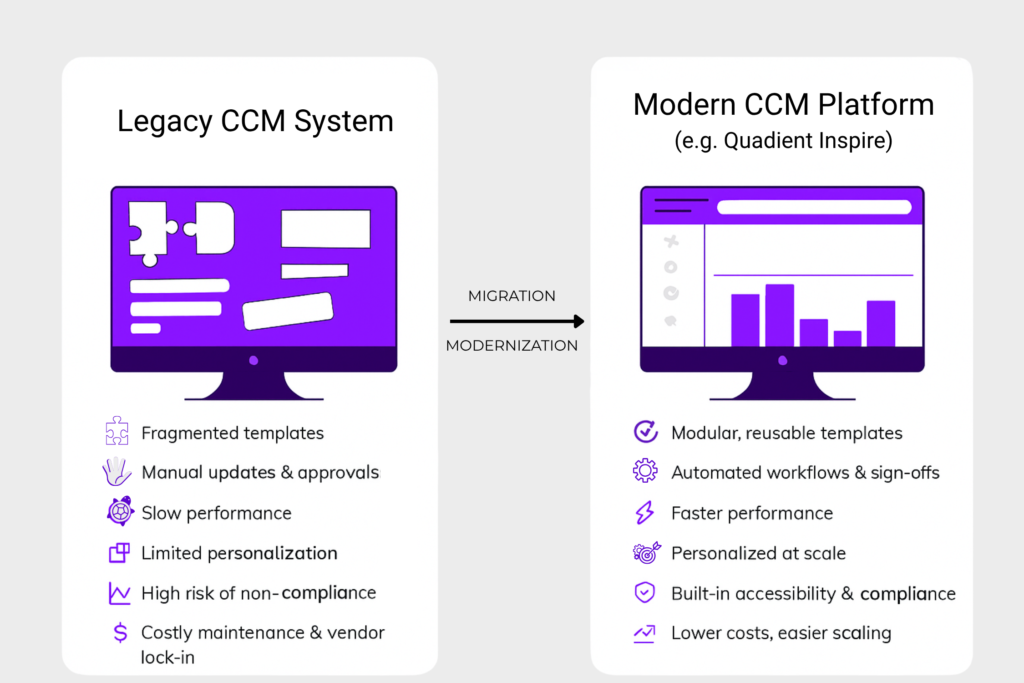
FactorModernisation “in place” (Legacy CCM Extension)Migration to a Modern Platform (CCM System Replacement)
Technical FoundationAdd-on to legacy code; technical debt remains.Full replacement; transition to modern architecture (e.g., API-first).
Risk ProfileDeceptively low start with high risk of future system failure. Risks are usually hidden.High initial controlled risk; long-term stability and risk reduction.
Cost DynamicsLocal maintenance budget consumption with a variety of partners’ and internal departments’ involvement.Concentrated upfront investment; predictable cost from migration and maintenance partners with significant reduction in TCO over the medium term.
Integration PotentialLimited; preserves fragile point-to-point connections and batch processes.High; it enables the implementation of event-driven architecture for real-time operations.
Regulatory ComplianceHigh effort to implement new standards (e.g., EAA); limited scalability for emerging channels and new communication loops.Built-in support for standards; easy adaptation to new requirements due to platform flexibility.
Business OutcomeDefers a critical decision; maintains the status quo.Resolves fundamental constraints; paves the way for AI and hyper-personalisation.
Impact of DelayDiverts resources from strategic growth to managing legacy complexity.Allows for the redirection of IT budgets from maintenance to innovation.

What Can Banks and Insurances Expect from CCM Modernisation?

Modernising in place offers less upfront disruption and a familiar environment. The base, however, continues to age beneath the work. Integration debt accumulates, and the underlying problem is deferred rather than resolved. 

McKinsey’s survey of financial-services CIOs found that 10% to 20% of the budget allocated to new products is redirected to resolving technical debt. That is before the new regulatory requirement lands on top.

The same research found that technical debt accounts for 20% to 40% of the value of the entire technology estate before depreciation. For a mid-size bank, that translates to hundreds of millions in unpaid obligations which stay invisible on the balance sheet.

McKinsey’s 2026 analysis of technology spending patterns found that organisations adding AI and new capabilities on top of existing systems face compounding costs: they pay to keep the legacy platform running and then pay again to operate everything built on top of it. 

Migrating to a modern platform requires more effort at the start but resets the foundation. Costs become predictable, integration moves to modern patterns, and the platform becomes ready for regulatory demands and reliable AI. Industry estimates suggest that total cost of ownership (TCO) reduces by roughly 38% to 52% following a successful migration. The core benefit is the shift of spending from maintenance back toward development – both for competitive advantage and higher customer LTV.

How the choice reshapes the linking to core banking

A CCM platform does not operate in isolation. It pulls data from core banking, policy administration, CRM, ERP, ESP, and billing to generate documents and messages. The decision to modernise or migrate changes the entire integration surface.

Modernising typically preserves existing integration patterns. In many institutions, these patterns are batch-based, point-to-point and fragile. Each new channel becomes another layer of middleware, increasing the amount of “glue code” with every release. By implementing the AI-assisted coding with the legacy one, the risk rises substantially.

CCM Migration allows for a transition toward API-based and event-driven integration. This creates a cleaner, more responsive link between systems. 

The risk in this approach lies in the data, meaning the cost of a mapping error is high. Teams often underestimate the original data model and its dependencies, discovering gaps late in the process. Understanding that model first separates a controlled migration from a damaging one. For those planning this transition, we have outlined the 6 steps to ease legacy CCM replacement.

The link between the CCM and the core determines whether a customer sees current data on a statement and whether the institution meets its SLA on a regulatory notice.

Why CCM Migration Wins and Why Timing Matters

The hidden cost of retaining legacy in place has climbed to meet the cost of a full migration, and each year of delay widens the gap. With AI agents’ capabilities available on modern CCMs, the expectations of end customers have risen, and competitors’ AI adoption speed is increasing.

Moreover, regulation will not wait for the budget cycle. For example, the European Accessibility Act, which is already in force, and older CCM stacks cannot produce accessible output reliably at scale. Accessibility obligations now carry a concrete price, with existing precedents for penalties. 

Similarly, banking and lending regulations do not bend to internal IT timelines. Under the Consumer Financial Protection Bureau (CFPB) Regulation Z, institutions face rigid, non-negotiable windows for delivering periodic statements and interest adjustment disclosures. Legacy CCM architectures rely heavily on delayed batch-processing with high error risks, making it nearly impossible to inject last-minute financial recalculations accurately. A single batch failure or delayed disclosure run instantly triggers compliance violations and predatory billing scrutiny.

Furthermore, as specialists on obsolete CCM platforms like StreamServe, Sefas, Scriptura, or DOPiX basically retire, the cost of closing the position increases autonomously. That creates a significant institutional knowledge gap. Attempting to offset this gap via tactical infrastructure tuning or legacy optimisation techniques meant to extract performance from outdated CCM infrastructure produces declining returns every quarter, making it more challenging and costly to close the skills gap.

Modern AI and customer experience strategies require a modern foundation. Personalisation at the individual customer level and real-time document generation require event-driven architecture. Batch-era stacks cannot deliver either without a rebuild that costs more than migration.

Our innovetive and optimised Quadient-based CCM solutions support deployment models ranging from on-premise to full SaaS, providing a cost-effective, future-ready path for regulated environments. Start with a focused assessment or technical pilot before committing to a full migration. This shows what migration would involve in your specific environment and validates the approach against real templates, business rules, integrations and compliance requirements. You receive a verified inventory, target architecture, delivery roadmap, cost model and working proof of the proposed approach, making the wider investment easier to evaluate and control.

Migration is not TSB. Done in phases, with full data testing and rigorous control of the source, the risk is manageable. That is the work of discovery, scope control, and practitioner-led delivery.

Communication Assessment and Rationalisation. Where Your Organisation Should Start

Your legacy platform survives another year. But the question is how much the budget leak’s communication current setup will be hidden in the balance sheet and the financial forecasts. Each year of delay costs the maintenance budget, regulatory exposure, and the IT capacity that goes into keeping the current setup alive instead of creating more competitive value for your customers. 

On our first discovery calls we go through three things: which platform model fits your current business goals and constraints (On-Premise, IaaS, PaaS, SaaS, or Hybrid), who operates the stack day-to-day to give your team members realistic phased migration, and what should move, be rebuilt, or be retired.

A free discovery call is what makes the big change less frictional and more predictable. Fill out the form and start your digital transformation with confidence.

Graphic by Quertum showing legacy CCM platforms like HP Exstream, Papyrus, DOPiX, Assentis, and Pitney Bowes with the message “True Cost of Legacy CCMs: How Obsolete Systems are Quietly Stealing Your Resources,” highlighting hidden operational costs in banking and insurance communication systems.

True Cost of Legacy CCMs: How Systems Like Exstream, DOC1, Assentis, DOPiX, Papyrus Are Quietly Stealing Your Resources

We are seeing a pattern repeat itself across nearly every large-scale Customer Communications Management (CCM) engagement we step into. An organisation runs a legacy CCM platform, the license and maintenance are paid, the output works somehow.

Nobody is asking hard questions about what that system actually costs because the line item in the IT budget looks manageable. In this article we place a stress on costs that stay behind invoices.

The real spend on legacy CCM hides in places that never make it onto an invoice:

  • the senior developer who spends 3 weeks on a regulatory change that should take 3 days;
  • the WhatsApp channel your competitor launched 8 months ago while your team was still trying to determine if the channel was even possible within the current architecture;
  • and the compliance deadline you will meet only by throwing contractors at the problem.

This article looks at 5 specific systems we encounter regularly in the field: Exstream, DOC1, Assentis, DOPiX, Papyrus, and CSF.

The Systems Trusted by Leadership and Questioned by Reality

HP Exstream (OpenText)

Hp exstream logo

Exstream was built in the early 2000s for high-volume transactional document output in insurance and banking. Many organisations still run it for policy documents, statements, and regulatory notices. The pain point in 2026 is architectural: Exstream was designed around batch processing and server-side rendering. Which means connecting it to event-driven flows (triggered emails, mobile push, API-first architectures) requires significant middleware. In our direct experience, organisations on document-centric legacy platforms spend more on integration than on the platform licence itself. And that integration overhead is often what triggers the first serious conversation about Exstream migration.

DOC1 (Now Quadient Inspire)

Pitnew Bowes logo

DOC1 from Pitnew Bower company started as a batch composition engine in European banking and utilities. Quadient acquired and evolved it into the Inspire platform, covering interactive, on-demand, and multi-channel output. What we consistently see, though, is that many organisations still run old DOC1 templates and workflows never migrated to modern Inspire architecture. They are technically on “Quadient” but operationally still on DOC1, with the gap between vendor capability and actual usage sometimes a decade wide. The templates, logic, and data mappings are so embedded that a full DOC1 replacement feels enormous, so teams keep running legacy logic on modern infrastructure, paying current prices for decade-old behaviour.

Assentis DocFamily

Assentis established a strong position in the Swiss and broader DACH banking sector, particularly in wealth management, due to its ability to handle multilingual and highly regulated documentation effectively. However, this very specialisation, built around static and tightly controlled communication scenarios, has become a bottleneck for the current environment. The market has shifted: banks now require omnichannel onboarding, mobile-accessible statements, and real-time notifications. As a result, a platform optimised for complex document production struggles to adapt to dynamic digital channels, forcing organisations to choose between short-term workarounds and full platform replacement.

DOPiX

DOPIX ccm logo

DOPiX is widely used in the insurance and public sectors across the DACH region and Northern Europe, particularly for the creation and optimisation of printed documents. But at the same time, as businesses shift from “document production” to full-scale customer communication, this architecture begins to limit capabilities. Modern requirements include HTML output, email campaigns, A/B testing, and other digital tools that the platform does not natively support. As a result, organisations are forced either to build parallel solutions or to forgo certain channels altogether.

Papyrus (ISIS Papyrus)

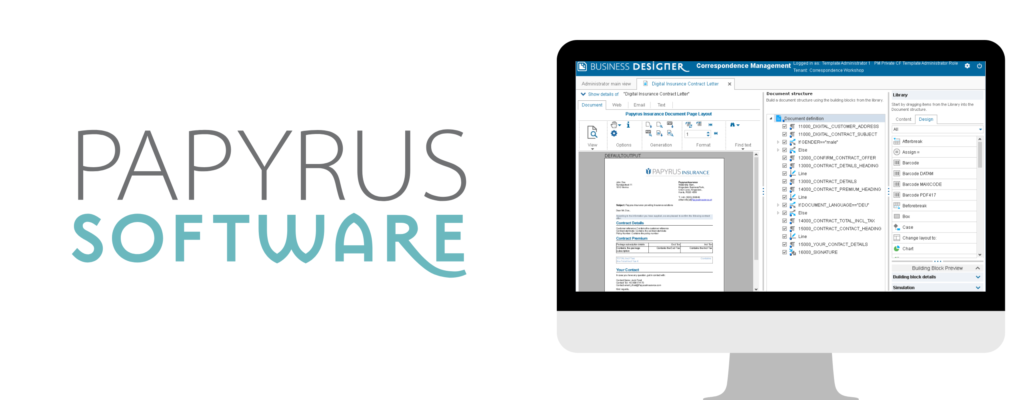
Papyrus positions itself as a combined BPM and CCM platform, and for organisations that adopted it 10-15 years ago for insurance policy correspondence and claims processing, this was a compelling pitch. In practice, this combined architecture creates lock-in: business processes and document templates in the same proprietary system means replacing either one risks disrupting the other. Clients who want to modernise communications first have to untangle them from the process layer, and that alone can take 6-12 months before actual CCM modernisation work begins.

Where the Budget Actually Goes When Supporting Legacy System

These 5 systems differ in architecture and heritage, yet the hidden costs follow the same 4 patterns:

  • Talent tax on scarce legacy skills: Dependency on niche expertise that is expensive, hard to replace, and creates operational risk.
  • Compliance delays → compounded costs: Delays go beyond fines, driving slower delivery, higher operational overhead, and missed market opportunities.
  • Maintenance spiral (cost increases over time): Postponing migration leads to growing technical debt, higher change costs, and reduced system flexibility.
  • Legacy trap (classic car effect): Low upfront cost, but high ongoing burden like specialist support, limited suppliers, hidden costs, and time spent maintaining instead of delivering value.

Truly it looks a bit like owning a classic car from the 1990s: the purchase price was settled long ago. But the specialist mechanic, the parts from a single supplier, the fuel nobody tracks, and the weekends in the garage instead of on the road add up to far more than running a modern, low-maintenance vehicle.

The Talent Tax

Finding a developer who knows Exstream’s scripting language, DOC1’s template logic, or Papyrus’s BPM/CCM environment is a scarcity game with predictable consequences. In our experience, senior consultants with deep legacy CCM knowledge command significant premiums over modern full-stack developers. They know they are hard to replace, which shifts negotiating power entirely to the consultant. The talent pool shrinks every year as experienced professionals retire or move to modern stacks, and every month of delayed migration makes the premium steeper.

Compliance Delays That Cost More Than Fines

The European Accessibility Act took its full effect in June 2025, and GDPR enforcement continues to tighten. Each regulatory change triggers a chain reaction across document templates, output channels, data handling, and audit trails. Enforcement under national accessibility laws is already happening across the EU, and the EAA will only sharpen that pressure.

On a modern API-native CCM platform, a compliance update might take a sprint or two. In a legacy environment, that same change can take months: the template has to be modified in a proprietary editor, testing requires a full regression cycle without an automated test suite, and the one person who understands the system is booked out for 6 weeks.

We have written about the specific collision between legacy CCM and the European Accessibility Act in detail. Retrofitting accessibility into a system designed for print-first output is effectively a rebuild of the output layer.

Opportunity Cost: Channels You Cannot Reach

Your competitor sends policy renewal reminders via WhatsApp, your marketing team wants interactive payment links in emails, your product team needs push notifications and in-app messages from a microservice, and operations needs SMS confirmations. All standard in 2026, but if your CCM was built for batch PDF output, each channel requires a standalone integration. Some organisations build a parallel communication layer next to the legacy CCM to support digital channels, and suddenly they maintain 2 systems, 2 sets of templates, and 2 compliance workflows where one should be enough.

This is why organisations that want to expand into digital channels cannot treat them as add-ons. Without a structured migration approach, each new channel simply adds another layer of complexity on top of an already fragmented communication stack.

The Maintenance Spiral

Technical debt on legacy CCM platforms does not grow linearly; it compounds. A workaround you build today becomes a dependency tomorrow. A custom integration becomes something the next developer has to reverse-engineer. A deferred upgrade quietly inflates the eventual migration scope. In our CCM experience, organisations that postpone migration regularly find that the project scope has grown well beyond original estimates, simply because the legacy environment kept accumulating custom logic in the meantime.

The Calculation Nobody Wants to Do

Licence fees are easy to track. The salary premium on a legacy Exstream developer, the 4-month delay on an accessibility compliance project, the WhatsApp channel that launched at your competitor while your team was writing a feasibility study. Those numbers live in different spreadsheets, or no spreadsheet at all.

Staying on a legacy CCM platform is itself a budgetary decision, even if nobody formally approved it, and it carries a compounding price in slower delivery, scarcer talent, growing technical debt, and missed channel opportunities.

Once organisations reach this point, the focus inevitably turns to how to approach migration in a structured and low-risk way. We have explored this in more detail in our overview of legacy CCM migration, including both strategic and operational aspects.

At some point, every organisation running one of these 6 systems will have to add up the full cost of keeping it, and when they do, the support licence will be the smallest number on the page. The only question is whether you run that calculation now, on your own terms, or later, when the next regulatory deadline or channel requirement makes the decision for you.

Banner graphic comparing two enterprise customer communications platforms. The Quadient logo appears on the left and the OpenText logo on the right with the text “vs” between them. Below the logos, the headline reads: “Which CCM Does More for Your Business?” The background is a dark blue gradient typical of enterprise technology visuals. The image introduces a comparison between Quadient Inspire and OpenText CCM platforms used by organisations such as banks and insurers to manage large-scale customer communications.

Migration Made for You: Quadient vs OpenText Comparison. Which CCM Does More for Your Business?

You might assume that CMM migration begins the moment it appears in a company strategy document. More often, however, it begins with a problem that has been accumulating for 2 or 3 years, and one event that finally makes it impossible to defer.

Sometimes it’s a vendor end-of-life notice that arrives on an otherwise ordinary Tuesday. In other cases, a compliance audit suddenly reframes the platform as a risk rather than an asset. Or a key developer who understood the original implementation leaves, and the team realises nobody can fully explain how the system actually works anymore.

At that point, the discussion changes quickly. The question is no longer whether migration should happen, but which direction makes sense, and how to justify that decision when leadership inevitably asks why this path was chosen.

If this kind of situation is approaching, you’re likely carrying a second question alongside the strategic one: what does the actual migration process look like for Customer Communications, and how do you keep it from becoming a multi-year disruption? We’ve written a practical guide on the six steps that ease legacy CCM replacement that’s worth reading alongside this one.

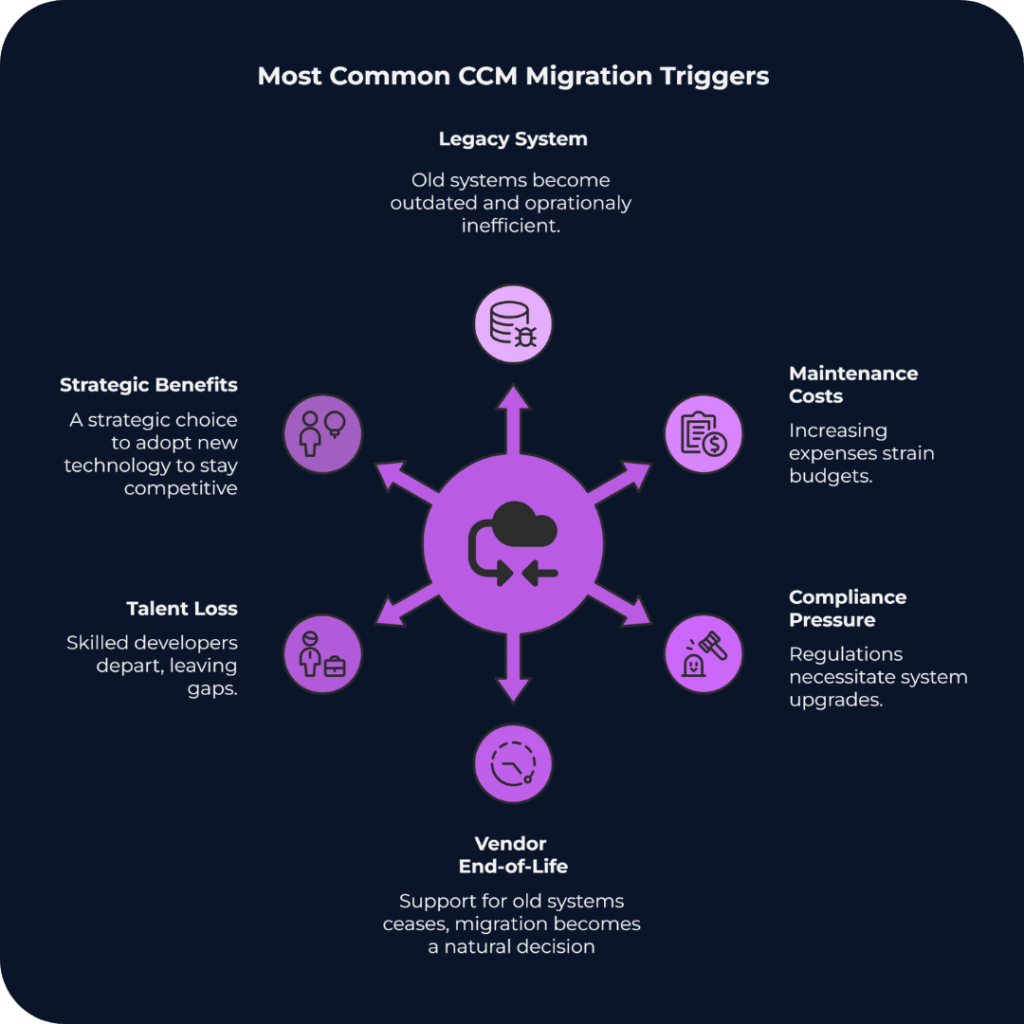
Infographic titled “Most Common CCM Migration Triggers.” In the center is a purple circular icon representing system migration, with arrows pointing outward to six surrounding causes. The causes listed around the circle are: Legacy System (outdated and inefficient infrastructure), Maintenance Costs (rising operational expenses), Compliance Pressure (regulatory requirements forcing upgrades), Vendor End-of-Life (support for the platform ending), Talent Loss (specialist developers leaving the organisation), and Strategic Benefits (adopting new technology to stay competitive). The graphic illustrates that organisations typically migrate customer communications management systems when several operational, financial, and regulatory pressures converge.

Scenario 1: The IT-Centric Bank and the OpenText Path

Take a mid-size European bank processing tens of millions of customer communications annually, operating on CCM infrastructure that has been running on-premise for 15 years without a major change. Statements, policy notices, regulatory disclosures, all generated by a system that nobody is quite sure how to upgrade without breaking something important.

The IT Director has been making the case for modernisation for 3 years. Every year the argument gets stronger. Every year the budget committee asks the same question: but is it urgent? Then the vendor end-of-life announcement lands, and that question stops being useful.

Why OpenText Makes Sense Here

For organisations where the primary CCM concern is governance, not speed or omnichannel agility but audit trails and deep integration with established archive systems, OpenText Exstream has a logic that is difficult to argue against.

The platform is built from HP Exstream, StreamServe, and xPression. That history gives it a functional breadth that few platforms match in high-volume batch environments. Nightly runs of 50 million personalised statements are well within what the architecture handles without drama.

OpenText also integrates tightly with its own portfolio. InfoArchive handles long-term record management, and there are dedicated accelerators for Guidewire and Duck Creek that reduce the data mapping work during implementation. For an organisation already running OpenText for Enterprise Content Management, that existing footprint makes the extension to CCM genuinely lower-friction than starting from scratch.

What the Teams Actually Talk About

In our experience working with banks through this process, the conversation at the architecture level rarely focuses on features. It focuses on:

  • Who owns the complexity after go-live?
  • How the platform behaves during the first major upgrade cycle?
  • What happens if the one certified Exstream specialist on the team decides to leave?

These are reasonable concerns. OpenText requires specialised expertise that is genuinely difficult to hire and retain, and upgrade timelines from legacy versions to the current Cloud Native architecture consistently land in the 12 to 24 month range. In practice it runs closer to 2 implementations in parallel, with the business continuing on the old system throughout.

For an organisation with deep regulatory requirements, an existing OpenText footprint, and the internal capacity to absorb that complexity, the trade-off works. Full implementations typically start at $1M and climb quickly once professional services, migration effort, and internal resourcing are factored in. For organisations without those three things, the difficulty tends to compound over time rather than resolve.

Scenario 2: The Insurer That Needs to Move, Not Just Survive

A European insurer, mid-market in size, that has spent 2 years watching its customer communications fall behind what its digital transformation roadmap was supposed to deliver. The marketing team wants personalisation at scale. Legal needs to update disclaimers faster than the current template pipeline allows. The digital team cannot integrate the mobile app because the legacy CCM engine does not expose reliable APIs.

The platform has run reliably for years, but the pace at which the business now needs to change what it sends, to whom, and through which channel has outgrown what the infrastructure was built for.

What Quadient Inspire Looks Like from the Inside

Across the CCM implementations we work on, Quadient Inspire comes up most consistently in organisations where the core question is not how to preserve existing infrastructure but how to replace it without stopping the business in the process.

The AnyPrem architecture is worth understanding specifically. A template built in Inspire Designer runs on-premise, in a private cloud, or in a public cloud environment without modification. For insurers managing hybrid cloud transitions under GDPR data residency requirements, that portability removes a class of risk that would otherwise need its own workstream.

The unified design environment has a practical impact that takes a few months to show up in the numbers. Managing Print, Email, Mobile, and Web outputs from a single template file rather than six separate variants means less maintenance overhead, fewer consistency errors, and shorter regulatory review cycles when a disclaimer needs updating.

Quadient holds 11% of the global CCM market, the largest individual share according to IDC. Organisations in financial services and insurance select it repeatedly over a long period, which tends to say more about operational reliability than any benchmark does.

The staffing profile is meaningfully different from OpenText. Quadient’s hiring pool is broader, and Quadient University, the vendor’s online training and certification platform, means new team members can reach productive output without relying on whoever built the original implementation. That dependency is a real operational risk, and one most organisations only recognise after someone leaves.

The Cost That Derails Most Migration Budgets

Template migration is consistently where CCM project budgets get revised upward, and where the original timeline estimate stops being credible.

A mid-size insurer accumulates thousands of document templates over a decade. Some are in active use, many are dormant but legally required, and some are genuinely critical and documented only in the memory of someone who retired in 2019. Manual template migration is slow and expensive, and it reliably surfaces legacy decisions that nobody remembered making.

In one recent project we supported, migrating from DOPiX to Quadient Inspire, the largest effort was not the platform installation but analysing and restructuring hundreds of legacy templates accumulated over more than a decade.

Quadient’s InspireXpress tool uses AI to auto-convert legacy templates from competing platforms. It does not eliminate human review for complex logic, but it substantially reduces the professional services hours needed in the early migration phases. For a project where the budget estimate is already moving, that reduction matters.

Focused Quadient implementations for a defined line of business typically take 3 to 6 months. Full enterprise rollouts run 6 to 18 months. The modular licensing structure means organisations can start with specific components, typically from around $500K annually, and expand as requirements grow, rather than committing to full enterprise capacity upfront.

Why the Right Answer Is an Operations Question, Not CCM’s Features List

The comparison between OpenText and Quadient tends to get treated as a feature question. The organisations that make it well treat it as a staffing and operations question as much as anything else.

OpenText Exstream makes sense for organisations where governance is the primary driver: audit trails, archival integrity, and tight integration with an existing OpenText content management stack. For Global Systemically Important Banks (G-SIBs) or large government agencies processing hundreds of millions of pages annually, the operational complexity is the cost of the control, and for those organisations it is a cost worth paying.

Quadient Inspire suits organisations where the constraint is speed: how quickly can a regulatory disclaimer be updated, how much does a routine template change depend on a specialist developer, how reliably can the mobile app trigger a document in real time. The modular pricing keeps the initial commitment lower, and AnyPrem means the cloud transition happens at a pace the organisation controls rather than the vendor’s.

The choice between them depends heavily on what the organisation can realistically sustain over a 3 to 5 year horizon, including staffing, upgrade cycles, and internal appetite for infrastructure complexity. Getting that assessment wrong in either direction tends to be expensive.

CriterionOpenText ExstreamQuadient Inspire
Primary mandateGovernance and archival integrityBuilt for organisations where the audit trail and record management are non-negotiableSpeed and digital channel agilityBuilt for organisations where the pace of change in communications is the primary constraint.
Best fitG-SIBs, government agencies, existing OpenText ECM stackRetail banks, insurers, mid-cloud transition
TCO entry point$1M+From $500K, modular
Implementation timeline12–24 months3–6 months (LoB) / 6–18 months (enterprise)
StaffingRequires certified OpenText specialists. The talent pool is narrow, and knowledge loss when a key person leaves is a documented operational risk.Broader hiring pool. New team members reach productive output faster, and Quadient University provides structured self-service training.
Cloud modelCloud Native (re-platforming)AnyPrem (no refactoring)

How to Build a Migration Case That Survives the Finance Committee

If you are determining whether migration is necessary rather than how to execute it, the architecture is rarely where the resistance comes from. Organisations resist migration because the existing system works, and changing something that works requires a level of justification that maintaining it never does.

A migration case built on “better features” tends not to survive contact with the finance committee. One built on EAA compliance deadlines, vendor end-of-life announcements, or documented scalability failures tends to hold. The difference is that the second set of arguments is about risk that is already present and growing.

The teams that navigate this well distribute the decision across IT, compliance, and finance rather than carrying it personally. They run a pilot before asking for full commitment. They document the external drivers clearly enough that the rationale survives leadership changes.

The trigger event, whether it is an audit finding, a vendor notice, or an outage, is rarely the moment the decision gets made. It is usually the moment the cost of waiting becomes visible to everyone at once.

What a Realistic First Step Looks Like

In banking and insurance, the organisations that move through this process with least disruption tend to start with a narrow scope: one line of business, one document type, one channel. A working pilot changes the internal conversation faster than any business case document, and the migration expands from there at a pace the organisation can absorb.

The projects we support in this space run on Quadient Inspire. The modular structure fits the phased approach well, and the AnyPrem deployment means the organisation does not have to resolve its cloud strategy before starting. If you are currently assessing whether your legacy CCM infrastructure warrants migration, or building a case to present internally, we can share what that process has looked like for similar organisations.

Illustration comparing legacy digital systems with European accessibility standards. On the left, a laptop displays multiple error pop-ups, warning icons, and a disabled accessibility symbol, representing inaccessible legacy software. On the right, a blue circle with EU stars surrounds a simplified human figure, symbolizing compliance with European accessibility regulations. The word “VS” between them highlights the contrast, with the Quertum logo shown at the bottom.

Legacy CCM vs European Accessibility Act: Why to Initiate Migration in 2026?

In our last article we already unpacked how The European Accessibility Act (EAA) has fundamentally changed the rules of engagement for banks, insurers, and utility providers. If you are still relying on a print-era engine to drive digital conversations, you have likely noticed a painful reality: your documents might look perfect to the human eye, but to a machine (and the law), they are invisible.

For years, accessibility was treated as a “nice-to-have” or a post-production patch, and these days are gone. With the EAA enforcement deadline looming, sticking to Legacy CCM systems is no longer just a technical debt issue,  but it’s becoming a compliance gamble in 2026.

The 30-Second Read

  • The Problem in a nutshell: Old CCM platforms place text on a page using X/Y coordinates (print logic). Accessibility standards require HTML-like tags and semantic structure (digital logic).
  • The Risk: Regulators treat inaccessible system outcomes a failure of service. The financial and reputational costs are already visible in global enforcement cases.
  • The Solution: Retrofitting is expensive. Migration to a modern platform like Quadient Inspire is already counted as the most cost-effective and future-proof way for strategic business sustainability in regulated landscape.

The “Print-First” Trap: Why Legacy CCM Fails

Most legacy platforms were built when “customer communication” meant printing a letter and putting it in an envelope. They excel at placing ink on paper with pixel-perfect precision.

However, accessibility requirements demand context, not just placement. A screen reader needs to know that a bold line of text is a Header (H1), not just “bold text”. It needs to know that a grid of numbers is a table with rows and headers, not a random collection of floating integers.

Trying to force a print-based system to generate accessible documents is like trying to turn a typewriter into a web browser. You can force it to work with enough glue and plugins, but it will never be scalable.

The Hidden Cost of “Bolted-On” Compliance

Some organisations attempt to solve this with post-processing tools — software that scans a PDF and tries to guess the tags. This is a dangerous strategy, and here is why:

  • Fragile workflows: If a marketing team changes a disclaimer layout, the automated tagger often breaks without even a warning.
  • No audit trail: You can not prove governance if your accessibility relies on a “black box” fix applied at the last second.
  • Performance drag: Retroactive tagging slows down batch processing, threatening SLA deadlines for delivery.

The Business Case: The Real Cost of Fines

While internal operational friction is annoying, the external financial threat is immediate. It is important to look at the broader regulatory landscape to understand the risks and how the world of regulation behaves globally. While the EAA is new, the legal logic behind it, punishing organisations for denying service via inaccessible documents, is well-established globally.

Global Precedents: The “Document Liability” Warning

Though ADA (Disabilities Act in the USA) and EAA are different in scope and jurisdiction, both treat inaccessible communication as a barrier to equal service. For instance, Wells Fargo settled a case with the U.S. Department of Justice for $16 million in 2011 after failing to provide accessible bank statements and forms in alternative formats like large print, Braille, and properly tagged digital files. The case reinforces how inaccessible documents are not considered technical faults but as legal liabilities.

Recent European Enforcement

“Closer to home”, European regulators are already proving they will enforce similar standards:

  • Vueling Airlines (Spain): Fined €90,000 for inaccessible digital channels. While this focused on interfaces, it confirms that digital barriers attract significant penalties.
  • UBS (Switzerland): Ordered to pay CHF 20,000 regarding inaccessible online banking. The regulator’s message was clear: digital exclusion is a punishable failure.
Slide with two sections. On the left, logos of SAS, Vueling, UBS, and accessiBe on a dark background. On the right, the Quertum logo above a green label reading “Field Notes on Inclusion” and a headline: “Real Cases & Financial Impact of Digital Non-Accessibility.”

The EAA simply extends this logic explicitly to your PDF/UA documents and customer communications.

Why Legacy CMM Migration Attracts So Much Attention of Banking and Insurance Leaders?

Meeting WCAG guidelines requires a platform that understands structure from the moment a template is designed. Modern platforms like Quadient Inspire do not “scan” for accessibility; they build it into the DNA of the document.

1. Omni-channel Consistency

Modern ecosystems separate content from presentation. You create the message once, and the system generates a compliant PDF for archiving, an accessible HTML5 email for mobile, and a tagged format for the web portal. This automation ensures consistency across all channels without triplicating the effort.

2. Risk Mitigation (Compliance by Design)

When you migrate, you shift from “detecting errors” to “preventing them”. Designers use templates with pre-approved accessibility blocks. If a font size is too small or a colour contrast fails accessibility standards, the system flags it before production, not after.

3. Future-Proofing

The EAA is just the beginning, and regulations will tighten. CCM migration allows you to adapt to new mandates (like EN 301 549 updates) via software updates rather than rewriting your entire codebase.

Frequently Asked Questions Covered

Q1: Can the 2030 transition period delay our migration plans?

Only for historic contracts. All new customers must receive accessible documents now, so postponing migration increases cost and complexity.

Q2: Does accessibility slow down batch processing?

Modern platforms build structure and layout simultaneously, so batch performance remains stable.

Q3: Are the automated tagging tools enough for compliance?

No. Automated fixes cannot guarantee full alignment with the WCAG 2.1 or PDF/UA standards. Accessibility must be built into the template.

Conclusion: The Era of Static Documents is Over

The European Accessibility Act is forcing a necessary evolution in how organisations handle data distribution. Sticking to Legacy CCM systems is a choice to face regulatory scrutiny and potential financial penalties like those seen in the Wells Fargo and Vueling cases. CCM migration is not just an IT upgrade; it is a strategic move to protect your brand and your bottom line.

Read how to CCM Migration made simple and how to go with it confidently in 6 steps.
And don’t wait for the first fine. Contact our team to review risks and determine your optimal CCM migration strategy.

Visual comparing old and new systems: legacy laptop with error symbols and modern laptop with checkmark, showing successful CCM migration. Title reads 'CCM Migration Made Simple: 6 Steps to Replace Your Legacy System.

CCM Migration: 6 Steps to Ease Legacy System Replacement

Switching to a new Customer Communication Management (CCM) platform? The next step is to tackle what often appears like the real challenge in this complex project.

Moving off a legacy system typically is like untangling a web of old templates, approvals, dependencies and compliance rules. It can be tempting to just recreate the same structure in the new system and hope for smoother results, but that rarely works. You end up dragging yesterday’s problems into a tool that was supposed to solve them. 

Whether you’re moving to Quadient Inspire or another modern communication solution, CCM migration and processes modernisation is more than a technical switch, but your chance to leave behind outdated processes and build faster, smarter, compliant communications.

In this article we explain how to make that happen without turning it into a year-long headache. Learn how to transition smoothly while accelerating your speed to market.

1. Don’t Migrate Everything. Migrate What’s Useful.

Legacy CCM systems store thousands of outdated templates. Our best advice for massive communication system: don’t transfer all of them at ones.

Instead, treat data migration like a spring-clean. Start by reviewing what’s still being used, what’s outdated and what’s just taking up space.


Ask straightforward: does this template support our customer experience today? Or is it just dead weight?”


Focus on what still matters for customer communication management workflow and take fair actions:

  • Identify what makes your business move – channels and logics;
  • Remove duplicates on templates;
  • Distinguish simple templates from communications with complex rules, integrations, or manual steps;
  • Eliminate broken or non-compliant workflows.

This is your moment to leave behind patchy messaging, mismatched formats and manual workarounds. Moving only what matters helps reduce complexity and significantly speeds up your migration from obsolete systems.

2. Map Dependencies Before They Break Something

CCM communications do not exist in isolation. They pull data from other systems like CRMs and ESPs, follow approval flows and feed into archiving or delivery tools. If these connections aren’t mapped properly, they tend to create delays, errors, or compliance risks that surface when it’s too late to fix them easily.

Our advice: Speak to the people who work with the content daily – from business users and legal teams to compliance officers. They’re the ones who understand the practical dependencies, the informal workflows and the nuances that might otherwise be overlooked.


Take the time to map where data comes from, who owns what, how sign-offs happen and how outputs are delivered.


If you ignore these connections, your migration from legacy platforms can break essential flows.

A well-structured migration plan starts with a shared, cross-functional view of these interdependencies. Without it, even the best-designed system can stall at the first approval gate.

To sum up this step, proactive migration from legacy system should include:

✅ Interviewing legal, compliance and customer service teams;
✅ Documenting data sources, approval chains and delivery paths;
✅ Looking beyond technical diagrams (they rarely show the full picture);
✅ Assigning an owner to every dependency, including data feeds, approval steps, integrations, archives and delivery channels;
✅ Mapping exception and failure paths before migration begins.

While assessing those points, don’t forget assigning an owner to every dependency, like data feed, approval step, integration, archive and delivery channel. Clear ownership makes it easier to approve changes and react quickly when an integration or process does not behave as expected. Without it, even a minor issue can remain unresolved because no team is clearly responsible for the affected part of the workflow. This is why most of migration projects, estimated as 6 months ones become 30% longer.

Exception and failure-path mapping is particularly important for IT, operations, customer service, compliance and delivery teams. These teams need to understand what happens when source data is missing, an approval is delayed, a document cannot be generated, or a delivery channel fails.

This is one of the areas first-time migration teams often overlook. Experienced migration planning does not document only the expected process. It also defines how the organisation will detect, manage and recover from the scenarios in which that process breaks.

3. Rebuild Templates. But Rethink Them First

One of the biggest missed opportunities in CCM migration is treating templates like fixed artifacts. Instead of redesigning them for the new system, many teams just copy what they had before, including the inefficiencies.


Copying old templates into your new system mean copying old mistakes. Use this moment to redesign templates for years of future performance.


Do not stop at static design. Modern CCM platforms such as Quadient Inspire allow teams to separate content, data, business rules and presentation. This makes communications easier to personalise, reuse, test and update across different products, customer segments and delivery channels. They support:

✅ Reusable content blocks to reduce duplication and simplify updates;
✅ Dynamic fields to personalise communications at scale using customer, product or transaction data;
✅ Personalisation rules to tailor messaging by customer type, region, language, product or behaviour;
✅ Conditional content to show or hide specific sections based on business rules or customer circumstances;
✅ Shared elements such as headers, footers, disclaimers and legal text that can be updated centrally;
✅ Reusable styles and brand components to keep design consistent across the full communication estate;
✅ Multichannel output so common content and logic can support print, PDF, email, portal and other digital formats.

For example, several templates that differ only by country, language or customer segment may be replaced with one configurable template using conditional content and reusable components.

Over time, this helps teams work faster, maintain greater consistency and avoid rebuilding the same content whenever messaging, branding or regulatory requirements change.

4. Prioritise Accessibility and Compliance Early

With laws like the European Accessibility Act (EAA) coming into effect and GDPR continuing to guide how organisations handle personal data, it’s important to build compliance and accessibility into the early stages of migration – not treat them as late-stage checks.

Our advice: think about accessibility from the early stage of migration, especially now with EAA went life on June 28, 2025. Otherwise, you put the company into a risk to pay twice.

Migration from older CCM platforms such as DOPiX, Assentis or StreamServe is an opportunity to assess whether current templates and output processes can reliably produce accessible documents. Older on-premises implementations may require template redesign, platform upgrades or additional remediation tools rather than a direct one-to-one migration.

From the start of your CCM data migration, consider:

  • Accessible formats (PDF/UA, HTML)
  • Built-in legal reviews
  • Trackable approvals and audit logs

The best time to embed accessibility and compliance is before anything goes live. Doing it early is faster, cheaper, and far less disruptive than applying fixes under pressure later.


5. Migrate in Phases

Trying to migrate everything at once often leads to stress, confusion and, in reality, avoidable mistakes. A phased rollout is more practical and far less risky.

Our advice: Start small, choose channel, team, or type of communication, for example, onboarding emails or monthly invoices. Use that first rollout to test templates, workflows, integrations, and output quality in a real-world setting. The feedback you gather will shape how you scale, helping you avoid errors before they reach a wider audience. 

Running the legacy and new systems in parallel for a short period also builds confidence. It allows teams to compare outputs, validate compliance and flag edge cases before anything is switched off for good.

6. Make CCM Migration a Team Effort

Customer communication touches nearly every part of the business:

  • Marketing (tone of voice, branding)
  • Operational (document workflows, SLAs, and service delivery timelines)
  • Legal (approvals, disclaimers, regulatory compliance)
  • Customer experience (usability, accessibility, clarity)

For example, this could mean involving CX and legal in defining template requirements, or having marketing validate tone before rollout, not after.

Our advice: bring the right voices in early, things click into place faster, and the end result isn’t just functional, it actually works for everyone. That’s why migration from obsolete platforms and systems needs to be planned and executed as a joint effort, not something handed off to IT in isolation. Clear roles, open communication and shared ownership are what turn a tech project into a successful business change.


Cross-functional planning ensures that your migration from legacy CCM aligns with your customer journey and brand.


Your CCM Migration. Phased, predictable and optimised

With the right focus, it becomes a chance to simplify, modernise and build a stronger foundation for how your organisation communicates – inside and out. Planned well and done wisely, CCM migration is more than a technical upgrade. It’s a real opportunity to streamline operations, reduce risk and deliver communications that make sense for legal, operational CX teams and valued by your customers.

A successful CCM migration starts with understanding what should be migrated, redesigned, consolidated or retired.

Explore how Quertum approaches migrations from platforms such as StreamServe, DOPiX, Assentis, HP Exstream and other legacy CCM systems, covering discovery, template rebuilding, integration, testing and phased cutover.

2 logos: 'Dopix. Icon. Technology for Documents' and 'Quadient. Because connections matter'. Logos connected with arrow down from 'Dopix' to 'Quadient', representing the migration process.

Legacy System Migration: from DOPiX to Quadient Inspire

The sooner companies realise the need to modernise, the more chances they have to keep and raise their market share. But what to do if maintenance of your outdated system is not only expensive but also has no chance for decent support – both for internal and customer-orientated processes? It’s a clear symptom that a legacy system migration is in demand.

DOPiX (Document Platform in eXcellence), a Customer Communication Management solution, has been widely adopted, particularly in the German-speaking regions. In 2025, 75% of the top 30 German insurance companies rely on DOPiX, including Generali, Badenia, ERGO, and AXA.

Quadient (formerly Neopost) acquired DOPiX through the acquisition of ICON Systemhaus GmbH, the German leader in Customer Communication Management (CCM), in June 2016. This acquisition enabled Quadient to strengthen its CCM offering, especially in the German-speaking market, where DOPiX was widely popular within major insurance companies and financial institutions.

The latest news about maintenance suspension for DOPiX changed the game for a significant number of German, Austrian, Swiss, and Liechtenstein insurance and financial companies. With some recent news, DOPiX support is prolonged up to December 2026, which gives more time to make a proper legacy system migration to Quadient Inspire.

Impact Snapshot

📄 3473 templates migrated
⚙️ 2200+ live in production
📈 5 000 total planned
♾️ 0 operational downtime
🔜 DOPiX exit before Dec 2026 deadline

Background of the Data Migration Project

Our client, a leading insurance group from Wiesbaden, Germany, was deeply reliant on a highly customised DOPiX environment. It was built over decades with thousands of documents, and its templates were embedded with logic difficult to decipher.

Their concerns mirrored what we hear across the industry:

Business Challenges in the Case of Legacy Systems Migration

  • “DOPiX is built on obsolete architecture – there is a lack of developers who know it anymore.”
  • “We’re risking non-compliance because the platform lacks sufficient controls and traceability.”
  • “Business users can’t adapt documents without relying on IT every time.”
  • “We can’t afford downtime, but we can’t afford to wait either.”

Displayed as a complex of requirements, the incompletion of them means being churned by an evolving market with the following risks:

  1. DOPiX nears the end of its maintenance lifecycle, with official support ending in December 2026. Continuing to rely on it exposes the organisation to growing operational and compliance risks.
  2. There is a rapidly shrinking pool of developers familiar with DOPiX architecture, making it difficult to maintain, scale or troubleshoot the system.
  3. The legacy platform lacks the modern governance features required to meet today’s regulatory standards, including auditability, data handling and secure delivery.
  4. Business users are unable to independently update or manage document templates, relying heavily on IT teams for even basic adjustments.
  5. The system contains thousands of templates developed over years with inconsistent logic, lack of naming conventions and no lifecycle governance, making clean-up and migration extremely complex.

System Migration Project Goals

Targeting migration, the business wasn’t just betting on system optimisation. Beyond simply replacing old technology, the project focused on preserving business-critical output, enabling non-technical users and laying the groundwork for long-term agility and compliance.

  1. Risk Mitigation: Decommission DOPiX before end‑of‑life without operational disruption.
  2. Seamless Document Transition: Reproduce business‑critical documents in Inspire, retaining output accuracy while introducing structural enhancements.
  3. Business‑User Empowerment: Enable non‑technical teams to manage templates with minimal IT dependency.
  4. Governance and Quality Assurance: Ensure compliance readiness and maintain audit trails for all communications.

Technical Execution of the Legacy System Migration

To deliver a smooth and risk-free migration, we assembled a dedicated team of senior developers trained in DOPiX and fully specialised in Quadient Inspire, working alongside experienced solution architects, migration specialists, and quality control professionals.

Together with the client, we defined the full scope and testing plan during joint workshops. Sprint by sprint, the team successfully migrated more than 1200 documents created in decades, and more are on their way. 5000 will be migrated in total. Each sprint follows a consistent rhythm: planning, development, peer reviews, quality checks and sprint reviews.

Here’s how the team designed and executes the workflow:

  1. We start by aligning on the overall migration scope, defining template complexity levels (simple, medium, complex), and setting up validation rules for templates and test data. As new document batches are prepared for the legacy system migration, we revisit this setup phase to ensure consistency and readiness.
  2. The team continuously plans sprints and updates the backlog whenever they transfer a new set of templates and test data to the Inspire environment. Each transfer starts a new development cycle, which the team follows with a template and data validation to ensure readiness.
  3. Refinement and enhancement in Quadient Inspire are being performed repeatedly across sprints. Developers carefully rebuild each template and improve structure and functionality, mirroring the business intent of the original DOPiX documents.
  4. The team reviews every migrated document through repeated rounds of internal testing, peer review, and quality control. This rigorous process guarantees accuracy and consistency, and the team applies it in every sprint to each new batch of templates.
  5. After internal approval, the client conducts external QA and user acceptance testing (UAT) on each document. Every UAT cycle drives further refinement and approval before production release, creating a loop that continues until the full migration is complete.

Results of the Migration Process: Now and the Future

  • The team has already migrated around 3473 templates to Quadient Inspire.
  • More than 2200 documents already run live in production.

Final goal: 5 000+ documents migration by Q4 2027

Benefits and Achievements:

  • Averted risk by replacing unsupported DOPiX before end-of-life
  • Empowered business users with a modern, intuitive interface
  • Strengthened governance and compliance through built-in controls
  • Enabled scalability and maintainability for future updates

Value, Uniqueness and Long-lasting Legacy System Migration Result

This project represents a mission-critical transformation tailored to the client’s specific challenges. It stands out not only because of its scale and complexity but also because of how we approached it – with precision, empathy for the business context, and a rare blend of legacy and modern system expertise. The client did not want a cosmetic re-skin; they needed a solution that carried forward the business value embedded in thousands of DOPiX templates while preserving both performance and compliance.

The Quertum team translated the client’s intent with precision. Every migrated document retains its purpose, structure, and output fidelity while gaining clarity, maintainability, and alignment with modern standards. This project demands a deep understanding of DOPiX’s intricacies, the discipline to recreate business logic inside Quadient Inspire, and a structured approach to deliver it all without disruption.

For our client, this legacy system migration is about modernising with confidence and avoiding system & penalty risks, preserving operational continuity, empowering their teams and staying future-ready in a rapidly evolving market.

Migration from Legacy CCM System Built for Your Business Logic

Don’t wait until support runs out or compliance risks escalate. Whether you’re navigating away from DOPiX or any other legacy platform, Quertum brings the expertise, structure, and precision to deliver seamless migrations – without disruption, without compromise.

Let’s talk about your migration path. Learn more about Migration from legacy CCM platforms.

AI generated image: ancient block screen with legacy interface, situated in the office. It represents the outdated system

How Legacy Systems Are Slowing Down Modern Business Managers

The role of a business manager today has transformed into a hybrid of strategist, analyst, and operator, all rolled into one. They’re not only keeping operations running, they’re expected to drive strategic projects, bridge gaps between teams, and turn data into actionable insights. Business managers are constantly jumping between finance, sales, supply chain matters, and people operations, trying to make sense of what’s happening across the business.

But if they’re still stuck working with legacy systems? That job becomes 10x harder than it needs to be and workload is quick as never before with facilitated day-to-day processes.

Old Tools, New Problems

We’ve seen it time and again: systems once labelled as ‘future-proof’ now block the workday. Perhaps it’s a slow ERP accessible only to the finance team, or a reporting tool that hasn’t been updated in years. In many cases, companies juggle five platforms that don’t communicate properly with each other.

As a result, more time is spent chasing data than using it. Reports are delayed, workflows are made manual and prone to error. When leadership requests insights for Monday, teams often piece spreadsheets together over the weekend.

This situation frustrates teams and creates unsustainable maintenance.

Understanding an Upcoming Strategic Risk: Outdated Systems are Not Just IT’s Problem

Too frequently, operational and business teams treat CCM systems as back-office concerns, left for IT to “eventually” sort out. Yet, business leaders feel their limitations daily by across functions. Decision-making slows down when teams can’t access performance data in real time – sales teams build forecasts on outdated figures, and managers guess inventory levels instead of knowing them. Processes follow system limits rather than team needs. For example, adjusting prices across regions typically requires manual approvals and Excel workarounds to bypass system limits. As companies scale, these inefficiencies multiply, and what worked in one market becomes a burden across five.

Meanwhile, missed opportunities pile up. One team spends hours consolidating quarterly reports while a competitor pivots strategy on live market data. As you wait for procurement data from three systems, teams may already make unnecessary purchases. These aren’t isolated cases – they’re the daily frustrations of business managers trying to lead with impact. Without visibility and flexibility, managers react to problems instead of steering the business forward. When systems dictate the pace of change, companies quietly lose agility – one of the most valuable traits in today’s environment.

Modernisation with Coffee To Go

Imagine this instead: You open one dashboard and see your key metrics, live, clean, and easy to get into. You don’t have to wait for a report or chase someone in another team for an export. Your workflows are automated where they can be and flexible where they need to be. Your systems are connected, and so is your team.

While this may sound like the ideal scenario, we at Quertum understand that you can’t switch off legacy systems overnight. That’s why we design our approach to make change as seamless as possible. Whether you manage heavily customised platforms, fragmented infrastructure, or operations across multiple countries, we handle the complexity behind the scenes, so your teams can focus on their day-to-day. Core systems keep running while we gradually introduce modern tools with minimal disruption.

Quertum brings your data together, streamlines manual processes, and enables old and new platforms to operate side by side. No lengthy implementations, no unnecessary downtime, only smarter systems that start making everyday work easier and faster than you’d expect.

What a Better Workday Looks Like

Running a business today means balancing priorities across teams, systems, and time zones, often with limited visibility and even less time. Business managers need more than reports and tools; they need clarity, speed, and systems that support smarter decisions without adding more work.

But old systems make that mission harder than it should be.

Here’s what a modern workday should feel like:

  • One clear view of the business: See revenue, stock levels, and supply chain status in real time without chasing updates from different teams.
  • Approvals that keep things moving: Purchase orders, expense reports, and hiring requests go forward as soon as they meet the right criteria. No more bottlenecks.
  • Issues flagged before they grow: Your system notifies you instantly about a delayed shipment or a spike in returns, so you can act early.
  • Everyone working from the same numbers: With one shared dataset across teams, there’s no confusion, no mismatch in the reports, and no digging through version after version.

It’s not about having more tools, more integrations or AI. We know that it’s about having the right ones, which make it easier to lead across functions, stay ahead of problems, and respond with confidence.

Ready to Work Smarter, Not Harder?

You don’t need to rip everything out to move forward. Legacy systems might still be part of the picture, and that’s okay. However, they shouldn’t define how your teams work today and how many challenges they need to tackle before having work done. We’ve prepared a quick yet insightful guide about 6 main steps on migration from legacy system. This article will show you what’s under the hood of complex migrations in regulated industries like banking and insurance.

At Quertum, we help businesses transition from rigid, outdated systems to setups that support the way teams operate today. We customise, optimise, or build systems from scratch to fit the company. That often means untangling siloed tools, streamlining manual processes, or connecting systems that never communicated before.

Our migration services minimise disruption and make change feel manageable. Whether you manage a custom ERP, local infrastructure, or global complexity, we work alongside your teams to build bridges between old and new. This way, your business runs faster and with far fewer headaches.

Let’s talk about where your legacy systems are holding you back, and how you can seamlessly migrate from obsolete systems and platforms.

Summary

Today’s business managers juggle strategy, data, and cross-functional coordination, but legacy systems make that already demanding role even harder. Outdated tools have become the biggest blocker in the workday, leading to delays, manual fixes, and unsustainable maintenance. This isn’t just an IT inconvenience, but a strategic risk that leaves teams stuck and businesses reactive. However, it doesn’t have to stay that way. Gradual system modernisation, done in a way that doesn’t disrupt daily work, can offer a more flexible and connected way of operating. Imagine an ideal workday with real-time insights, smoother workflows, and connected teams that stay in sync and ahead of problems. Because, when systems work with you, the business moves forward – not sideways.

Illustration of a mountain representing the journey toward accessible digital documents. The mountain is divided into ascending levels labeled from bottom to top: “PDF,” “PDF/UA,” “WCAG,” and “Usability,” with a red flag at the peak. A dotted line with red dots marks the path upward, symbolizing progressive improvement in accessibility and user experience. The background features dark blue mountains and a gradient night sky.

Massive System Migration and PDF Accessibility Leading Finnish Bank: Compliance and Modernisation Challenge

PDF Accessibility has become central to a major transformation for a leading Finnish bank. Although committed to sustainability and excellent customer service, the bank relied on an outdated document management system that no longer met its needs. To modernise, it chose a Customer Communication Management (CCM) solution with Quadient Inspire. The challenge was to implement PDF accessibility alongside the migration—reducing legacy templates, refreshing CCM processes, and ensuring full readiness for the European Accessibility Act (EAA). The bank’s clear mission was to centralise and streamline document production while maintaining scalability, compliance, and inclusivity across its entire banking group, thereby safeguarding efficiency and customer trust. A critical element of this transition was a large-scale migration, a task often vulnerable to silos and losses. At the same time, the looming EAA deadline demanded rapid adaptation—especially challenging for large, complex organisations.

Service Delivered: Creation of Accessible PDF templates along with system migration from the outdated system to Quadient Inspire
Project Duration: January 2024 – December 2024

Recognising the need for a comprehensive and experienced team of Quality Control specialists, Solutions Architects, and Senior Developers skilled in Interactive, Scaler, Designer, and Project Management, the bank engaged Quertum to support its transformation efforts. Together, we delivered high-demand services that have earned the trust of thousands of clients for decades and helped businesses modernise their Customer Experience (CX).

Business Challenges: PDF Accessibility along the Migration

As the bank sought to modernise its document production processes, several challenges emerged, compounded by the pressure of meeting upcoming accessibility standards by June 28, 2025:

  1. Document interfaces were not aligned with the bank’s branding.
  2. Existing documents did not comply with EAA accessibility requirements.
  3. High operational costs due to reliance on the outdated legacy system.
  4. Inefficiencies in document production and process management.

Project Goals

The primary objective of the project was to facilitate a seamless migration while ensuring compliance with accessibility regulations and improving efficiency. Key goals included:

  • Avoiding interruptions in day-to-day business operations during the transition.
  • Migrating processes and documents from the legacy document management system to Quadient Inspire.
  • Ensuring 100% compliance with accessibility standards for all new documents.
  • Implementing branding details within the migrated documents.

Technical Implementation Overview

The project required a structured approach that combined strategic planning with robust technical execution. The initial phase involved a thorough assessment of the legacy document management system, analysing document structures, workflows, and accessibility gaps. This groundwork enabled the seamless configuration of the new Inspire system to align with the bank’s operational requirements and infrastructure.

A major component of the migration was the complete redesign of document templates. These templates incorporated the bank’s latest branding elements while ensuring compliance with stringent accessibility standards ahead of the EAA deadline. Multi-language support, including Finnish and Swedish, was integrated to accommodate the client’s diverse customer base.

To enhance efficiency, we automated key document production processes using Inspire’s advanced workflow management features. This significantly reduced manual interventions, lowered operational costs, and streamlined document generation processes.

Ensuring accessibility compliance was a top priority. Our team conducted rigorous testing throughout the migration to verify screen-reader compatibility and proper document structuring. Compliance checks were crucial for meeting regulatory requirements and providing an inclusive user experience. Additionally, comprehensive Quality Assurance (QA) testing and User Acceptance Testing (UAT) were conducted to ensure the final solution met all client expectations before deployment.

Execution Steps of PDF Accessibility Implementation

  1. Initial Assessment: Detailed analysis of legacy systems to identify migration challenges.
  2. Planning & Resource Allocation: Development of a migration roadmap, considering system complexities.
  3. Development: Implementation, leveraging Inspire’s advanced features to bridge technical gaps.
  4. QC Testing: Validation of document integrity, accessibility, and compliance.
  5. UAT & Client Approval: Extensive user acceptance testing to ensure alignment with business needs.
  6. Go-Live & Post-Implementation Support: Deployment with tailored support to address post-migration needs.

Unique Value Delivered

The implementation of accessible and compliant PDFs significantly enhanced customer experience, maintained the bank’s reputation, and mitigated EAA compliance risks. Achieving accessibility within the EAA framework posed unique challenges, particularly in preserving the brand’s tone and visual identity. Quertum successfully delivered fully compliant and branded documents that adhered to accessibility standards while maintaining a consistent user experience.

Through this project, the bank achieved an improved document production efficiency and got full accessibility compliance for over 100 documents. The company now benefits from a modern, streamlined document management system that enhances operational efficiency and regulatory compliance.

Key Results

  • Successful migration from the legacy system to Quadient Inspire.
  • Full compliance with EAA accessibility standards with ensured PDF/UA Accessibility
  • 100+ fully accessible branded document templates.
  • Improved operational efficiency and reduced manual workload.

Full GDPR Compliance

100+ documents created both in Finnish and Swedish

Full PDF/UA Accessibility implementation

This project shows how PDF Accessibility and EAA compliance can be achieved seamlessly, even during large-scale migrations. By modernising document production with Quadient Inspire, the Finnish bank not only reduced legacy inefficiencies, but also secured full regulatory readiness and improved customer trust. If your organisation is facing similar challenges, explore our expertise in PDF Accessibility and EAA compliance and discover how Quertum can help you future-proof your customer communications.