Top PDF Accessibility Tools in 2025: Comparative Review for Those Starting Their Accessibility Journey

Checking PDFs for accessibility may sound straightforward, until you realise this: automated tools only catch 30-40% of real accessibility barriers. The European Accessibility Act has made PDF compliance mandatory across banking, insurance, utilities, and public sectors. Yet most compliance teams still rely solely on automated checkers to shape their EAA compliance strategy, missing critical issues that only manual testing reveals. And the the loop is clear: the more company relys on automated checkers, the more it puts financials at risk. Read our article about fines and penalties here.
This guide offers practical techniques for evaluating PDF accessibility tools and services in 2025. We’ll compare the most popular free and paid validators: PAC 2024, Adobe Acrobat Pro DC, PDFix Desktop Lite, and CommonLook PDF Validator. We’ll explain why even the best automation must be paired with manual accessibility audits by people who understand how assistive technologies actually work.
If you’re starting your accessibility journey post-EAA, this is your roadmap to choosing the right pathways without wasting budget on features you don’t need.
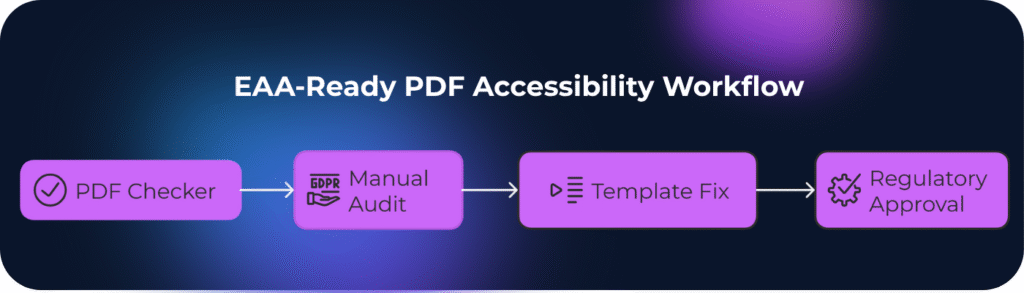
Understanding What PDF Accessibility Tools Actually Check
Before comparing specific tools, understand what automated checkers can and cannot do.
What automated tools check well:
- PDF/UA conformance (tagged structure, reading order)
- WCAG 2.1 AA technical checkpoints (color contrast ratios, language attributes)
- Missing alt text or table headers
- Document metadata and title display
- Font embedding and Unicode mapping
But what automated tools miss:
- Whether alt text is meaningful (tools can’t tell if “image1.png” describes the content)
- Logical reading order across complex layouts
- Table structure usability for screen reader users
- Form field instructions clarity
- Real-world navigation with keyboard or assistive tech
This gap is why EN 301 549 and national EAA implementations require both automated and manual testing. Tools provide technical compliance baselines. But humans verify usability.
PAC 2024 Accessibility Checker: The Free Industry Standard
PAC (PDF Accessibility Checker) 2024 is the first worldwide ISO 14289-1 (PDF/UA) validator and remains the go-to free tool for PDF accessibility testing. Developed by axes4 company, it’s trusted by European accessibility professionals.
Key Features:
- WCAG 2.1 checks with all machine-testable checkpoints
- Quality Checks feature to simplify visual inspection during manual assessments
- Screen reader preview showing logical document structure
- Detailed error reports highlighting specific PDF/UA violations
- Completely free with no feature restrictions
| Strengths | Limitations |
|---|---|
| Precise document language checking adhering strictly to PDF/UA and WCAG specifications | Windows-only (Mac users need axesCheck online alternative) |
| User interface remains consistent across all screen resolutions | Manual visual review still necessary because PAC primarily focuses on technical elements |
| Soft hyphen highlighting in screen reader preview for better differentiation | No remediation features—purely a validation tool |
| Generates comprehensive PDF reports documenting compliance status | Learning curve for interpreting technical error messages |
Best For: European organisations needing free PDF/UA validation for EAA compliance; teams with technical accessibility knowledge; audit documentation preparation.
Real-World Use Case: A Nordic insurance company used PAC 2024 to validate 12,000 policy documents before the EAA deadline. The tool identified 78% structural compliance but flagged 4,200 documents requiring manual alt text review—work PAC couldn’t assess automatically.
Adobe Acrobat Pro DC: The All-in-One Automated Remediation Solution
Adobe Acrobat Pro DC includes built-in accessibility checking, tagging, and remediation tools. It’s the most comprehensive single-tool solution but comes with complexity and cost.
Key Features:
| Strengths | Limitations |
|---|---|
| Industry standard—most accessibility professionals know it | Checks many characteristics but doesn’t match PAC’s PDF/UA certification rigor |
| Combines checking and fixing in one environment | Expensive licensing (€180–240/year per user) |
| Handles complex table remediation | Steep learning curve for accessibility features |
| Integration with Adobe Creative Suite | Tag editing can be tedious for large documents |
| – | Automated tagging often creates more problems than it solves |
Best For: Organisations with dedicated accessibility teams; high-volume remediation needs; complex document workflows requiring both creation and validation.
Important Note: Adobe’s checker is excellent for identifying issues, but experienced teams often use PAC 2024 as final validation because it’s specifically designed for PDF/UA conformance certification.
PDFix Desktop Lite: Lightweight Free Alternative
PDFix Desktop Lite offers basic accessibility checking and repair capabilities in a simpler interface than Acrobat. It’s designed for occasional users who need quick assessments without professional remediation features.
Key Features:
- Automated tagging for simple documents
- Basic accessibility checks
- Reading order verification
- Free for non-commercial use
- Cross-platform (Windows, Mac, Linux)
| Strengths | Limitations |
|---|---|
| Simpler interface than Acrobat | Less comprehensive than PAC or Acrobat checkers |
| Free tier available | Automated tagging quality varies significantly |
| Automatic tagging works well for straightforward documents | Limited manual remediation tools |
| Good for quick preliminary checks | Lacks detailed PDF/UA compliance reporting |
Best For: Small teams testing occasional PDFs; preliminary document screening before professional remediation; educational purposes.
CommonLook PDF Validator: Enterprise-Grade Free Validation
CommonLook PDF Validator works as an Adobe Acrobat Pro plugin, identifying and highlighting accessibility concerns within PDF documents. Now part of Allyant, it’s widely used in US federal agencies and large enterprises.
Key Features:
- Tests against Section 508, WCAG 2.0 AA, PDF/UA, and HHS guidelines
- Guides users through manual tests necessary for complete accessibility compliance
- Tag-based content highlighting—select content in PDF and immediately see corresponding tags
- Provides certification report documenting compliance for each tested document
| Strengths | Limitations |
|---|---|
| Divides checks into structure (ISO 32000) and accessibility conformance categories | Requires Adobe Acrobat Pro DC (adds to total cost) |
| More comprehensive standard coverage than PAC’s PDF/UA focus | Interface differences from PAC may require learning adjustment |
| Table summaries accuracy validation improves comprehension of tabular data | US-centric standard focus (though PDF/UA applies globally) |
| Accepted by regulatory agencies for compliance documentation | – |
Best For: Organisations serving US and EU markets; federal contractors; enterprises needing multi-standard certification reports; teams already using Acrobat Pro.
Quick Sheet for PDF Accessibility Chekers
| Tool | Cost | PDF/UA Check | WCAG Check | Remediation | Best For |
|---|---|---|---|---|---|
| PAC 2024 | Free | Certified – provides highly accurate validation aligned with PDF/UA and WCAG 2.1 standards, widely accepted across the EU. | Level AA – verifies accessibility according to WCAG 2.1 AA, ideal for compliance audits. | No correction or editing options; used purely for validation and reporting. | EU compliance validation, auditors, and accessibility specialists needing a certified, trusted tool. |
| Acrobat Pro DC | €180–240/year per user | Good – performs detailed PDF/UA checks, including tagging and structure validation. | Broad WCAG coverage integrated with accessibility features and reports. | Full remediation workflow – allows manual and semi-automated fixes directly within documents. | Organizations seeking an all-in-one tool for creating, editing, and remediating accessible PDFs. |
| PDFix Lite | Free (limited version) | Basic – performs basic structure and tag checks for small or simple documents. | Basic – supports quick accessibility validation but lacks deep analysis. | Simple – includes limited remediation features like auto-tagging and metadata editing. | Occasional checking or small teams that need a quick, lightweight accessibility validator. |
| CommonLook Validator | Free (requires Adobe Acrobat) | Multi-standard – supports PDF/UA, WCAG, Section 508 (US Accessibility Standard), and HHS standards. | Extensive cross-standard compliance validation with detailed reports. | Validation only; remediation requires other CommonLook products. | Enterprise-level – large organisations, and government audits. |
Why Automated Chekers Alone Fail EAA Compliance?
Here’s the uncomfortable truth: checkers and automated remediators primarily focuse on technical elements of accessibility, so manual review is still necessary, other wise the document can make no sence to a real person. Every major accessibility standard, like WCAG, PDF/UA, EN 301 549, requires human evaluation. It requires manual check because of:
Automated Tools Can’t Judge Context
A checker sees <Figure alt="graph"> and marks it compliant. A screen reader user hears “graph” with no data context. It is completely useless for person with impairment. A human auditor would flag this as non-compliant despite passing automated checks.
Reading Order Logic Requires Human Understanding
Tools verify that content has a reading order. They can’t assess whether the order makes sense. Multi-column layouts, sidebars, and callout boxes often pass technical checks while creating incomprehensible experiences for assistive tech users.
Form Usability Is Invisible to Automation
Validators check if form fields have labels. They don’t assess whether instructions are clear, whether error messages are helpful, or whether tab order follows logical completion flow.
Real-World Example: A Swedish bank we audited had 100+ PDF templates passing PAC 2024 checks at 98% compliance. Manual testing by accessibility specialists revealed:
- 40% of alt text was generic (“chart,” “logo”) without meaningful descriptions
- 29% of tables had correct tags but illogical header associations
- 16% of forms lacked keyboard navigation hints despite having technical labels
Fixing these issues at the template level eliminated manual remediation costs and ensured genuine accessibility, not just checkbox compliance.
How Quertum Combines Tools with Human Expertise
We use automated validators as the first screening layer, not the final answer. Our process includes automated scanning, manual accessibility audits with actual screen readers (NVDA, JAWS) and keyboard navigation, plus contextual review of whether alt text and form instructions actually communicate meaning—not just whether they exist.
However, for banks, insurers, and enterprises generating thousands of documents monthly, individual file remediation quickly becomes unsustainable. That’s why template-based accessibility implementation is the only approach that makes sense at scale.
The Template-First Strategy:
Instead of fixing 50,000 customer statements one by one, we remediate your CCM templates once. For Quadient Inspire, OpenText Exstream, Smart Communications or other enterprise systems, this means:
- One compliant template = unlimited accessible outputs – Every bank statement, insurance policy, or invoice generated from that template automatically meets PDF/UA and EN 301 549 requirements
- Future-proofing – New regulations or standard updates require template adjustments, not archive-wide remediation
- Operational continuity – No disruption to document generation workflows; accessibility becomes built-in, not bolted-on
This template-centric approach is precisely what European banks and large enterprises need: scalable compliance that doesn’t require armies of remediators or disrupt customer communications.
Final Takeaway: Tools Are Your Starting Point, Not Your Finish Line
PAC 2024, Acrobat Pro, and CommonLook Validator are excellent tools when used correctly. They identify technical violations efficiently, but they’re screening tools, not compliance guarantees.
The European Accessibility Act doesn’t ask, “Did your PDF pass an automated checker?” It asks, “Can people with disabilities actually use your documents?” That second question requires human testers who understand assistive technology, not just software that counts tags.
Organisations that thrive in the post-EAA era understood this early. Read our case study on how a leading Finnish bank met the EAA deadline and future-proofed its reputation. By combining automated tools for technical checks with expert manual audits, they ensured real usability and lasting compliance.
Ready to move beyond checkbox compliance? Contact Quertum for a comprehensive accessibility audit combining automated validation with expert manual testing or explore our PDF accessibility services designed specifically for EAA requirements.
Let’s drive your Digital Transformation Together.
Schedule a free consultation with our team to explore how we can help you achieve your goals.
See also

How PaaS Enables Scalable & Controlled Customer Communication Operations in Regulated Industries

AI and Automated PDF Accessibility in Regulated Industries: Opportunity or Trap?
